Si development study 02
Separating persistent layout from temporary interaction in a vector-editor workspace
A source-level study of panel visibility, keyboard normalization and reload behavior in Si.
Engineering report · Historical implementation records, current source tests and public-interface checks
Abstract
A familiar editor layout is not yet a dependable workspace. The meaning of a hidden panel, a collapsed panel and a saved preference must remain distinct across keyboard commands and page reloads. We examine how Si separates those states in a React reducer and a versioned browser-storage record. A second boundary normalizes physical keyboard input before resolving a command. The preserved implementation record documents a Shift+Equal mismatch; the current source recognizes that combination as Plus. On 2 November 2026, ten isolated source checks and eight bounded public-interface checks passed. The interface checks covered visibility, panel selection, reload persistence and tool selection. They do not establish complete Illustrator compatibility, drawing correctness or support on every keyboard layout. The result is a small, inspectable contract between input, workspace state and persistence.
1. From a recognizable screen to an observable contract
The first Si study examined a document snapshot: which state should a save request preserve while editing continues? This second study addresses a different kind of state. Panel width, toolbar arrangement and the selected panel describe the working environment. A temporary request to hide the interface describes an interaction in progress. Treating both as an undifferentiated saved object would make a later session inherit accidental conditions.
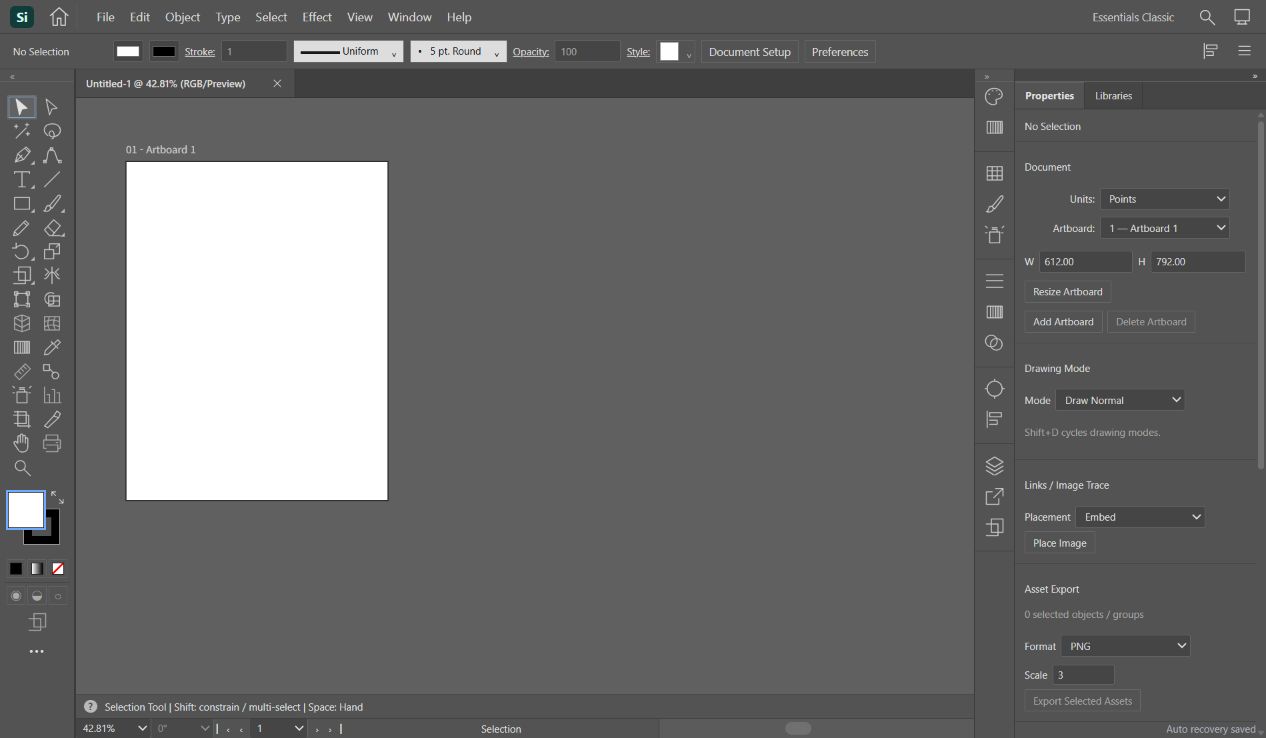
The historical screen reference was the Windows Essentials Classic workspace in an installed Adobe Illustrator 30.2.1 application. The preserved observation identifies a 1266 × 738 viewport, approximately 34 px for the menu, 35 px for the control bar and 76 px for the toolbar. Those are recorded observations from October, not measurements of a newly launched Adobe session today. No pixel-identical comparison score was produced.
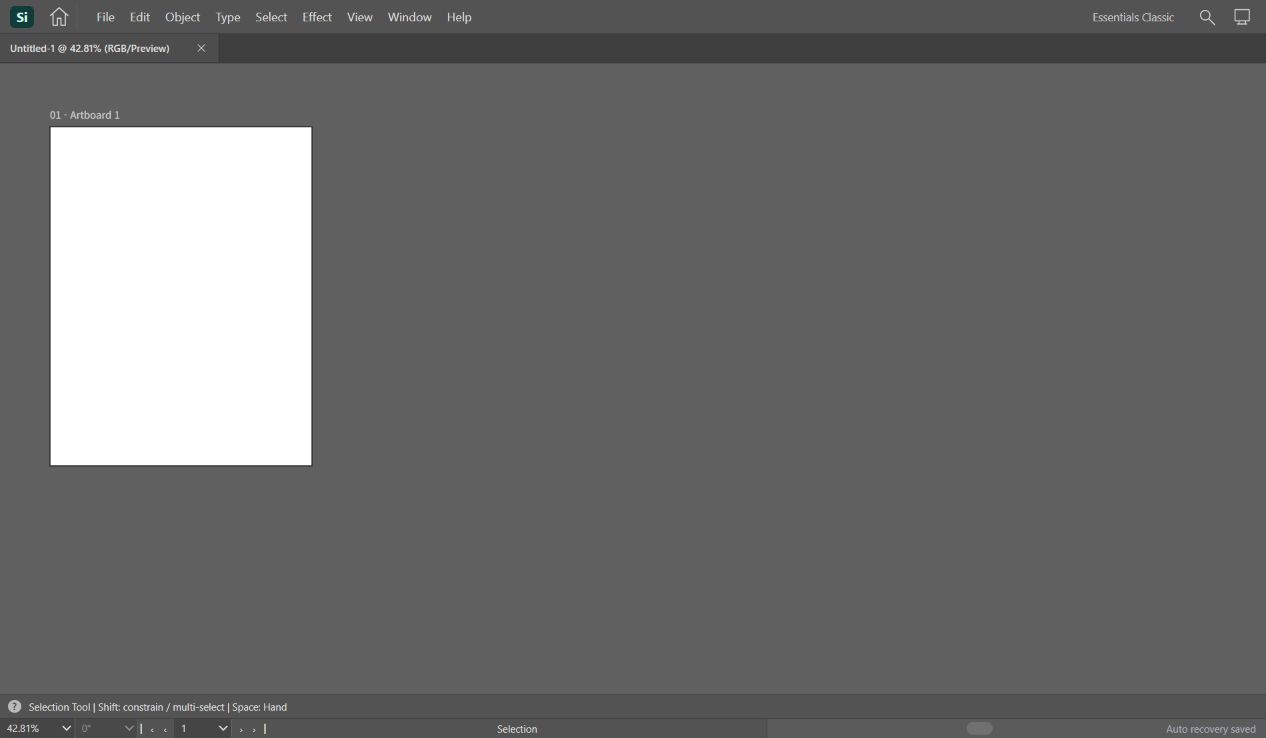
The useful acceptance conditions concern transitions. Tab should hide and restore tools and side panels. Shift+Tab should affect the side panels while retaining the tools. Selecting Layers explicitly should reveal that panel even if an earlier hide command concealed it. Reload should retain chosen layout preferences while returning temporary hiding and tool selection to the implementation’s defaults.
The original stage-two workspace had a preview artboard; later stages attached document and drawing engines. The screenshots here show the current public Si editor, which contains more controls than that historical stage. This distinction prevents a current screenshot from being mistaken for evidence of what every feature could do in October.
2. Visibility is more than a single boolean
The workspace state has separate allHidden, sideHidden and collapsed fields. Their meanings are deliberately narrower than a general “panel is off” flag. allHidden changes the broad interface presentation; sideHidden concerns the side area; collapsed retains a compact panel arrangement. panel records which panel is selected. A single flag would lose information needed to restore a previous arrangement.
The reducer below centralizes the transitions. A toggle changes the corresponding visibility value without rewriting the document. An explicit panel action clears both hiding flags and selects the requested panel. Its collapse condition applies only when the same panel is already selected and visibly expanded. Reset returns the defined workspace defaults. These are application rules implemented in Si, not an imported Adobe state machine.
Keeping transitions together also makes them independently testable. We checked that applying toggleAll twice restores the original state, that toggleSide does not alter allHidden, and that selecting Layers from a hidden state makes both hiding flags false. These checks exercise source functions with controlled inputs; they are separate from clicking the deployed interface.
export function workspaceReducer(s:WorkspaceState,a:WorkspaceAction):WorkspaceState{
 switch(a.type){
 case 'toggleAll':return {...s,allHidden:!s.allHidden};
 case 'toggleSide':return {...s,sideHidden:!s.sideHidden};
 case 'panel':return {...s,allHidden:false,sideHidden:false,collapsed:a.toggle&&s.panel===a.panel&&!s.collapsed&&!s.sideHidden&&!s.allHidden?true:false,panel:a.panel};
 case 'reset':return {...DEFAULT_WORKSPACE};
 case 'patch':return {...s,...a.patch};
 }
}
3. A plus sign is not always the same input event
The historical implementation log records a specific mismatch: Shift+Equal was not interpreted as the Add Anchor Point shortcut when the event key arrived as “=” instead of “+”. The physical key and its modifier carried information that a character-only lookup could miss. The current normalizer recognizes a plus character, NumpadAdd, or Equal with Shift and without Alt as the Plus symbol command.
The normalizer removes Shift from the resulting symbol chord while preserving Ctrl or Meta and Alt in the prefix. The command table maps the plain Plus chord to tool.addAnchor. Thus character interpretation and command selection are separate steps. Input composition and AltGraph return an empty chord before command resolution. This is especially relevant when text entry and global editing shortcuts share the same page.
The current report did not recover a preserved executable of the faulty version. We therefore do not show a fabricated “before” browser failure. The historical defect is attributed to the saved development record. Today’s positive evidence is narrower: the current source maps a synthetic Shift+Equal event to Plus and the Add Anchor command, and the public interface visibly selected Add Anchor Point when the same key combination was sent.
Selecting the tool is not proof that adding an anchor to every type of path works. This report stops at the input-to-tool transition. A path-editing article must independently test an editable path, the resulting anchors, undo/redo and saved output.
export function keyChord(e:KeyInput):string {
 if(e.isComposing||e.keyCode===229||e.getModifierState?.('AltGraph'))return '';
 const prefix=[e.ctrlKey||e.metaKey?'Ctrl':'',e.altKey?'Alt':'',e.shiftKey?'Shift':''].filter(Boolean);
 // Plus is a symbol shortcut: Shift+= and numpad + identify the same tool.
 if(e.key==='+'||e.code==='NumpadAdd'||(e.code==='Equal'&&e.shiftKey&&!e.altKey)) return [...prefix.filter(p=>p!=='Shift'),'Plus'].join('+');
 const extra:Record<string,string>={Backslash:'Backslash',Space:'Space',Tab:'Tab'};
 if(extra[e.code])return [...prefix,extra[e.code]].join('+');
 return eventShortcut(e);
}
4. Persist preferences, reset temporary interaction
writeWorkspace stores the layout with a version marker, but deliberately writes allHidden and sideHidden as false and tool as selection. The current editor may be temporarily hidden when this write occurs; the next session should nevertheless start with the workspace visible. Panel choice and width remain persistent preferences. This is a product decision visible in the code, rather than a claim that browser storage always succeeds.
The read path starts from defaults. It accepts only boolean values for a specified list of preferences, checks panel names and units against allowed values, and clamps a finite saved panelWidth to 220–420 px. Invalid JSON, a missing value or a version other than 2 returns defaults. This defensive read boundary prevents a stale or malformed storage value from becoming an unchecked layout instruction.
Storage writes are wrapped in a catch block so that a storage failure does not make the current workspace unusable. The tradeoff is that this function does not report successful persistence to the user. We did not simulate browser quota exhaustion or all private-browsing modes. A future persistence-status design would need a separate observable result and failure-handling test.
Workspace preferences also differ from artwork. Hiding panels does not remove vector objects, and saving a panel width is not equivalent to saving a document. The UI checks used an existing blank document and made no drawing edits. Document data, workspace preferences and transient interaction should be evaluated as separate responsibilities.
export function writeWorkspace(s:WorkspaceState){try{localStorage.setItem(UI_STORAGE_KEY,JSON.stringify({...s,version:2,allHidden:false,sideHidden:false,tool:'selection'}));}catch{/* The workspace stays usable when browser storage is unavailable. */}}export function readWorkspace():WorkspaceState{
try{const v=JSON.parse(localStorage.getItem(UI_STORAGE_KEY)??'null');if(!v||v.version!==2)return {...DEFAULT_WORKSPACE};
const s={...DEFAULT_WORKSPACE};
for(const k of ['controlVisible','helpVisible','singleColumn','collapsed','rulers','grid'] as const)if(typeof v[k]==='boolean')s[k]=v[k];
if(typeof v.panelWidth==='number'&&Number.isFinite(v.panelWidth))s.panelWidth=Math.max(220,Math.min(420,v.panelWidth));
if(panels.includes(v.panel))s.panel=v.panel;
if(['Points','Pixels','Millimeters'].includes(v.units))s.units=v.units;
return s;
}catch{return {...DEFAULT_WORKSPACE};}
}5. Results and reproducible boundaries
On 2 November 2026, eight public-interface checks passed: Tab hiding, Tab restoration, Shift+Tab retaining tools while hiding the side area, F7 selecting Layers, Layers remaining selected after reload, the changed panel width remaining 242 px after reload, Shift+Equal selecting Add Anchor Point, and a Tab round-trip at the historical 1266 × 738 desktop viewport. The width was subsequently restored to 252 px and Properties and Selection were restored.
Ten isolated source checks also passed. They cover three keyboard-routing cases, composition rejection, three reducer transitions, persistence of preferences with transient-field reset, the upper width bound, and malformed JSON fallback. The source tests use an in-memory storage substitute in Node; they are not browser-storage durability tests. Source-file SHA-256 values are retained in the downloadable record.
The preserved October stage-two record lists eleven earlier browser checks, including menu navigation, input protection and temporary Hand/Zoom restoration. Those historical checks remain useful evidence of the stage at which they ran. They are not added to today’s totals, and we do not describe all eleven as freshly rerun.
The two current evidence layers have different strengths: source checks isolate rules; public-interface checks establish that selected interactions are reachable in the deployed product. We did not assert byte-for-byte identity between every live application bundle and the local source tree. Agreement on the tested transitions is evidence for those transitions, not proof of complete equivalence.
| Observation | Result |
|---|---|
| Tab hides tools and side panels | Pass |
| Tab restores both regions | Pass |
| Shift+Tab keeps tools and hides side panels | Pass |
| F7 selects Layers panel | Pass |
| Selected Layers panel persists after reload | Pass |
| Panel width survives reload | Pass |
| Shift+Equal selects Add Anchor Point | Pass |
| Desktop 1266x738 Tab round-trip | Pass |
6. What was reused, and what remains outside the claim
The package manifest identifies React and React DOM 19.2.6 as dependencies, with Vite 8.0.13 and TypeScript 5.9.3 in the build toolchain. They provide rendering, state integration and compilation infrastructure. The saved stage-two record states that no new external GitHub source was copied for that UI stage. Si’s existing Photoshot-derived shortcut helper continued to be used; the workspace reducer and its product-specific transitions were application code written with AI assistance.
React’s current reducer documentation was checked while preparing this report as an explanation of the design pattern. It is not presented as a historical record proving the developer consulted that page at the time, nor as the source of an identical copied patch. Adobe’s workspace and shortcut documentation supplies behavioral reference. Adobe application resources or proprietary source code were not extracted for this article.
The scope excludes unrestricted panel docking, complete Illustrator command coverage, every operating-system shortcut, cloud-library compatibility and all vector-editing operations. Several controls in the current interface remain disabled. The report’s outcome is a tested boundary among layout preferences, temporary visibility and normalized input. The next article will connect the workspace to document dimensions and artboard state without treating a visible control as a completed feature.
Sources and supporting records
- Adobe Illustrator workspace overview — behavioral reference, checked 2 November 2026.
- Adobe Illustrator default keyboard shortcuts — shortcut reference.
- React: extracting state logic into a reducer — explanatory reference checked during this report.
- React source repository — dependency provenance, not the origin of Si’s workspace policy.
- Ten isolated source checks and source hashes.
- Eight public-interface checks.
Authoring disclosure. This report was assembled by an AI agent from the project’s source, preserved development records and the checks described above. Historical observations and current tests are identified separately.