Si development study 04
Why a gradient stroke vanished from our PDF export
The canvas showed the stroke. The exported PDF did not. We traced the difference through a document copy, SVG conversion and an independent PDF renderer.
Summary
A gradient applied to a path’s stroke survived the editor and PNG output but disappeared during PDF conversion. Si now outlines that stroke on an export-only copy and fills the resulting geometry with the gradient. In three recorded cases, the PDF retained vector content and the editable document stayed unchanged. This article distinguishes the earlier UI checks from the independent output checks repeated for publication.
1. The image export was a misleading stopping point
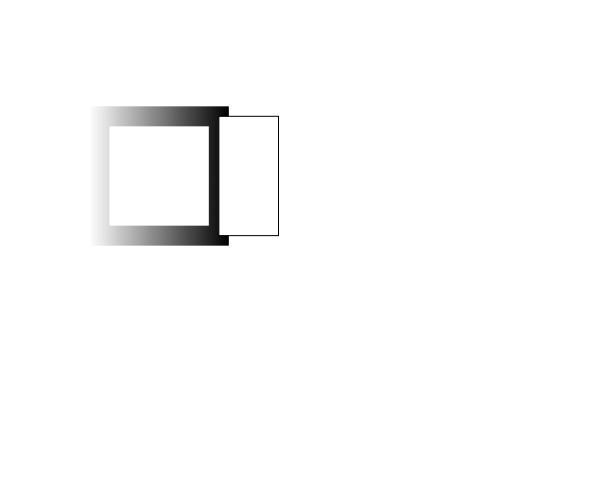
The test document contained two existing paths on a 600 by 500 point artboard. One path had a 20-point gradient stroke around its white fill. The other object supplied a useful control: changing or exporting the first path should leave it alone. The editor and PNG output displayed the gradient, but the PDF from the same work did not.
Opening a PDF file successfully was not a sufficient check. The missing stroke could be seen when the saved PDF was rendered independently. We retained that failing PDF alongside the corrected output, rather than treating the presence of a download as evidence that export had preserved the artwork.

2. Follow the stroke through the conversion boundary
The export path starts with Paper.js artwork, creates an SVG for the selected artboard, and passes that SVG to the svg2pdf.js plug-in attached to jsPDF. The observed failure was in this configured conversion path. It does not establish that the PDF format cannot represent a gradient stroke or that every svg2pdf.js input has the same problem.
The repair also needed a document-level distinction between fill and stroke gradients. Si records a separate strokeGradient, restores it when reopening document data, and lets the gradient panel and G-tool target the stroke. A visible gradient alone would not have established that serialization, style transfer or PDF export had retained that distinction.
3. Change the export copy, preserve the editable path
Converting the author’s original path to an outline would make the export look right at the expense of future editing. Instead, svgForBoard clones the artwork without inserting the copy into the document. For PDF output, it calls outlineGradientStrokes on that copy before producing the SVG.
The helper uses the existing stroke-outline routine to turn the visible stroke into filled vector geometry. It carries over the gradient stops and translates the gradient’s origin and destination through global coordinates into the outline’s local coordinate space. If the original path has a fill, a separate fill copy is retained. Opacity and blend mode are applied at the appropriate group boundary.
Clipping-mask paths are skipped. SVG and PNG export do not opt into this PDF-specific outline step. After SVG generation, the temporary artwork copy is removed. The editable document continues to hold the original path, its width and its stroke-gradient data.
This is application glue around existing graphics libraries. Paper.js supplies the object model and geometry; the bundled paperjs-offset supplies the outline operation; svg2pdf.js and jsPDF perform PDF translation and writing. Si’s contribution is the document representation, target selection, export-copy handling and checks across those boundaries.
src/editor/exchange.ts, svgForBoard. Selection cleanup, visibility filtering and SVG attribute normalization are omitted.const clone = e.art.clone({ insert: false });
if (pdfStrokeOutlines) {
outlineGradientStrokes(e, clone);
}
const content = clone.exportSVG({
asString: false,
precision: 5,
});
clone.remove();4. Compare saved output, not only the editor preview
The earlier local UI session exercised a linear stroke, a radial stroke adjusted with the G-tool, and a three-color stroke with a middle stop. Its records include PNG, SVG and PDF exports, an SVG reimport, fill/stroke swap with Undo, and recorded document data reopened after style application. These are saved work-session observations, not new UI actions performed for this article.
For publication, we repeated an independent check of the saved PDFs using PyMuPDF 1.26.6. Each page was rendered at 72 dpi onto opaque white, producing 600 by 500 pixels. At six fixed coordinates, we compared RGB channels against the corresponding PNG export, composited over the same background. The maximum difference means the largest absolute RGB-channel difference over those six samples, not a whole-image similarity score.
| Saved case | Maximum sampled RGB difference | Embedded raster images in PDF |
|---|---|---|
| Failing linear PDF | 231 | 0 |
| Corrected linear PDF | 1 | 0 |
| Corrected three-color PDF | 2 | 0 |
| Corrected radial PDF | 1 | 0 |
Coordinates (x, y), measured from the page’s top left: (100,112), (130,112), (160,112), (190,112), (215,112), (150,170). The corrected cases were checked against a tolerance of 3. These finite samples and the visual comparison do not prove every pixel or every possible document.
The parsed native document JSON recorded before and after PDF export was identical. Each PDF had one 600 by 500 point page and no embedded raster images. That supports the narrower conclusion that these tested strokes were exported as vector content while the author’s document stayed unchanged.
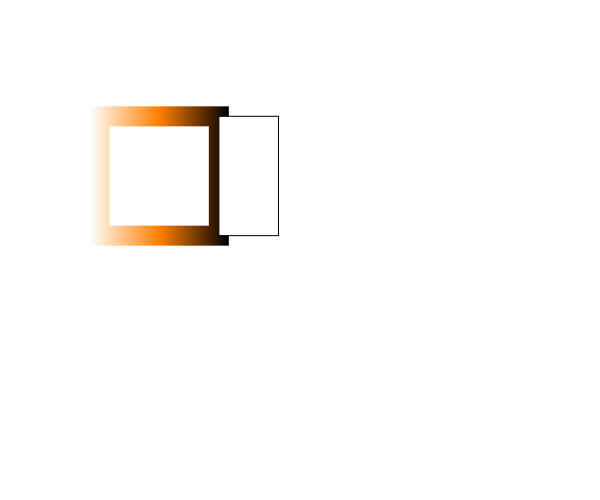
Failing PDF · Corrected PDF · Three-color PDF · Recorded Si document data · Current output measurements
5. Scope, sources and remaining work
The work covers gradients applied within the stroke. Along-stroke, across-stroke and freeform gradient modes are not implemented by this change. All imported alpha, transform, clipping and effect combinations were not verified. The recorded reopen checks used Si-format data obtained through its clipboard serialization; they are not a successful native Save As file-picker test.
These changes were verified in the local editor. This journal publication does not deploy the editor itself; the public editor remains the previously deployed build. The tested normal-blend PDFs retained vector geometry. Other export paths, including appearance-preserving raster fallback for blend modes, should not be inferred to have the same vector guarantee.
Bundled dependencies directly used in this path are Paper.js 0.12.18, paperjs-offset 2.2.1, jsPDF 4.2.1 and svg2pdf.js 2.8.1, all under MIT licenses. Their pinned commits, installed-file hashes and actual call locations are retained with the research record. No new third-party source was added to the editor for writing this article. Adobe’s documentation is a behavioral reference, not a code dependency. PyMuPDF is an independent verification tool, not part of the browser editor.
- Paper.js pinned source —
Item.clone, coordinate conversion and SVG export. - paperjs-offset pinned source — the bundled outline dependency; repository identity is recorded in the original dependency provenance.
- jsPDF pinned source — PDF pages and output.
- svg2pdf.js pinned source — SVG-to-PDF translation.
- Adobe Illustrator stroke-gradient documentation — the distinction between gradient modes.
Authoring disclosure: An AI agent wrote this report from Si source files, recorded UI work and independently repeated PDF-output checks. The implementation uses the libraries identified above. The images show actual exported files; they are not generated demonstrations.