
Building a free Photoshop alternative
Repair with nearby pixels
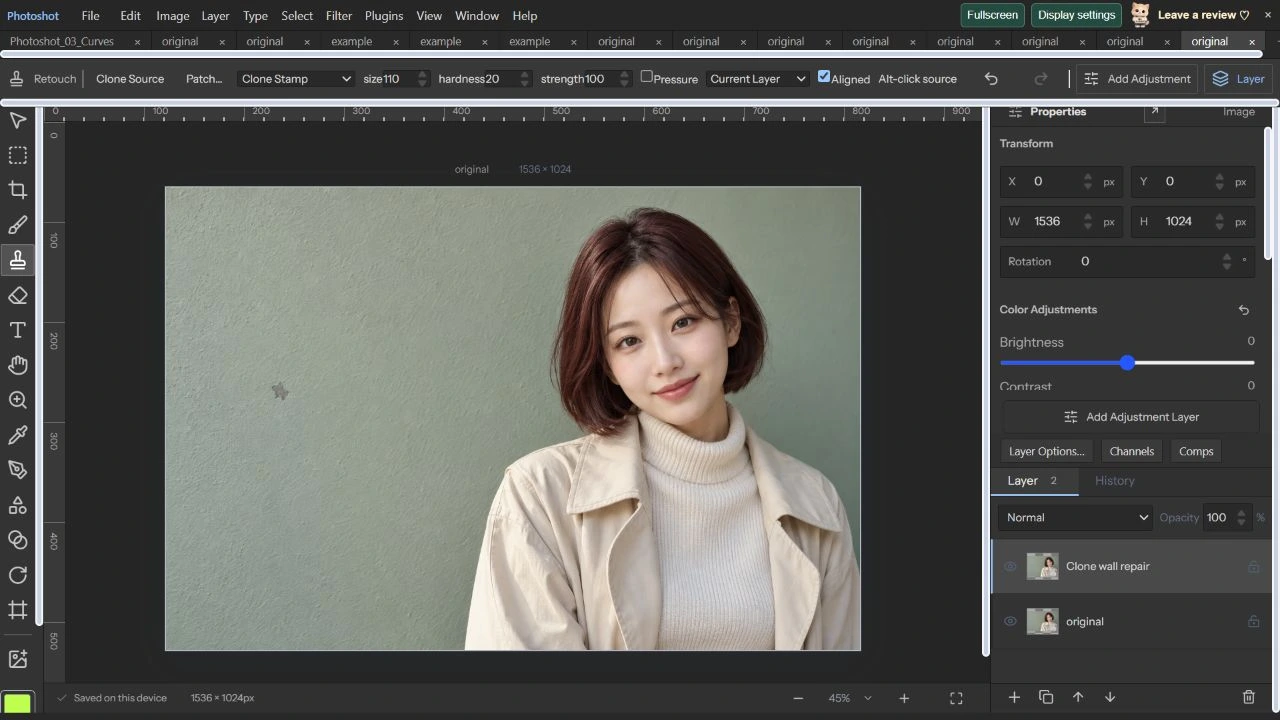
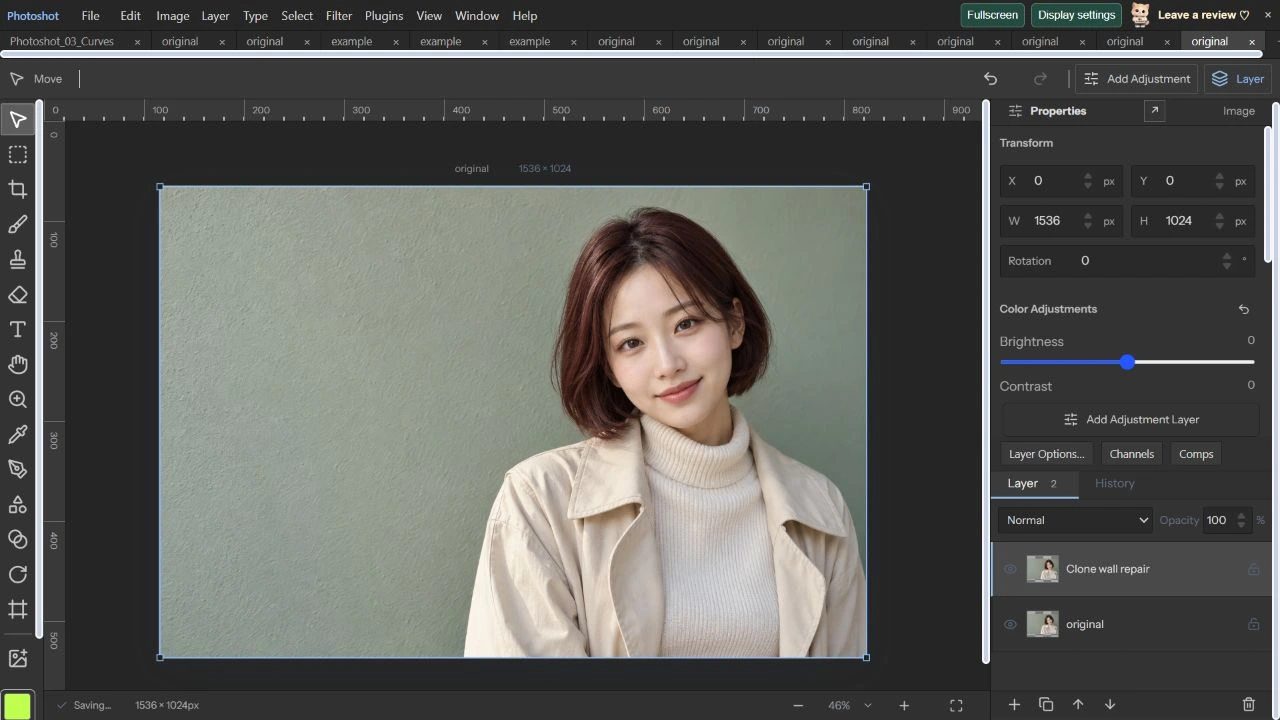
We removed a small mark on the wall of an AI portrait using Clone Stamp. Work stayed on a duplicate layer, with Undo and Redo checked in the actual editor.
AI-generated study photograph. Editor captures and outputs show Photoshot in use.
From the source.
Separate the original from the edited layer
Clone and healing operations change target pixels. We retained original and created a duplicate named Clone wall repair. Preserving an original and providing Undo are separate safeguards.
retouch.ts checks pixel locks and rejects direct edits to text, adjustment, shape and smart-object layers. It also validates brush size, strength, paths and sampling modes. Tool availability does not mean every layer is an eligible target.
Clone Stamp reads a designated source
Clone Stamp requires an Alt-clicked source. Destination movement offsets the donor position, while Clone Source scale, rotation and flips transform sampling coordinates. Current-layer sampling is distinct from reading a composite of other layers.
We sampled clean wall and stamped once over the mark: Size 110px, Hardness 20, Strength 100, Current Layer and Aligned, with Pressure disabled. The soft edge blends coverage rather than copying a hard rectangular patch.
 if(layerLocked(doc,layer,'pixels'))throw Error('Unlock the layer before retouching.');
 if(layer.kind==='text'||layer.kind==='adjustment'||layer.shape||layer.smartObject||layer.gridWarp||layer.puppet)throw Error('Rasterize this layer before retouching.');
 if(!['clone','heal','dodge','burn','sponge','blur','sharpen','spot','smudge','remove','mixer'].includes(settings.mode)||!Number.isFinite(settings.size)||settings.size<1||settings.size>300||!Number.isFinite(settings.hardness)||settings.hardness<0||settings.hardness>100||!Number.isFinite(settings.strength)||settings.strength<0||settings.strength>100)throw Error('Invalid retouch brush.');
 if(settings.sourceTransform)validateCloneTransform(settings.sourceTransform);
 if(settings.sample!==undefined&&!['current','below','all'].includes(settings.sample))throw Error('Invalid sample layers.');
if(!['shadows','midtones','highlights'].includes(settings.range)||typeof settings.saturate!=='boolean'||typeof settings.pressure!=='boolean'||settings.source&&(!Number.isFinite(settings.source.x)||!Number.isFinite(settings.source.y)))throw Error('Invalid retouch settings.');if(!points.length)return doc;if(points.length>100000||points.some(p=>!Number.isFinite(p.x)||!Number.isFinite(p.y)||p.pressure!==undefined&&(!Number.isFinite(p.pressure)||p.pressure<0||p.pressure>1)))throw Error('Invalid retouch path.');Inside the
calculation.
Healing, patch and removal take different routes
The current Healing Brush adjusts source colors using the difference between target and source averages in a 5×5 neighborhood. Patch uses a separate path joining a selection to a donor area. Its stored report covers source preservation, selection relocation, color adaptation and new-layer output.
Spot Healing and Remove turn painted coverage into a mask passed to the project’s contentAwareFill implementation. This uses document surroundings; it does not mean generative AI invents a replacement scene. Today’s portrait demonstration uses Clone Stamp only.
Verify the change with Undo and Redo
On October 22, 2026, a clone stamp covered the dark wall mark with nearby texture. Undo restored the mark and Redo restored the repair. We switched to Move to hide the brush circle and source overlay before capturing the result.
A separate project file retains both layers for comparison. This demonstrates one small mark, not quality across large repeating patterns, silhouettes or intricate hair boundaries.
Read the code.
export function validateCloneTransform(t:CloneTransform){if(!t||![t.scaleX,t.scaleY].every(n=>Number.isFinite(n)&&n>=1&&n<=1000)||!Number.isFinite(t.angle)||Math.abs(t.angle)>360||typeof t.flipX!=='boolean'||typeof t.flipY!=='boolean')throw Error('Invalid clone source transform.');}
// Inverse of the displayed source scale/rotation: destination pixels map back to donors.
export function cloneDelta(p:Point,t:CloneTransform=defaultCloneTransform):Point{const a=t.angle*Math.PI/180,c=Math.cos(a),s=Math.sin(a);return {x:(p.x*c+p.y*s)*100/t.scaleX*(t.flipX?-1:1),y:(-p.x*s+p.y*c)*100/t.scaleY*(t.flipY?-1:1)};}
export function cloneDonor(point:Point,start:Point,source:Point,t?:CloneTransform):Point{const d=cloneDelta({x:point.x-start.x,y:point.y-start.y},t);return {x:source.x+d.x,y:source.y+d.y};} const clone=settings.mode==='clone'||settings.mode==='heal';if(clone&&!settings.source)throw Error('Alt-click to choose a source point.');
const edit=await openPixelEdit(doc,layer),image=edit.image,base=image.data.slice(),data=image.data,w=image.width,h=image.height,clip=doc.selection?selectionForLayer(doc.selection,layer):undefined,path=points.map(p=>({...localPoint(p,layer),pressure:p.pressure??1})),coverage=new Float32Array(w*h),hard=settings.hardness/100;
const merged=clone&&settings.sample&&settings.sample!=='current'?(await openPixelEdit({...doc,layers:settings.sample==='below'?doc.layers.slice(0,doc.layers.findIndex(l=>l.id===layer.id)+1):doc.layers})).image:undefined;
const donor=merged,matrix=homography(quadPoints(layer));
const read=(x:number,y:number,shift:boolean):number[]|undefined=>{const world=mapMatrix(matrix,layer.flipX?1-(x+.5)/layer.width:(x+.5)/layer.width,layer.flipY?1-(y+.5)/layer.height:(y+.5)/layer.height),point=shift?cloneDonor(world,points[0],settings.source!,settings.sourceTransform):world;if(donor){const dx=Math.floor(point.x),dy=Math.floor(point.y);if(dx<0||dy<0||dx>=donor.width||dy>=donor.height)return;const i=(dy*donor.width+dx)*4;return Array.from(donor.data.subarray(i,i+4));}const local=shift?localPoint(point,layer):{x:x+.5,y:y+.5},dx=Math.floor(local.x+1e-7),dy=Math.floor(local.y+1e-7);if(dx<0||dy<0||dx>=w||dy>=h)return;const i=(dy*w+dx)*4;return Array.from(base.subarray(i,i+4));};
const lum=(i:number)=>(base[i]*.2126+base[i+1]*.7152+base[i+2]*.0722)/255;
const stamp=(p:RetouchPoint)=>{const pressure=settings.pressure?Math.max(.05,Math.min(1,p.pressure??1)):1,r=settings.size*pressure/2;for(let y=Math.max(0,Math.floor(p.y-r));y<Math.min(h,Math.ceil(p.y+r));y++)for(let x=Math.max(0,Math.floor(p.x-r));x<Math.min(w,Math.ceil(p.x+r));x++){const d=Math.hypot(x+.5-p.x,y+.5-p.y)/r;if(d>1)continue;const n=y*w+x,a=(d<=hard?1:(1-d)/Math.max(.001,1-hard))*settings.strength/100*(clip?clip.alpha[n]/255:1);coverage[n]=Math.max(coverage[n],a);}}; else for(let y=0;y<h;y++)for(let x=0;x<w;x++){const n=y*w+x,i=n*4,a=coverage[n];if(!a)continue;const brightness=lum(i),tone=Math.max(0,Math.min(1,brightness)),range=settings.range==='shadows'?(1-tone)**2:settings.range==='highlights'?tone**2:4*tone*(1-tone);let sampled:number[]=[];
if(clone){const pixel=read(x,y,true);if(!pixel)continue;sampled=pixel;if(settings.mode==='heal'){let target=[0,0,0],from=[0,0,0],tw=0,fw=0;for(let yy=-2;yy<=2;yy++)for(let xx=-2;xx<=2;xx++){const t=read(x+xx,y+yy,false),f=read(x+xx,y+yy,true);if(t){tw+=t[3];for(let k=0;k<3;k++)target[k]+=t[k]*t[3];}if(f){fw+=f[3];for(let k=0;k<3;k++)from[k]+=f[k]*f[3];}}if(tw&&fw)for(let k=0;k<3;k++)sampled[k]+=target[k]/tw-from[k]/fw;}}
for(let k=0;k<3;k++){const v=base[i+k];let value=v;if(clone)value=sampled[k];else if(settings.mode==='dodge')value=edit.native?v*(1+range):v+(255-v)*range;else if(settings.mode==='burn')value=v*(1-range);else if(settings.mode==='sponge')value=brightness*255+(v-brightness*255)*(settings.saturate?2:0);else {let sum=0,count=0;for(let yy=-1;yy<=1;yy++)for(let xx=-1;xx<=1;xx++){const qx=Math.max(0,Math.min(w-1,x+xx)),qy=Math.max(0,Math.min(h-1,y+yy));const alpha=base[(qy*w+qx)*4+3]/255;sum+=base[(qy*w+qx)*4+k]*alpha;count+=alpha;}const mean=count?sum/count:v;value=settings.mode==='blur'?mean:v+(v-mean)*2;}const outAlpha=clone&&!layer.lockTransparency?base[i+3]*(1-a)+sampled[3]*a:0;data[i+k]=clone&&!layer.lockTransparency?(outAlpha?(v*base[i+3]*(1-a)+(edit.native?value:Math.max(0,Math.min(255,value)))*sampled[3]*a)/outAlpha:0):v*(1-a)+(edit.native?value:Math.max(0,Math.min(255,value)))*a;}
if(clone&&!layer.lockTransparency)data[i+3]=base[i+3]*(1-a)+sampled[3]*a;In the editor.
Keep mixer, tonal tools and historical checks distinct
Mixer Brush passes its color reservoir and mixing settings into a separate engine. Dodge and Burn use Shadows, Midtones and Highlights weights; selections and transparency locks also affect output. These operations should not all be described as pixel copying.
The stored precision-retouch report includes 16-bit, tiny-alpha and outside-selection cases across several color spaces. That full suite was not rerun for this article. The portrait depicts an AI-generated fictional adult; workspace images are actual captures. Part 27 covers transforms and perspective.
Original and clone repair.
AI-generated study photograph. Editor captures and outputs show Photoshot in use.