
Building a free Photoshop alternative
Areas to fill and protect
We corrected the missing sampling area and completed the sticker removal again. We then reduced the image-layer width with a portrait-protection channel and compared saved pixels against the same operation without protection.
AI-generated study photograph. Editor captures and outputs show Photoshot in use.
From the source.
Find source patches in the surroundings
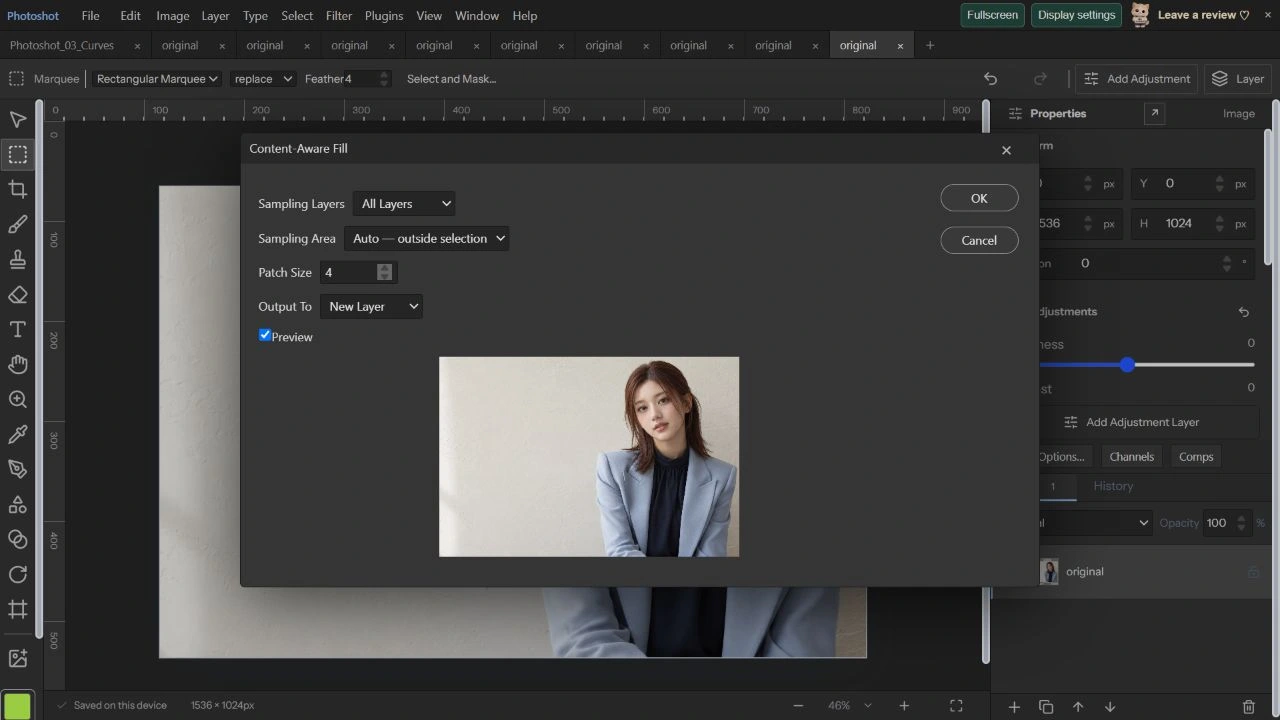
content-aware.ts fills from the selection boundary inward. It compares known neighboring colors to candidate patches, excluding pixels that are still missing. It tests nearby and global candidates; this is not a trained generative model inventing new objects.
Donor patches must not contain selected or excluded pixels. Separating the target from the sampling area reduces copying the sticker back into the fill. Suitable surrounding texture is still needed for a convincing result.
New-layer output separates result and original
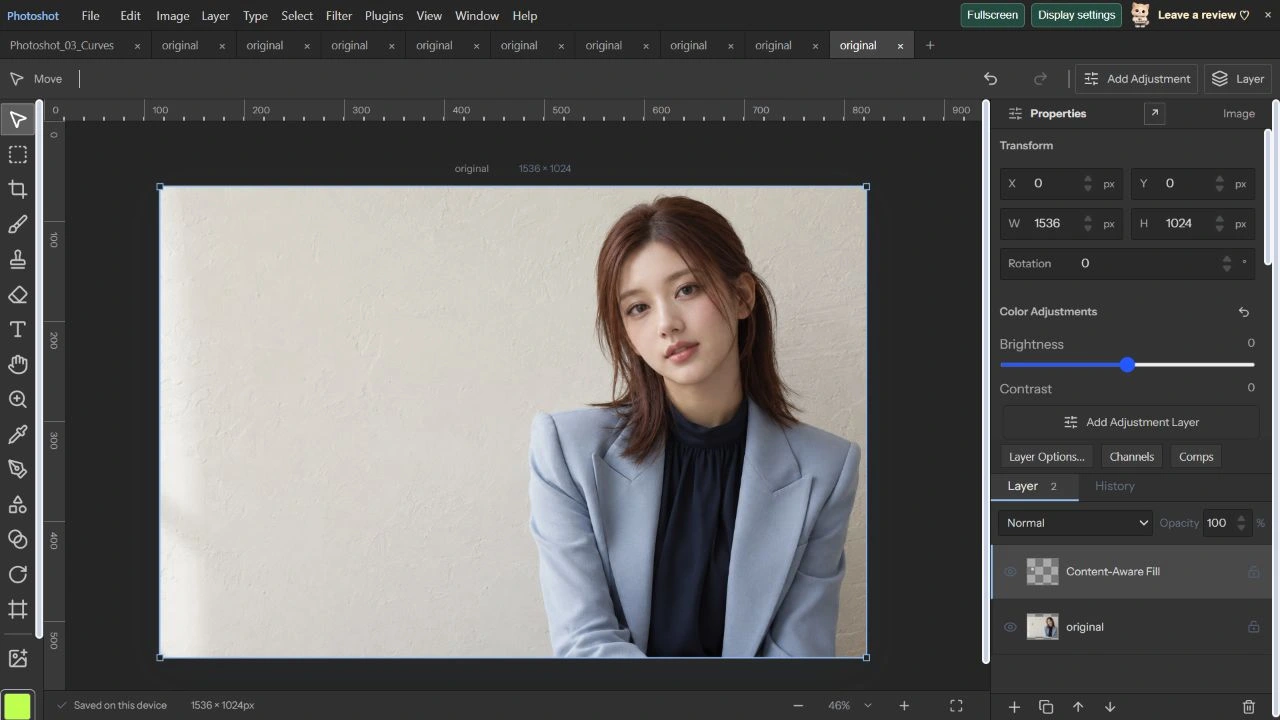
On October 22, 2026, we made a rectangular selection around the sticker with Feather 4. Fill used Patch Size 4, All Layers, Auto — outside selection and New Layer. The preview replaced the sticker with light wall texture before we applied it.
The project retains original and Content-Aware Fill. PNG bytes decoded from the original src exactly match the input file. The output layer’s nontransparent area is confined around the selection, with soft alpha values along its edge.
/** Exemplar patch synthesis. Donor patches never include selected or excluded pixels. */
export async function contentAwarePixels(image:{width:number;height:number;data:Uint8ClampedArray|Float32Array},mask:ArrayLike<number>,options:Pick<FillOptions,'radius'|'sampling'|'signal'|'progress'>){
 check(options.signal);const {width:w,height:h}=image,n=w*h,r=Math.round(options.radius);if(!supportedSize(w,h)||!Number.isInteger(w)||!Number.isInteger(h)||image.data.length!==n*4||mask.length!==n||!Number.isFinite(r)||r<1||r>15)throw Error('Invalid fill image or patch size.');if(options.sampling&&(options.sampling.length!==n||options.sampling.some(v=>!Number.isFinite(v)||v<0||v>255)))throw Error('Invalid sampling area.');
 const source=image.data,out=source.slice(),missing=new Uint8Array(n),queue=new Int32Array(n),seen=new Uint8Array(n),integral=new Int32Array((w+1)*(h+1));let total=0,tail=0;
 for(let y=0;y<h;y++){if(y%64===0){check(options.signal);await new Promise(r=>setTimeout(r,0));}let row=0;for(let x=0;x<w;x++){const i=y*w+x;if(!Number.isFinite(mask[i])||mask[i]<0||mask[i]>255)throw Error('Invalid fill selection.');missing[i]=mask[i]>0?1:0;total+=missing[i];row+=missing[i]||source[i*4+3]<250||options.sampling&&options.sampling[i]<128?1:0;integral[(y+1)*(w+1)+x+1]=integral[y*(w+1)+x+1]+row;}}
 if(!total)throw Error('Select an area to fill.');
 const candidates:number[]=[],valid=new Uint8Array(n),stride=w+1;
 for(let y=r;y<h-r;y++){if(y%64===0){check(options.signal);await new Promise(r=>setTimeout(r,0));}for(let x=r;x<w-r;x++){const x0=x-r,y0=y-r,x1=x+r+1,y1=y+r+1;if(integral[y1*stride+x1]-integral[y0*stride+x1]-integral[y1*stride+x0]+integral[y0*stride+x0]===0){valid[y*w+x]=1;candidates.push(y*w+x);}}}
if(!candidates.length)throw Error('No clean sampling patch. Expand the sampling area or reduce Patch Size.');Inside the
calculation.
Correct the selection and complete the fill again
The full-selection attempt failed because no sampling area remained outside the selection. We cleared it, reopened the original and selected only the sticker and a small surrounding margin. Leaving clean wall outside the selection allowed the same Patch Size 4 operation to complete.
New-layer output preserved the original. The correction was to separate target and donor areas properly, not force the algorithm past its guard. We saved the repeated result and checked the original bytes and output layer again.
Protect the portrait while reducing 1536px to 1200px
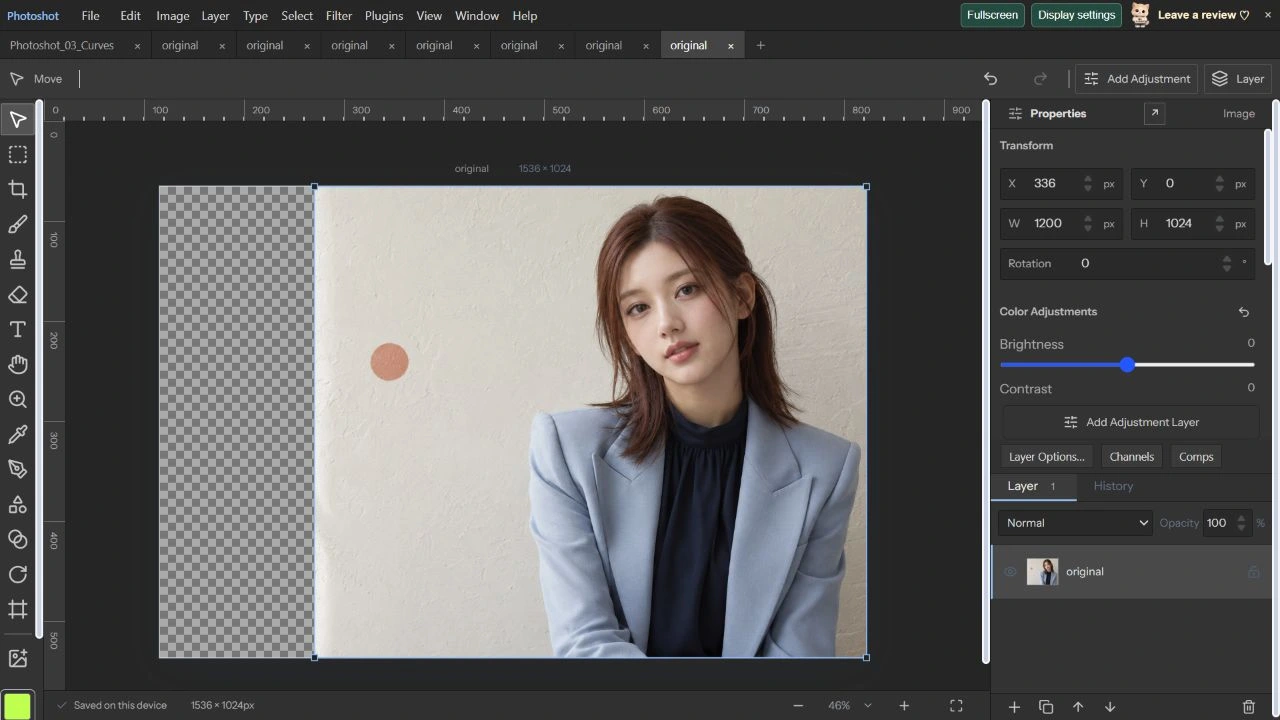
We selected the portrait side and saved it as Portrait protect. Content-Aware Scale used Width 1200, Height 1024, Protect Portrait protect and Middle Right as the reference point. We updated the preview and applied the result.
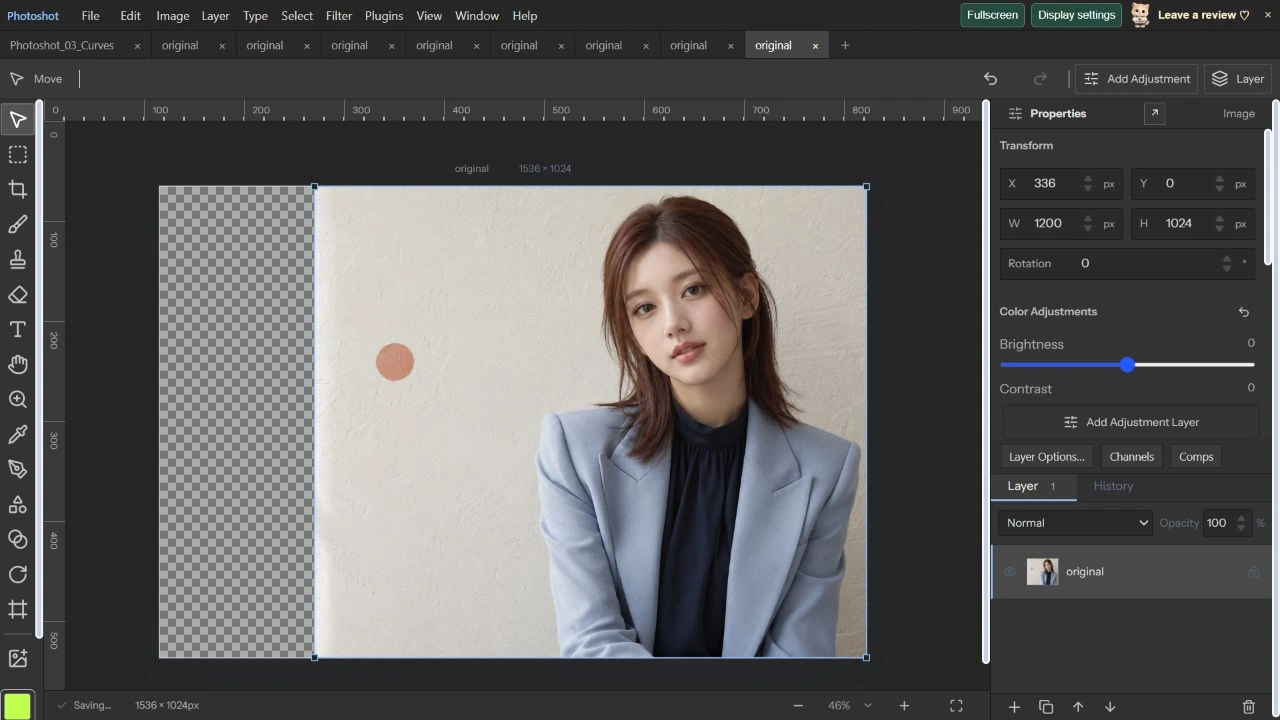
The document remains 1536×1024, while the layer becomes 1200×1024 at X 336, Y 0. Keeping the right edge fixed leaves 336px transparent on the left. After accounting for that offset, all RGBA values in the 757,020 protected pixels exactly matched the original saved PNG.
Read the code.
export async function contentAwareFill(doc:StudioDoc,layer:Layer,options:FillOptions):Promise<StudioDoc>{

 if(!doc.selection)throw Error('Make a selection first.');if(options.output==='new'&&doc.layers.length>=256)throw Error('Up to 256 layers.');if(options.output==='current'&&(layerLocked(doc,layer,'pixels')||layer.kind==='text'||layer.kind==='adjustment'||layer.shape||layer.smartObject||layer.gridWarp||layer.puppet))throw Error('Choose New Layer or an unlocked raster layer.');
 check(options.signal);const edit=await openPixelEdit(options.sample==='all'?doc:{...doc,layers:[layer]}),pixels=edit.image,result=await contentAwarePixels(pixels,doc.selection.alpha,options);check(options.signal);
if(options.output==='new'){for(let i=0;i<doc.width*doc.height;i++)result[i*4+3]*=doc.selection.alpha[i]/255;const output=await newPixelEditLayer(edit,'Content-Aware Fill',result);check(options.signal);return {...doc,layers:[...doc.layers,output]};}/** Dynamic-programming seams, including masks, follow the same pixel correspondence. */
export async function carveImage(input:ImageBuffer,width:number,height:number,options:{signal?:AbortSignal;progress?:(n:number)=>void}={}){
if(!supportedSize(width,height)||!Number.isInteger(width)||!Number.isInteger(height)||!supportedSize(input.width,input.height)||input.data.length!==input.width*input.height*4||input.channels.some(c=>c.length!==input.width*input.height||c.some(v=>!Number.isFinite(v)||v<0||v>255)))throw Error('Invalid content-aware size or channels.');let image:ImageBuffer={...input,data:input.data.slice(),channels:input.channels.map(c=>c.slice())},done=0,total=Math.abs(width-input.width)+Math.abs(height-input.height),yieldAt=performance.now();
const checkpoint=async()=>{if(options.signal?.aborted)throw new DOMException('Scale canceled.','AbortError');if(performance.now()-yieldAt>16){options.progress?.(total?done/total:1);await new Promise(r=>setTimeout(r,0));yieldAt=performance.now();if(options.signal?.aborted)throw new DOMException('Scale canceled.','AbortError');}};export async function contentAwareScale(doc:StudioDoc,layer:Layer,options:ScaleOptions):Promise<StudioDoc>{
if(layerLocked(doc,layer,'pixels')||layerLocked(doc,layer,'position')||layer.kind==='adjustment'||layer.kind==='text'||layer.smartObject||layer.shape||layer.gridWarp||layer.puppet)throw Error('Select an unlocked raster layer. Rasterize type, shapes, Smart Objects or existing warps first.');if(!Number.isInteger(options.anchor)||options.anchor<0||options.anchor>8)throw Error('Invalid scale reference point.');
const edit=await openPixelEdit(doc,layer),canvas=edit.canvas,pixels=edit.image,selected=options.protect==='$selection'?doc.selection:options.protect?doc.savedSelections?.[options.protect]:undefined;if(options.protect&&!selected)throw Error('Protection selection is unavailable.');const channels=[selected?Float32Array.from(selectionForLayer(selected,layer).alpha):new Float32Array(canvas.width*canvas.height)],maskKeys=(['mask','vectorMask'] as const).filter(k=>layer[k]);for(const key of maskKeys){const m=maskSurface({...layer[key]!,enabled:true},canvas.width,canvas.height),p=m.getContext('2d')!.getImageData(0,0,m.width,m.height).data;channels.push(Float32Array.from({length:m.width*m.height},(_,i)=>p[i*4+3]));}
const result=await carveImage({width:pixels.width,height:pixels.height,data:pixels.data,channels},options.width,options.height,options);const raster=await closePixelEdit(edit,layer,result.data,result.width,result.height),masks:Partial<Layer>={};if(options.signal?.aborted)throw new DOMException('Scale canceled.','AbortError');maskKeys.forEach((key,i)=>{masks[key]={width:result.width,height:result.height,enabled:layer[key]!.enabled,inverted:false,strokes:[],raster:{width:result.width,height:result.height,alpha:Array.from(result.channels[i+1],Math.round)}};});if(layer.vectorMask){const enabled=maskKeys.filter(key=>layer[key]!.enabled),merge=enabled.length?enabled:maskKeys;masks.mask={width:result.width,height:result.height,enabled:enabled.length>0,inverted:false,strokes:[],raster:{width:result.width,height:result.height,alpha:Array.from({length:result.width*result.height},(_,n)=>Math.round(merge.reduce((a,key)=>a*result.channels[maskKeys.indexOf(key)+1][n]/255,255)))}};masks.vectorMask=undefined;}const next=aroundAnchor(layer,{...raster,...masks,width:result.width,height:result.height},options.anchor);return {...doc,layers:doc.layers.map(l=>l.id===layer.id?next:l)};In the editor.
Compare the same operation without protection
We reopened the same original and changed only Protect to None, keeping size and anchor identical. In the previously protected region, 522,490 pixels changed at the corresponding coordinates, compared with zero when protection was enabled. These measurements apply to this photograph at 1200px; pixel difference is not an aesthetic-quality score.
content-scale.ts removes low-cost seams and adds a large weight for protected pixels. Masks follow the same pixel correspondence. This article now records a completed fill retry, protection-on/off comparison and saved-output checks. The portrait is an AI-generated fictional adult. Part 29 covers alignment, HDR and panoramas.
Original and new-layer fill.
Compare portrait protection.
AI-generated study photograph. Editor captures and outputs show Photoshot in use.