
無料Photoshop代替の開発記
一度直して二つを変える
2026年10月23日、公開ポトショットで一つの内蔵原本を編集し、二つの配置とプロジェクト・PSDの再読込を確認しました。外部リンクファイルへの書込保護は別のコードと検査で確認しています。
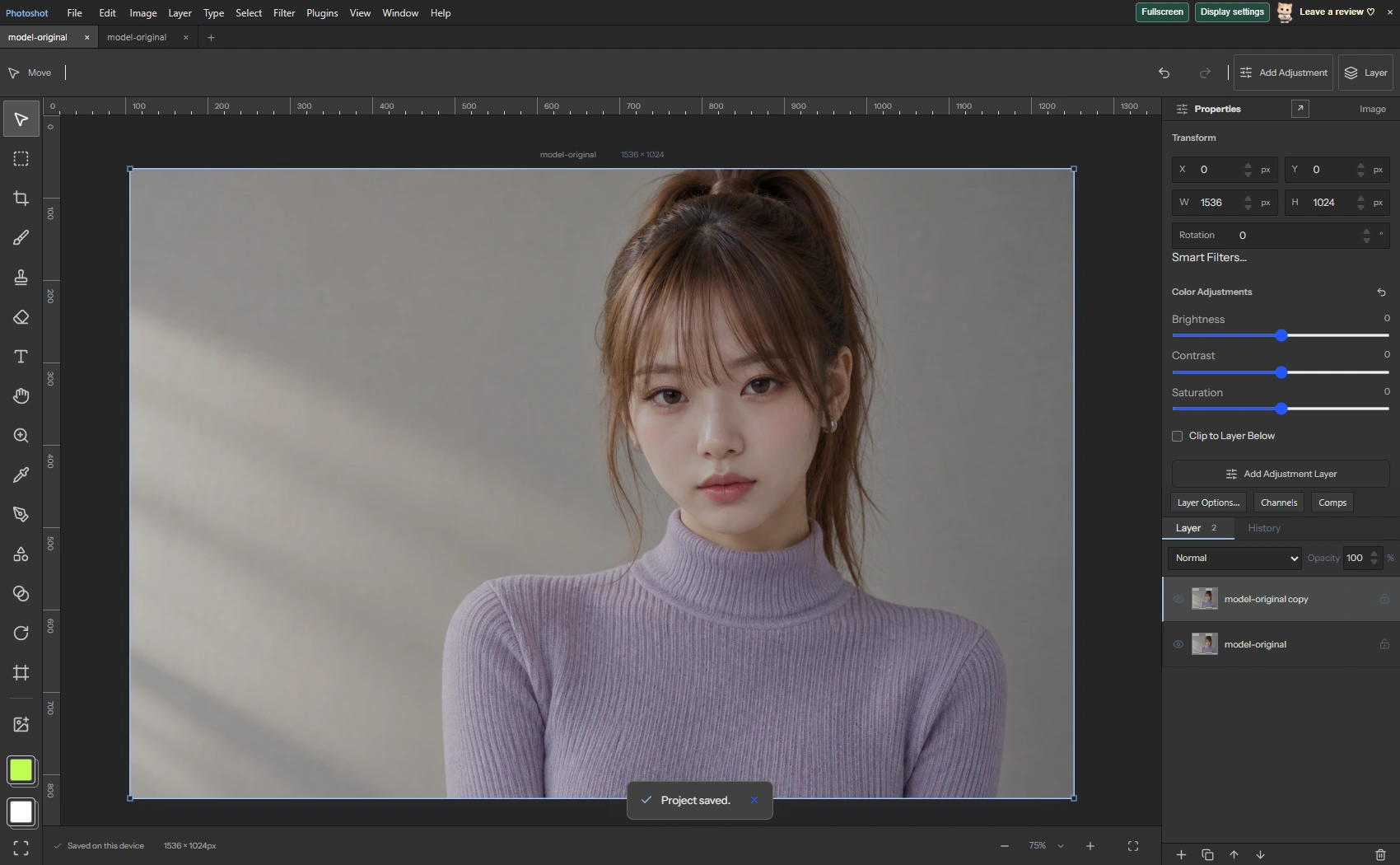
AI生成の動作例用写真。編集画面と出力画像は実際のPhotoshotで作成しました。
ソースから始める。
名前より原本IDが関係を決める
異なるレイヤーIDでも同じスマートオブジェクト原本を共有できます。smartIdはplacedLayer.idを読み、openSmartContentsは一致するlinkedFilesのバイトを別文書として開きます。
既存のPSD読書きと合成へ原本管理を接続するコードです。新しい外部ライブラリを複製したと推測せず、実際の参照関係を読みました。
内容の編集一回で二つの配置を更新
新しいAI生成PNGを開き、スマートオブジェクトへ変換して複製しました。二つのレイヤーIDは異なり、placedLayer.idは同じでした。Edit ContentsのBrightnessへ75を入力し、Update Parent Documentを実行しました。
親の二層は同じ変更後srcを持ち、変更前とは異なりました。今回の二層は同じ位置に重なっています。あらゆる配置や変形をこの人物画像で試したという意味ではありません。
export function smartId(layer:Layer){return layer.psdData?.placedLayer?.id as string|undefined;}
export async function openSmartContents(doc:StudioDoc,layer:Layer):Promise<StudioDoc>{const id=smartId(layer),meta=unpackMetadata(doc.psdData??{}),file=meta.linkedFiles?.find((f:any)=>f.id===id);if(!file?.data?.length)throw Error('This linked Smart Object has no embedded content. Use Replace Contents to select its source file.');return readSmartFile(file.data,file.name??layer.name+'.psd');}
export async function readSmartFile(bytes:Uint8Array,name:string):Promise<StudioDoc>{if(bytes.length>=4&&new DataView(bytes.buffer,bytes.byteOffset,bytes.byteLength).getUint32(0)===0x38425053)return readPhotoshop(bytes.slice().buffer,name);const mime=/\.jpe?g$/i.test(name)?'image/jpeg':/\.webp$/i.test(name)?'image/webp':'image/png',blob=new Blob([bytes as BlobPart],{type:mime}),url=URL.createObjectURL(blob);try{const image=await loadImage(url),c=surface(image.width,image.height);c.getContext('2d')!.drawImage(image,0,0);return {...blankDoc(),version:6,name:name.replace(/\.[^.]+$/,''),width:c.width,height:c.height,layers:[makeLayer({kind:'image',name,src:c.toDataURL(),width:c.width,height:c.height})]};}finally{URL.revokeObjectURL(url);}}計算の
内側へ。
プロジェクトとPSDを別々に再読込
親プロジェクトの保存・再読込・再保存では文書が完全一致しました。PSD出力と再読込でも二層と共有原本IDを保持し、Edit Contentsから一層の内蔵文書を開けました。
updateSmartContentsは同じ原本IDの層を更新し、新しい境界に配置とマスクを合わせます。変換・ラスタライズ・座標・PSD/PSBリンク書込は別の再実行検査で確認し、今回の単純な画面例と区別しています。
外部ファイルへの保存は別の処理
writeLinkedContentsは原本キーとハッシュ、書込権限、ロックされた配置を調べます。PSD/PSBでは色モードと深度も保持します。符号化と親の次状態を準備してから書込ストリームを開き、直前と途中にも外部変更を検査します。
権限拒否、古い編集文脈、外部変更、書込失敗で原本と親を守る再実行検査が通過しました。リンクファイルはコード上最大512MBで、形式別の制約もあります。
コードを読む。
 placed.width=content.width;placed.height=content.height;placed.transform=points.flatMap(p=>[p.x,p.y]);placed.nonAffineTransform=placed.transform.slice();Object.assign(original,{left:bx,top:by,right:bx+bw,bottom:by+bh});const src=c.toDataURL(),precise=preciseContent?positionPrecision(preciseContent,makeLayer({width:bw,height:bh,transformQuad:quad}),bw,bh):undefined;return {...l,x:bx,y:by,width:bw,height:bh,rotation:0,flipX:undefined,flipY:undefined,transformQuad:undefined,mask,vectorMask,smartFilterMask,src,precision:precise?packPrecision(precise):undefined,precisionSource:precise?precisionSource(src):undefined,strokes:[],shape:undefined,typography:undefined,textRuns:undefined,textPath:undefined,textWarp:undefined,raw:undefined,gaussian:undefined,psdData:packMetadata(original)};});return {...doc,version:6,psdData:packMetadata(meta),layers};}
export async function rasterizeSmartObject(doc:StudioDoc,layer:Layer):Promise<StudioDoc>{return rasterizeLayer(doc,layer);}export async function writeLinkedContents(doc:StudioDoc,layer:Layer,content:StudioDoc,baseline:{key:string;hash:string},handle?:SourceHandle):Promise<StudioDoc>{
const id=smartId(layer),linked=layer.smartObject?.linked;
if(!id||!linked)throw Error('This Smart Object is no longer linked.');
if(linked.key!==baseline.key||linked.hash!==baseline.hash)throw Error('The linked source changed since these contents were opened. Close and reopen Edit Contents before saving.');
if(doc.layers.some(l=>smartId(l)===id&&layerLocked(doc,l,'pixels')))throw Error('Unlock all instances before saving linked contents.');
const target=handle??await readLinkedHandle(linked.key,true);
if(target.queryPermission){let permission=await target.queryPermission({mode:'readwrite'});if(permission!=='granted'&&target.requestPermission)permission=await target.requestPermission({mode:'readwrite'});if(permission!=='granted')throw Error('Write permission was not granted. The source file was not changed.');}
const check=async()=>{const file=await target.getFile();if(file.size>512*1024*1024)throw Error('Linked source exceeds 512 MB.');const bytes=new Uint8Array(await file.arrayBuffer());if(await checksum(bytes)!==baseline.hash)throw Error('The source file was changed outside Photoshot. Close and reopen Edit Contents after Update Modified Contents.');return {file,bytes};}; // Build the complete parent state before opening a write stream, so codec failures cannot overwrite the file.
const next=await updateSmartContents(doc,id,encodedContent),hash=await checksum(bytes);
const metadata:LinkedSource={...linked,name:file.name,size:bytes.length,modified:Date.now(),hash};
const result={...next,layers:next.layers.map(l=>smartId(l)===id?{...l,smartObject:{...l.smartObject!,linked:metadata}}:l)};
await check();
const stream=await target.createWritable({keepExistingData:false});
try{await stream.write(bytes as unknown as BufferSource);await check();await stream.close();}catch(error){try{await stream.abort();}catch{}throw error;}
return result;エディターで見る。
Undoはディスクのファイルを戻さない
ブラウザーのリンク原本検査では、PNG保存後の親Undo/Redoが外部ファイルを書き直さないことを確認しました。再読込後の編集文脈復元と外部変更の衝突保護も通過しました。
高精度リンク書込の最大差はRGB32で0、RGB16・CMYK16・Lab16で約0.000000954でした。指定した試験文書の結果であり、全原本の互換性ではありません。次回はフィルター順序とマスクの保存です。
原本と編集結果。

AI生成の動作例用写真。編集画面と出力画像は実際のPhotoshotで作成しました。