
무료 포토샵 개발기
변형은 좌표로 남긴다
무료 포토샵을 만드는 포토샷 개발기입니다. 26편의 AI 원본을 다시 열어 두 개의 연결 평면으로 변형했습니다. 인물 보정 효과보다 공유 경계와 원본 보존을 확인하기 위한 시연입니다.
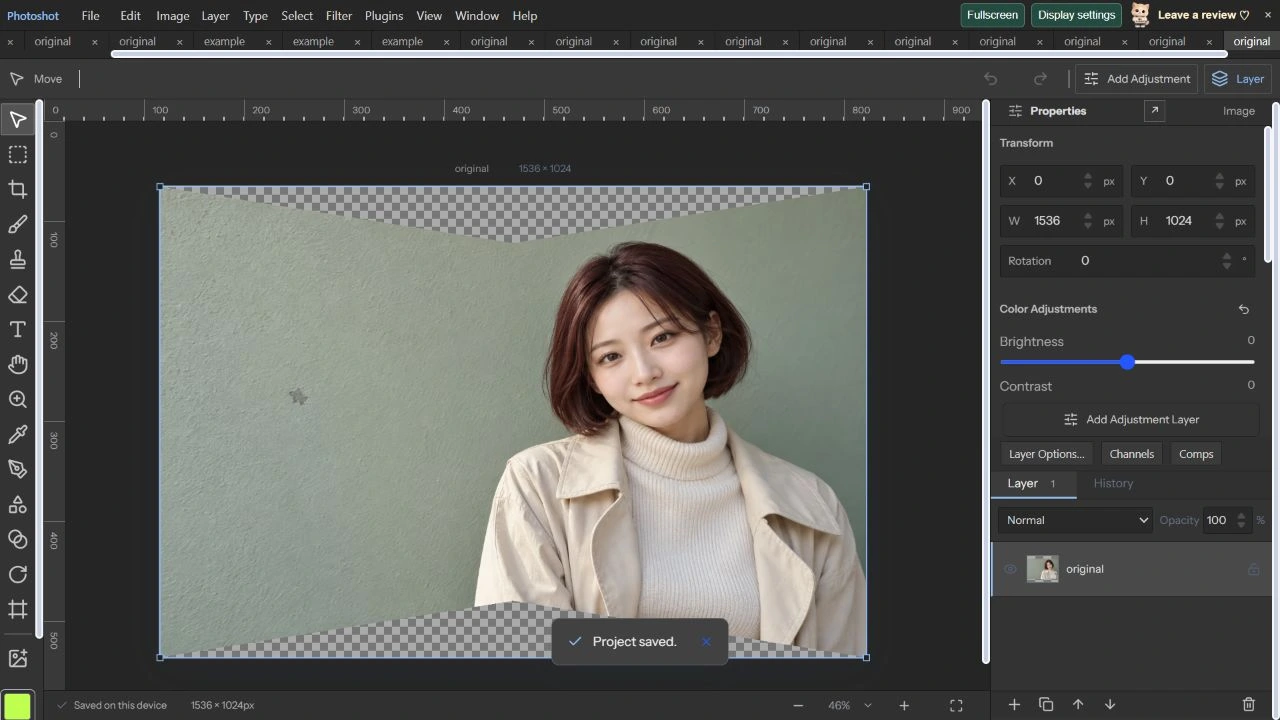
AI 생성 시연용 사진. 편집 화면과 출력 이미지는 실제 포토샷에서 만들었습니다.
출처에서 시작하다.
변형된 화면과 보관한 원본을 구분한다
원근을 적용한 화면만 저장하면 다음 수정에서 무엇을 기준으로 삼을지 불분명해집니다. 포토샷의 연결 평면은 원본 src와 gridWarp.planes 정보를 함께 보관합니다. 표시할 때 원래 평면에서 목적 평면으로 픽셀 위치를 계산합니다.
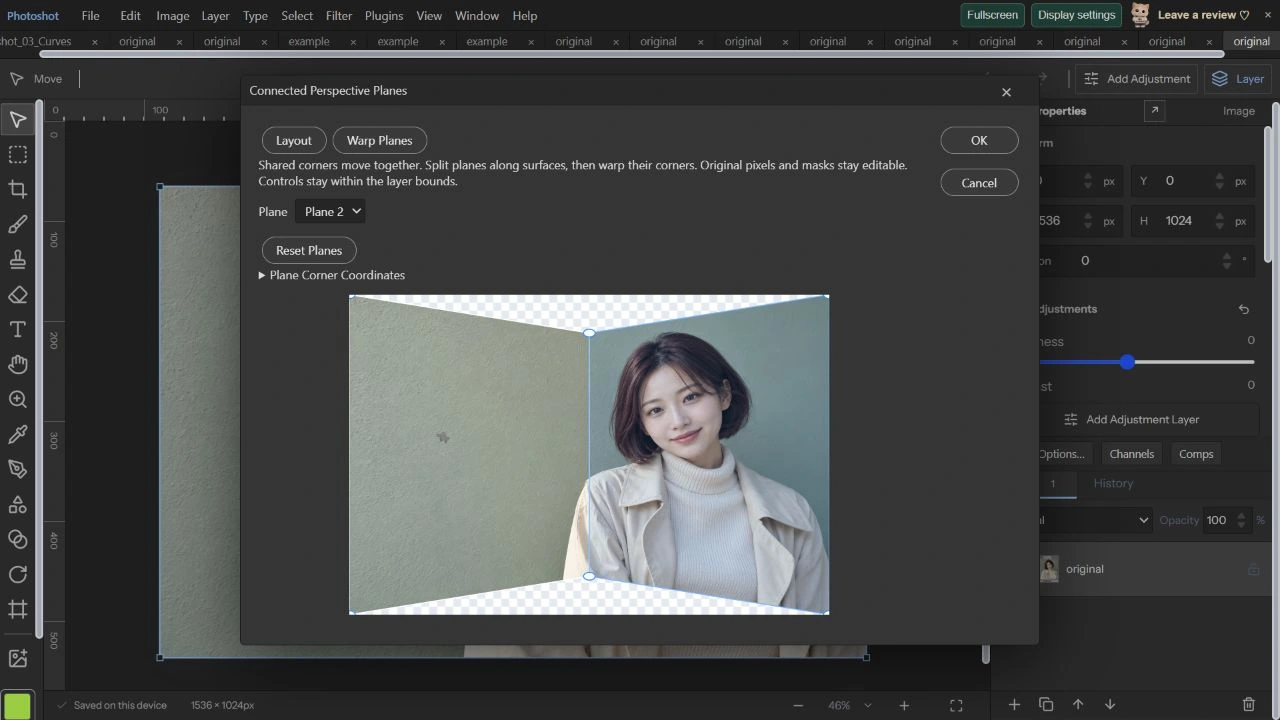
이번 예제는 사진 전체를 두 사각형으로 나눈 기본 배치를 사용했습니다. 원본의 가운데 위·아래 점을 안쪽으로 옮겨 변화를 크게 보이게 했습니다. 인물을 아름답게 보정하는 추천값이 아니라 변형 구조를 드러내는 검사값입니다.
이웃한 두 평면이 같은 꼭짓점을 공유한다
initialPlanes는 여섯 점과 두 사각형을 만듭니다. 두 사각형은 가운데 위·아래 점의 인덱스를 공유합니다. 겉보기 좌표만 비슷하게 맞추는 대신 같은 점을 참조하므로 한쪽에서 수정하면 옆 평면의 경계도 함께 움직입니다.
2026년 10월 22일 Plane 1의 가운데 위를 x 50%, y 12%, 가운데 아래를 x 50%, y 88%로 바꿨습니다. Plane 2로 전환하자 Corner 1과 Corner 4에 동일한 좌표가 표시됐습니다. 공유점 연결을 실제 UI에서 확인한 부분입니다.
export type GridWarp={planes?:ConnectedPlanes;enabled:boolean;points:WarpPoint[]};
export function rectangleWarp(x=0,y=0,width=1,height=1):GridWarp{return{enabled:true,points:Array.from({length:16},(_,i)=>({x:x+(i%4)/3*width,y:y+Math.floor(i/4)/3*height}))};}
export function validateGridWarp(w:GridWarp){if(w?.planes)validateConnectedPlanes(w.planes);if(!w||typeof w.enabled!=='boolean'||!Array.isArray(w.points)||w.points.length!==16||w.points.some(p=>!p||[p.x,p.y].some(n=>!Number.isFinite(n)||n<0||n>1)))throw Error('Invalid custom warp.');}
export function gridWarpIdentity(w?:GridWarp){return !w?.enabled||!w.planes&&w.points.every((p,i)=>Math.abs(p.x-(i%4)/3)<1e-10&&Math.abs(p.y-Math.floor(i/4)/3)<1e-10);}
const weights=(t:number)=>[(1-t)**3,3*t*(1-t)**2,3*t*t*(1-t),t**3];
// Bicubic Bezier surface: moving a control point bends the continuous image surface.
export function warpPoint(w:GridWarp,u:number,v:number){const a=weights(u),b=weights(v);let x=0,y=0;for(let j=0;j<4;j++)for(let i=0;i<4;i++){const p=w.points[j*4+i],weight=a[i]*b[j];x+=p.x*weight;y+=p.y*weight;}return{x,y};}
export function gridWarpMesh(w:GridWarp,width:number,height:number){const nx=40,ny=40,points=[];for(let j=0;j<=ny;j++)for(let i=0;i<=nx;i++){const p=warpPoint(w,i/nx,j/ny);points.push({x:i/nx*width,y:j/ny*height,tx:p.x*width,ty:p.y*height});}return{nx,ny,points};}계산의
안쪽으로.
접힌 평면과 범위 밖 입력을 먼저 막는다
connected-planes.ts는 좌표를 레이어 안의 0~1 범위로 제한하고, 점은 최대 40개·평면은 최대 8개로 검사합니다. 사각형은 볼록하고 정해진 방향을 유지해야 합니다. 분할은 이웃 경계의 중간점을 찾아 연결을 전파합니다.
렌더링은 목적 평면에서 원래 평면으로 역으로 좌표를 찾고, 알파를 고려한 보간을 합니다. 검은 테두리나 투명 경계가 생기는 문제는 좌표뿐 아니라 색과 알파를 함께 다뤄야 합니다. 이번 시연에서는 기본 두 평면만 사용했습니다.
프로젝트를 다시 열어 원본 바이트까지 비교한다
변형을 적용한 뒤 프로젝트를 저장하고 다시 열어 재저장했습니다. 전체 레이어 데이터가 이전 저장본과 같았고, src에서 꺼낸 PNG 바이트도 불러온 original.png와 정확히 같았습니다. 화면만 비슷한지 보는 것보다 강한 원본 보존 확인입니다.
위·아래 가운데를 안쪽으로 옮겼으므로 그 자리는 투명한 체크무늬로 보입니다. 이것은 새 배경이 채워진 결과가 아닙니다. 이번 사진에는 마스크를 추가하지 않았으므로 마스크 동작까지 직접 확인했다고 쓰지 않습니다.
코드를 읽다.
export type ConnectedPlanes={layout:{x:number;y:number}[];destination:{x:number;y:number}[];quads:[number,number,number,number][]};
export const initialPlanes=():ConnectedPlanes=>({layout:[{x:0,y:0},{x:.5,y:0},{x:1,y:0},{x:0,y:1},{x:.5,y:1},{x:1,y:1}],destination:[{x:0,y:0},{x:.5,y:0},{x:1,y:0},{x:0,y:1},{x:.5,y:1},{x:1,y:1}],quads:[[0,1,4,3],[1,2,5,4]]});
const convex=(q:{x:number;y:number}[])=>q.every((p,i)=>{const b=q[(i+1)%4],c=q[(i+2)%4];return (b.x-p.x)*(c.y-b.y)-(b.y-p.y)*(c.x-b.x)>1e-6;});
export function validateConnectedPlanes(p:ConnectedPlanes){if(!p||!Array.isArray(p.layout)||!Array.isArray(p.destination)||p.layout.length!==p.destination.length||p.layout.length<4||p.layout.length>40||!Array.isArray(p.quads)||!p.quads.length||p.quads.length>8||[...p.layout,...p.destination].some(v=>!v||[v.x,v.y].some(n=>!Number.isFinite(n)||n<0||n>1)))throw Error('Connected plane points must stay inside the layer bounds.');for(const q of p.quads){if(q.length!==4||new Set(q).size!==4||q.some(i=>!Number.isInteger(i)||i<0||i>=p.layout.length)||!convex(q.map(i=>p.layout[i]))||!convex(q.map(i=>p.destination[i])))throw Error('Keep each connected plane convex and clockwise.');}}export function planesPrecision(source:PrecisionRaster,p:ConnectedPlanes){validateConnectedPlanes(p);const {width,height}=source,{sample,result,stride}=sampler(source);for(const indices of p.quads){const layout=indices.map(i=>p.layout[i]) as Quad,dest=indices.map(i=>p.destination[i]) as Quad,a=homography(layout),b=inverse(homography(dest)),x0=Math.max(0,Math.floor(Math.min(...dest.map(v=>v.x))*width)),x1=Math.min(width-1,Math.ceil(Math.max(...dest.map(v=>v.x))*width)),y0=Math.max(0,Math.floor(Math.min(...dest.map(v=>v.y))*height)),y1=Math.min(height-1,Math.ceil(Math.max(...dest.map(v=>v.y))*height));for(let y=y0;y<=y1;y++)for(let x=x0;x<=x1;x++){const uv=mapMatrix(b,(x+.5)/width,(y+.5)/height);if(uv.x< -1e-7||uv.x>1+1e-7||uv.y< -1e-7||uv.y>1+1e-7)continue;const at=mapMatrix(a,uv.x,uv.y);sample(at.x*width-.5,at.y*height-.5,(y*width+x)*stride);}}return result;}
export function warpPrecision(source:PrecisionRaster,grid?:GridWarp,puppet?:PuppetWarp){let r=source;if(grid?.enabled&&!gridWarpIdentity(grid))r=grid.planes?planesPrecision(r,grid.planes):meshPrecision(r,gridWarpMesh(grid,r.width,r.height));if(puppet?.enabled&&!warpIdentity(puppet))r=meshPrecision(r,puppetMesh(puppet,r.width,r.height));return r;}/** Projected cubic curves are rational; adaptively subdivide only when perspective is present. */
export function projectPath(p:PathShape,forward:number[],width=1,height=1):PathShape{
const map=(p:Point)=>{const q=mapMatrix(forward,p.x,p.y);return {x:q.x*width,y:q.y*height};};
const checkRegion=(points:Point[])=>{const z=points.map(p=>forward[6]*p.x+forward[7]*p.y+forward[8]);if(z.some(v=>Math.abs(v)<1e-7)||z.some(v=>v*z[0]<0))throw Error('The perspective horizon crosses a path.');};편집 화면에서.
격자·퍼펫·원근 자르기는 서로 다른 범위다
일반 격자 Warp는 16개 제어점의 3차 베지어 곡면과 40×40 격자를 사용합니다. precision-warp는 격자나 연결 평면 뒤에 퍼펫 변형을 적용할 수 있습니다. 원근 자르기의 곡선 경로는 투영 뒤 적응적으로 나누고 지평선 교차와 앵커 수를 검사하는 별도 처리입니다.
기존 connected-planes 보고서에는 분할·취소·공유 경계·PSD/PSB·마스크 보존 사례가 있지만 이번에 전부 재실행하지는 않았습니다. 이번 직접 검증은 두 평면 좌표와 프로젝트 왕복입니다. 인물은 AI 생성 성인 가상 모델이며, 다음 28편은 내용 인식 채우기와 크기 변경입니다.
원본과 연결 평면 변형.
AI 생성 시연용 사진. 편집 화면과 출력 이미지는 실제 포토샷에서 만들었습니다.