
무료 포토샵 개발기
도형 속에 경로를 남기다
무료 포토샵을 만드는 포토샷 개발기입니다. 새 AI 인물 사진의 왼쪽 여백에 타원과 사각형을 만들고 앞 도형을 뺐습니다. 구멍 난 결과만 남기는 대신, 어떤 경로와 연산으로 만들어졌는지 저장하는 과정을 확인합니다.
AI 생성 시연용 사진. 편집 화면과 출력 이미지는 실제 포토샷에서 만들었습니다.
출처에서 시작하다.
도형은 채움과 좌표를 함께 가진다
shapes.ts는 기본 도형 종류와 채움·획·획 두께·모서리 반경 등을 저장합니다. 사용자 경로가 있으면 복합 경로를 그리는 쪽으로 연결합니다. 레이어의 화면 위치와 경로의 내부 좌표가 함께 있어야 이동하거나 크기를 바꿀 때 같은 구조를 재사용할 수 있습니다.
shape-paths.ts의 타원은 네 개의 베지어 구간으로 표현됩니다. 이때 사용하는 0.5522847498307936 계수는 원호를 근사하는 제어점 배치에 쓰입니다. 벡터라는 말이 모든 곡선의 수학적 완전 일치를 뜻하는 것은 아닙니다.
결합 뒤에도 구성 경로를 남긴다
shape-boolean.ts는 combine·subtract·intersect·exclude를 구분합니다. 입력 레이어의 변환을 경로 좌표에 반영한 뒤 구성 경로와 연산을 새 도형에 남깁니다. 아래쪽 도형의 채움과 획이 결합 결과의 기준이 됩니다.
결합은 같은 그룹에 있는 2~32개 도형으로 제한됩니다. 잠금, 마스크, 열린 경로, 일부 변형·클리핑 등이 있으면 거부하며 빼기와 교차에 복잡한 복합 경로를 무조건 허용하지 않습니다. 이런 조건을 숨기고 모든 벡터가 자유롭게 섞인다고 설명하지 않습니다.
export type Shape={gradient?:ShapeGradient;strokeGradient?:ShapeGradient;dash?:number[];dashOffset?:number;lineCap?:CanvasLineCap;lineJoin?:CanvasLineJoin;paths?:PathShape[];type:'rectangle'|'ellipse'|'polygon'|'line';fill:string;stroke:string;strokeWidth:number;radius:number;sides:number};
export const defaultShape:Shape={type:'rectangle',fill:'#bfff50',stroke:'#000000',strokeWidth:0,radius:0,sides:5};
export function validateShape(s:Shape){if(s)validateShapePaint(s);if(s?.paths)validatePaths([{id:'shape',name:'Shape',paths:s.paths}]);if(!s||!['rectangle','ellipse','polygon','line'].includes(s.type)||![s.fill,s.stroke].every(c=>c==='none'||/^#[0-9a-f]{6}$/i.test(c))||!Number.isFinite(s.strokeWidth)||s.strokeWidth<0||s.strokeWidth>300||!Number.isFinite(s.radius)||s.radius<0||s.radius>8192||!Number.isInteger(s.sides)||s.sides<3||s.sides>100)throw Error('Invalid shape settings.');}
export function paintShape(ctx:CanvasRenderingContext2D,l:Layer){const s=l.shape!;validateShape(s);if(s.paths){paintCompoundShape(ctx,l);return;}ctx.save();ctx.beginPath();for(const p of shapePaths(l)){if(!p.knots.length)continue;ctx.moveTo(p.knots[0].points[2],p.knots[0].points[3]);for(let i=1;i<p.knots.length+(p.open?0:1);i++){const a=p.knots[i-1].points,b=p.knots[i%p.knots.length].points;ctx.bezierCurveTo(a[4],a[5],b[0],b[1],b[2],b[3]);}if(!p.open)ctx.closePath();}if(s.fill!=='none'&&s.type!=='line'){ctx.fillStyle=shapePaint(ctx,s,'fill',l.width,l.height);ctx.fill();}if(s.stroke!=='none'&&s.strokeWidth){ctx.strokeStyle=shapePaint(ctx,s,'stroke',l.width,l.height);setupShapeStroke(ctx,s);ctx.stroke();}ctx.restore();}계산의
안쪽으로.
그라데이션과 획도 검증할 설정이다
shape-paint-style.ts는 그라데이션 종류·각도·배율과 2~32개 스톱의 위치·색·불투명도를 검사합니다. 점선 길이, 선 끝과 모서리 연결 방식도 별도로 검증합니다. 모양이 남는 것과 채움·획이 같은 의미로 남는 것은 다른 검사입니다.
외부 그라데이션의 맞춤 중간점이나 배치처럼 이 편집 모델이 그대로 다루지 못하는 조건에는 제한이 있습니다. 코드는 원래 외관을 보존하는 경계와 편집 가능한 범위를 구분합니다. 편집 가능이라는 표시만으로 모든 외부 설정을 다시 만들 수 있다고 보장하지 않습니다.
타원에서 앞 사각형을 실제로 뺐다
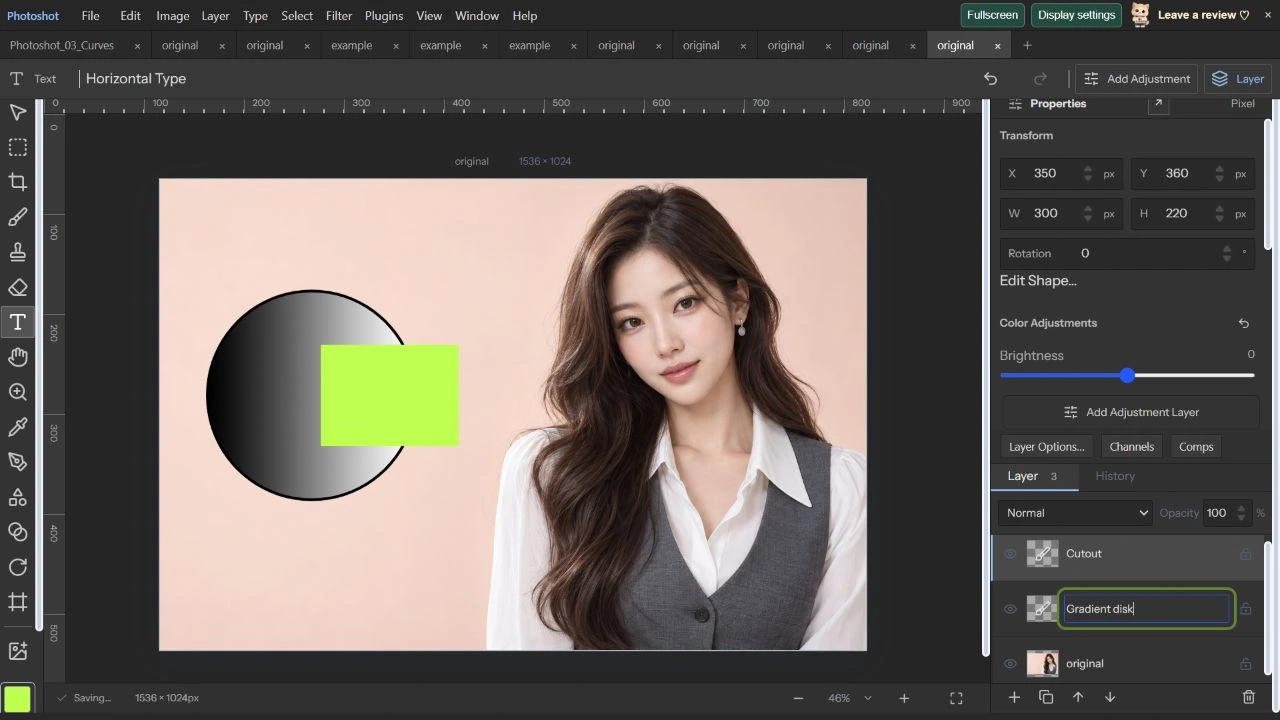
2026년 10월 22일 1536×1024 AI 원본에 460×460 타원을 만들고 검정→흰색 선형 그라데이션과 6px 검정 획을 적용했습니다. 위치는 X100·Y240입니다. 300×220 사각형을 X350·Y360에 놓고 두 레이어를 선택했습니다.
Subtract Front Shape를 적용한 결과는 Combined Shape가 됐습니다. Edit Shape Paths에서 Path 1과 Path 2를 확인했고, 두 번째 경로에는 subtract가 남아 있었습니다. 이 시연에서는 개별 앵커를 새 위치로 드래그하지 않았습니다. 경로가 남아 편집 창에서 선택되는 것을 확인한 범위입니다.
코드를 읽다.
export type ShapeOperation='combine'|'subtract'|'intersect'|'exclude';
export function combineShapes(doc:StudioDoc,ids:string[],operation:ShapeOperation):StudioDoc{if(!['combine','subtract','intersect','exclude'].includes(operation))throw Error('Invalid shape operation.');const layers=doc.layers.filter(l=>ids.includes(l.id));if(layers.length<2||layers.length>32)throw Error('Select 2 to 32 shape layers.');for(const l of layers)if(!l.shape||l.shape.type==='line'||l.shape.paths?.some(p=>p.open)||layerLocked(doc,l)||l.mask||l.vectorMask||l.gridWarp||l.puppet||l.strokes.length||l.clipped)throw Error('Select unlocked, unmasked filled shape layers.');if(new Set(layers.map(l=>l.groupId??'')).size!==1)throw Error('Choose shapes in the same group.');const paths:PathShape[]=[];for(let index=0;index<layers.length;index++){const l=layers[index],matrix=homography(quadPoints(l)),local=shapePaths(l).map(p=>({...p,knots:p.knots.map(k=>({...k,points:k.points.map((n,i)=>i%2?(l.flipY?1-n/l.height:n/l.height):(l.flipX?1-n/l.width:n/l.width))}))}));if(local.length>1&&(operation!=='combine'||index>0&&local.some(p=>p.operation&&p.operation!=='combine')))throw Error('For subtraction/intersection, use single-path shapes. Compound unions remain editable.');for(const p of local)paths.push({...projectPath(p,matrix),operation:index===0?p.operation??'combine':operation});}const values=paths.flatMap(p=>p.knots.flatMap(k=>[0,2,4].map(i=>({x:k.points[i],y:k.points[i+1]})))),pad=layers[0].shape!.strokeWidth/2,left=Math.floor(Math.min(...values.map(p=>p.x))-pad),top=Math.floor(Math.min(...values.map(p=>p.y))-pad),right=Math.ceil(Math.max(...values.map(p=>p.x))+pad),bottom=Math.ceil(Math.max(...values.map(p=>p.y))+pad),width=Math.max(1,right-left),height=Math.max(1,bottom-top);if(width*height>16000000)throw Error('Combined shapes currently support up to 16 MP.');const base=layers[0],shape={...base.shape!,radius:0,paths:paths.map(p=>({...p,knots:p.knots.map(k=>({...k,points:k.points.map((n,i)=>i%2?(n-top)/height:(n-left)/width)}))}))},result=makeLayer({name:'Combined Shape',kind:'paint',x:left,y:top,width,height,shape,groupId:base.groupId,opacity:base.opacity,fill:base.fill,blend:base.blend,effects:base.effects}),first=doc.layers.indexOf(base),remaining=doc.layers.filter(l=>!ids.includes(l.id));remaining.splice(first,0,result);const next={...doc,layers:remaining};validateDoc(next);return next;}import type {Layer} from './document.ts';import type {PathShape} from './paths.ts';
export function shapePaths(layer:Layer):PathShape[]{const s=layer.shape!;if(s.paths)return s.paths.map(p=>({...p,knots:p.knots.map(k=>({...k,points:k.points.map((n,i)=>n*(i%2?layer.height:layer.width))}))}));const inset=s.strokeWidth/2,w=Math.max(0,layer.width-s.strokeWidth),h=Math.max(0,layer.height-s.strokeWidth),x=inset,y=inset,k=.5522847498307936,knot=(x:number,y:number,ix=x,iy=y,ox=x,oy=y)=>({linked:true,points:[ix,iy,x,y,ox,oy]}),path:PathShape={open:s.type==='line',operation:'combine',fillRule:'non-zero',knots:[]};if(s.type==='ellipse'){const cx=x+w/2,cy=y+h/2,rx=w/2,ry=h/2;path.knots=[knot(cx,y,cx-k*rx,y,cx+k*rx,y),knot(x+w,cy,x+w,cy-k*ry,x+w,cy+k*ry),knot(cx,y+h,cx+k*rx,y+h,cx-k*rx,y+h),knot(x,cy,x,cy+k*ry,x,cy-k*ry)];}else if(s.type==='polygon'){path.knots=Array.from({length:s.sides},(_,i)=>{const a=-Math.PI/2+i*Math.PI*2/s.sides;return knot(layer.width/2+Math.cos(a)*w/2,layer.height/2+Math.sin(a)*h/2);});}else if(s.type==='line')path.knots=[knot(x,y),knot(x+w,y+h)];else{const r=Math.min(s.radius,w/2,h/2);path.knots=r?[knot(x+r,y,x+r-k*r,y),knot(x+w-r,y,x+w-r,y,x+w-r+k*r,y),knot(x+w,y+r,x+w,y+r-k*r),knot(x+w,y+h-r,x+w,y+h-r,x+w,y+h-r+k*r),knot(x+w-r,y+h,x+w-r+k*r,y+h),knot(x+r,y+h,x+r,y+h,x+r-k*r,y+h),knot(x,y+h-r,x,y+h-r+k*r),knot(x,y+r,x,y+r,x,y+r-k*r)]:[knot(x,y),knot(x+w,y),knot(x+w,y+h),knot(x,y+h)];}return [path];}export type ShapeGradient={type:'linear'|'radial'|'reflected';angle:number;scale:number;reverse:boolean;stops:{location:number;color:string;opacity:number}[]};
export const defaultShapeGradient=():ShapeGradient=>({type:'linear',angle:0,scale:100,reverse:false,stops:[{location:0,color:'#000000',opacity:1},{location:1,color:'#ffffff',opacity:1}]});
export function validateShapePaint(s:Shape){for(const g of [s.gradient,s.strokeGradient])if(g){if(!['linear','radial','reflected'].includes(g.type)||!Number.isFinite(g.angle)||Math.abs(g.angle)>360||!Number.isFinite(g.scale)||g.scale<1||g.scale>1000||typeof g.reverse!=='boolean'||!Array.isArray(g.stops)||g.stops.length<2||g.stops.length>32||g.stops.some((p,i)=>!Number.isFinite(p.location)||p.location<0||p.location>1||i>0&&p.location<g.stops[i-1].location||!/^#[0-9a-f]{6}$/i.test(p.color)||!Number.isFinite(p.opacity)||p.opacity<0||p.opacity>1))throw Error('Invalid shape gradient.');}if(s.dash&&(s.dash.length>16||s.dash.some(n=>!Number.isFinite(n)||n<.1||n>10000)))throw Error('Dash lengths must be between 0.1 and 10000 pixels.');if(s.dashOffset!==undefined&&(!Number.isFinite(s.dashOffset)||Math.abs(s.dashOffset)>10000))throw Error('Invalid dash offset.');if(s.lineCap&&!['butt','round','square'].includes(s.lineCap)||s.lineJoin&&!['round','bevel','miter'].includes(s.lineJoin))throw Error('Invalid shape stroke style.');}편집 화면에서.
재열기 결과와 과거 픽셀 오차를 구분한다
.layerstudio 저장·재열기·재저장 후 결합 도형 레이어를 비교했습니다. 두 경로의 앵커와 combine/subtract 연산, 그라데이션, 6px 획을 포함한 전체 레이어 데이터가 정확히 일치했습니다. 이번 직접 검사는 포토샷 프로젝트 형식입니다.
기존 shape-paint-native 보고서는 지정된 PSD/PSB를 편집 가능한 벡터로 기록하지만 픽셀 오차가 0은 아닙니다. 선형 사례는 평균 절대 오차 약 0.647·최대 2, 점선 사례는 약 0.153·최대 255입니다. 낮은 평균만으로 모든 픽셀이 같다고 할 수 없습니다. 새 인물은 AI 생성이고 작업 화면은 실제 캡처입니다. 25편은 브러시와 ABR을 다룹니다.
원본과 벡터 빼기.
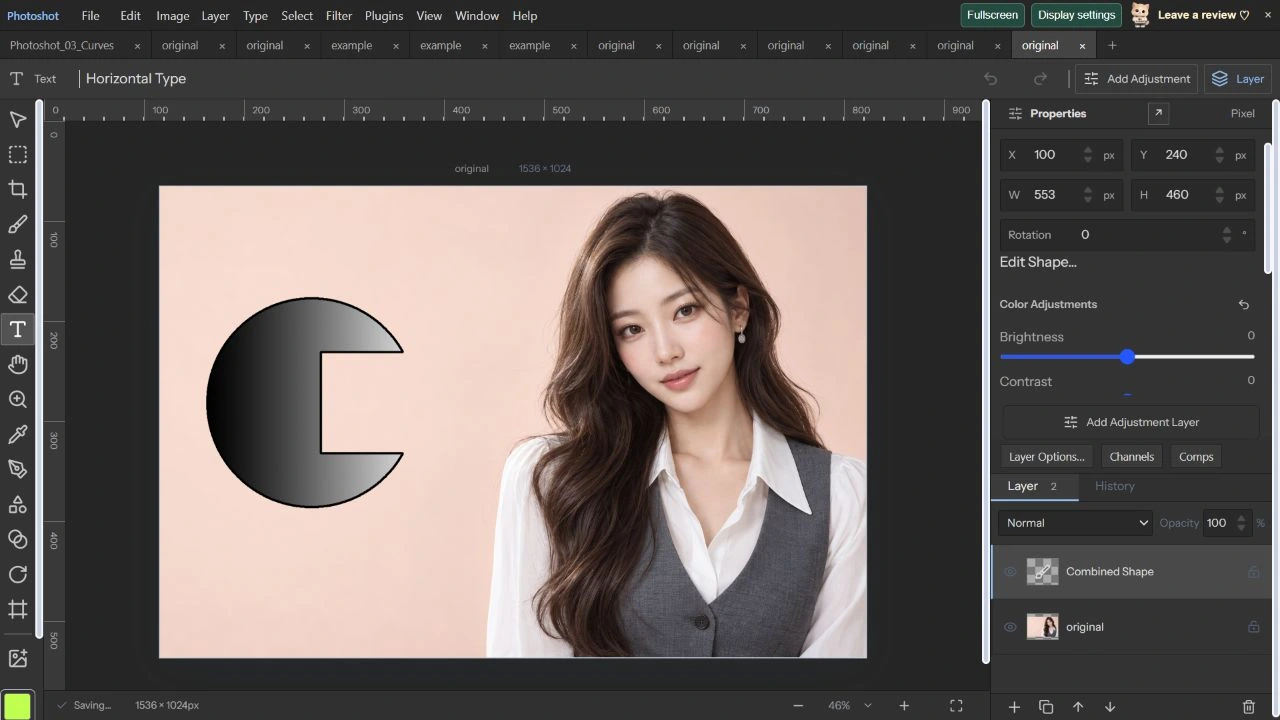
AI 생성 시연용 사진. 편집 화면과 출력 이미지는 실제 포토샷에서 만들었습니다.