
無料Photoshop代替の開発記
図形にパスを残す
新しいAI人物写真の余白に楕円と矩形を作り、前面の図形を差し引きました。切り抜いた画像だけでなく、元のパスと演算が残るかを確認します。
AI生成の動作例用写真。編集画面と出力画像は実際のPhotoshotで作成しました。
ソースから始める。
図形は塗りと座標を持つ
shapes.tsは基本形状、塗り、線、線幅、角丸などを保持します。独自パスがあれば複合パスの描画へ進みます。レイヤー位置と内部パス座標を合わせて、移動や拡大後も構造を再利用します。
shape-paths.tsの楕円は四つのベジエ区間です。係数0.5522847498307936は円弧を近似する制御点の配置に使います。ベクトルであることは全曲線の数学的な完全一致を意味しません。
結合後にも構成パスを残す
shape-boolean.tsはcombine・subtract・intersect・excludeを区別します。入力レイヤーの変換を座標へ反映し、構成パスと演算を新しい図形に残します。塗りと線は下の図形が基準です。
結合対象は同じグループの2~32図形です。ロック、マスク、開いたパス、一部の変形やクリッピングなどは拒否します。減算や交差で任意の複合パスを許可するわけでもありません。この条件も対応範囲の一部です。
export type Shape={gradient?:ShapeGradient;strokeGradient?:ShapeGradient;dash?:number[];dashOffset?:number;lineCap?:CanvasLineCap;lineJoin?:CanvasLineJoin;paths?:PathShape[];type:'rectangle'|'ellipse'|'polygon'|'line';fill:string;stroke:string;strokeWidth:number;radius:number;sides:number};
export const defaultShape:Shape={type:'rectangle',fill:'#bfff50',stroke:'#000000',strokeWidth:0,radius:0,sides:5};
export function validateShape(s:Shape){if(s)validateShapePaint(s);if(s?.paths)validatePaths([{id:'shape',name:'Shape',paths:s.paths}]);if(!s||!['rectangle','ellipse','polygon','line'].includes(s.type)||![s.fill,s.stroke].every(c=>c==='none'||/^#[0-9a-f]{6}$/i.test(c))||!Number.isFinite(s.strokeWidth)||s.strokeWidth<0||s.strokeWidth>300||!Number.isFinite(s.radius)||s.radius<0||s.radius>8192||!Number.isInteger(s.sides)||s.sides<3||s.sides>100)throw Error('Invalid shape settings.');}
export function paintShape(ctx:CanvasRenderingContext2D,l:Layer){const s=l.shape!;validateShape(s);if(s.paths){paintCompoundShape(ctx,l);return;}ctx.save();ctx.beginPath();for(const p of shapePaths(l)){if(!p.knots.length)continue;ctx.moveTo(p.knots[0].points[2],p.knots[0].points[3]);for(let i=1;i<p.knots.length+(p.open?0:1);i++){const a=p.knots[i-1].points,b=p.knots[i%p.knots.length].points;ctx.bezierCurveTo(a[4],a[5],b[0],b[1],b[2],b[3]);}if(!p.open)ctx.closePath();}if(s.fill!=='none'&&s.type!=='line'){ctx.fillStyle=shapePaint(ctx,s,'fill',l.width,l.height);ctx.fill();}if(s.stroke!=='none'&&s.strokeWidth){ctx.strokeStyle=shapePaint(ctx,s,'stroke',l.width,l.height);setupShapeStroke(ctx,s);ctx.stroke();}ctx.restore();}計算の
内側へ。
グラデーションと線にも検査がある
shape-paint-style.tsは種類・角度・倍率と2~32個の停止点の位置・色・不透明度を検査します。破線長、線端、結合形状にも検査があります。形状と塗り・線の意味の保持は別項目です。
外部グラデーションの独自中間点や配置には対応の境界があります。元の外観を保つ処理と設定を直接編集する範囲を区別します。編集可能という表示だけで外部の全設定を再現できるとは保証しません。
前面の矩形を実際に差し引く
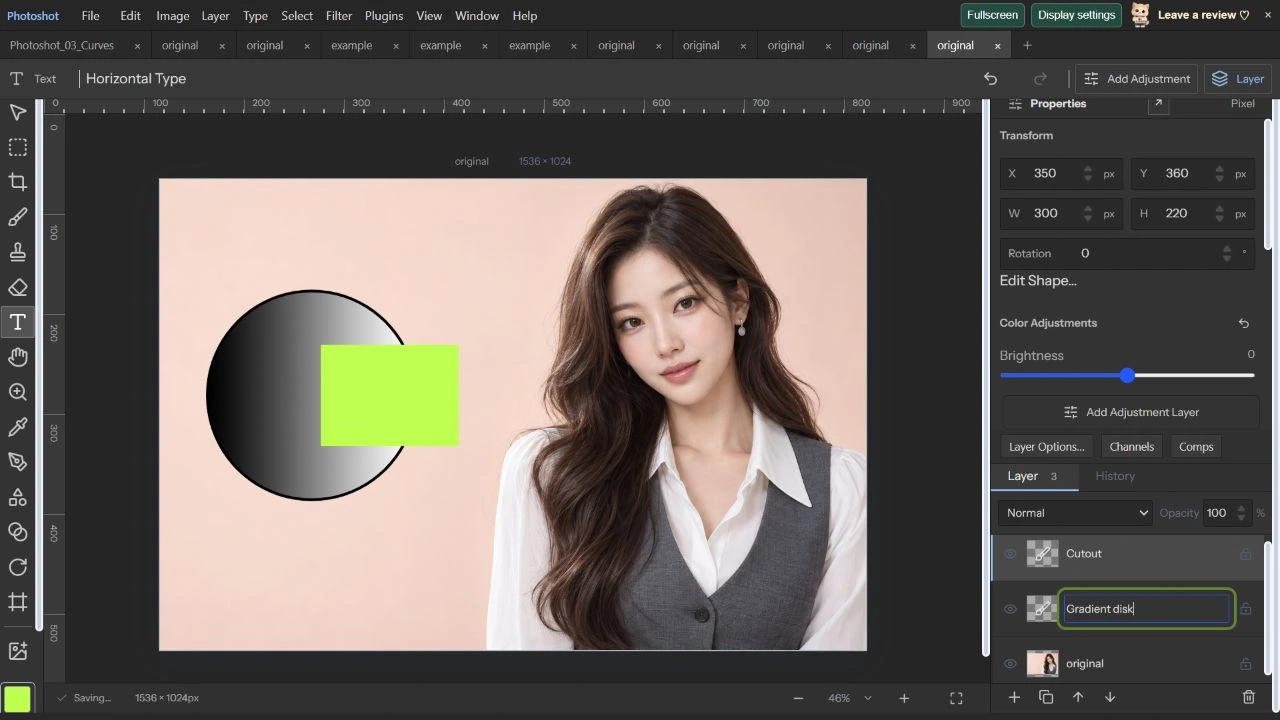
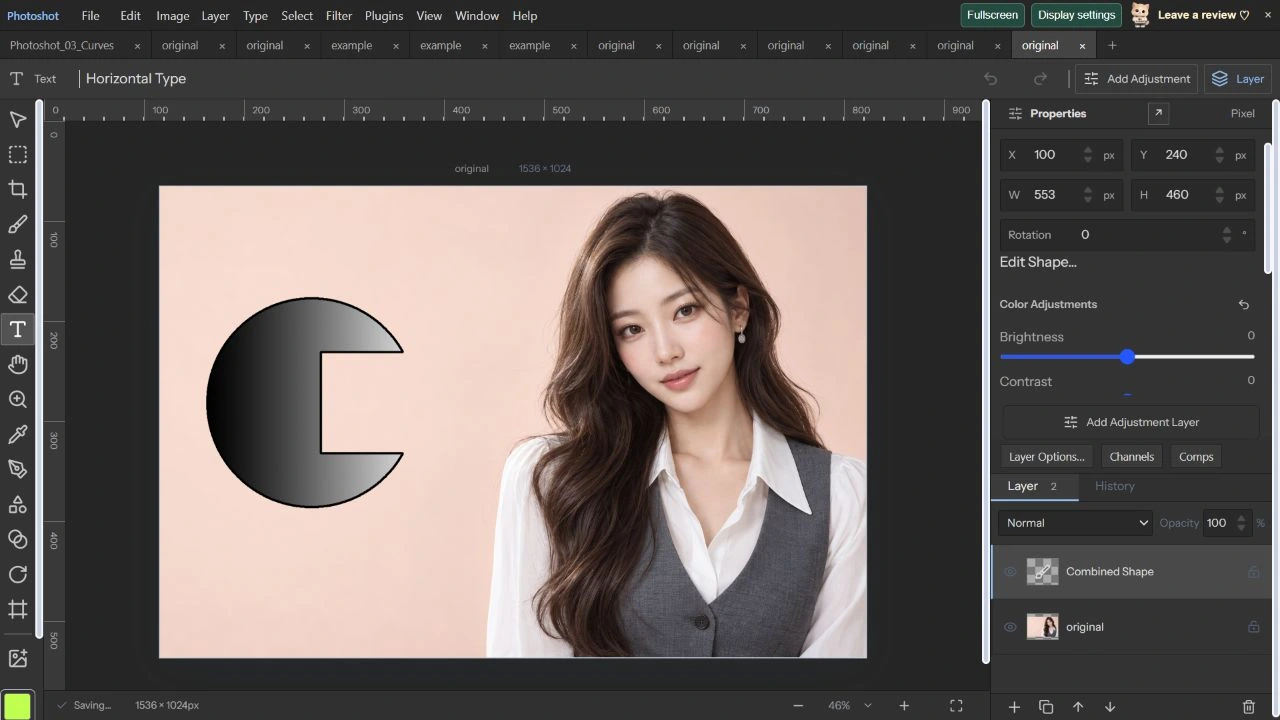
2026年10月22日、1536×1024のAI原画像で460×460の楕円をX100/Y240に置きました。黒から白の線形グラデーションと6px黒線を設定し、300×220の矩形をX350/Y360に重ねて二層を選択しました。
Subtract Front ShapeでCombined Shapeになりました。Edit Shape Pathsで二つのパスを選択でき、Path 2にはsubtractが残っています。今回は個別アンカーを新しい位置へドラッグしておらず、構成パスの保持と選択を直接確認した範囲です。
コードを読む。
export type ShapeOperation='combine'|'subtract'|'intersect'|'exclude';
export function combineShapes(doc:StudioDoc,ids:string[],operation:ShapeOperation):StudioDoc{if(!['combine','subtract','intersect','exclude'].includes(operation))throw Error('Invalid shape operation.');const layers=doc.layers.filter(l=>ids.includes(l.id));if(layers.length<2||layers.length>32)throw Error('Select 2 to 32 shape layers.');for(const l of layers)if(!l.shape||l.shape.type==='line'||l.shape.paths?.some(p=>p.open)||layerLocked(doc,l)||l.mask||l.vectorMask||l.gridWarp||l.puppet||l.strokes.length||l.clipped)throw Error('Select unlocked, unmasked filled shape layers.');if(new Set(layers.map(l=>l.groupId??'')).size!==1)throw Error('Choose shapes in the same group.');const paths:PathShape[]=[];for(let index=0;index<layers.length;index++){const l=layers[index],matrix=homography(quadPoints(l)),local=shapePaths(l).map(p=>({...p,knots:p.knots.map(k=>({...k,points:k.points.map((n,i)=>i%2?(l.flipY?1-n/l.height:n/l.height):(l.flipX?1-n/l.width:n/l.width))}))}));if(local.length>1&&(operation!=='combine'||index>0&&local.some(p=>p.operation&&p.operation!=='combine')))throw Error('For subtraction/intersection, use single-path shapes. Compound unions remain editable.');for(const p of local)paths.push({...projectPath(p,matrix),operation:index===0?p.operation??'combine':operation});}const values=paths.flatMap(p=>p.knots.flatMap(k=>[0,2,4].map(i=>({x:k.points[i],y:k.points[i+1]})))),pad=layers[0].shape!.strokeWidth/2,left=Math.floor(Math.min(...values.map(p=>p.x))-pad),top=Math.floor(Math.min(...values.map(p=>p.y))-pad),right=Math.ceil(Math.max(...values.map(p=>p.x))+pad),bottom=Math.ceil(Math.max(...values.map(p=>p.y))+pad),width=Math.max(1,right-left),height=Math.max(1,bottom-top);if(width*height>16000000)throw Error('Combined shapes currently support up to 16 MP.');const base=layers[0],shape={...base.shape!,radius:0,paths:paths.map(p=>({...p,knots:p.knots.map(k=>({...k,points:k.points.map((n,i)=>i%2?(n-top)/height:(n-left)/width)}))}))},result=makeLayer({name:'Combined Shape',kind:'paint',x:left,y:top,width,height,shape,groupId:base.groupId,opacity:base.opacity,fill:base.fill,blend:base.blend,effects:base.effects}),first=doc.layers.indexOf(base),remaining=doc.layers.filter(l=>!ids.includes(l.id));remaining.splice(first,0,result);const next={...doc,layers:remaining};validateDoc(next);return next;}import type {Layer} from './document.ts';import type {PathShape} from './paths.ts';
export function shapePaths(layer:Layer):PathShape[]{const s=layer.shape!;if(s.paths)return s.paths.map(p=>({...p,knots:p.knots.map(k=>({...k,points:k.points.map((n,i)=>n*(i%2?layer.height:layer.width))}))}));const inset=s.strokeWidth/2,w=Math.max(0,layer.width-s.strokeWidth),h=Math.max(0,layer.height-s.strokeWidth),x=inset,y=inset,k=.5522847498307936,knot=(x:number,y:number,ix=x,iy=y,ox=x,oy=y)=>({linked:true,points:[ix,iy,x,y,ox,oy]}),path:PathShape={open:s.type==='line',operation:'combine',fillRule:'non-zero',knots:[]};if(s.type==='ellipse'){const cx=x+w/2,cy=y+h/2,rx=w/2,ry=h/2;path.knots=[knot(cx,y,cx-k*rx,y,cx+k*rx,y),knot(x+w,cy,x+w,cy-k*ry,x+w,cy+k*ry),knot(cx,y+h,cx+k*rx,y+h,cx-k*rx,y+h),knot(x,cy,x,cy+k*ry,x,cy-k*ry)];}else if(s.type==='polygon'){path.knots=Array.from({length:s.sides},(_,i)=>{const a=-Math.PI/2+i*Math.PI*2/s.sides;return knot(layer.width/2+Math.cos(a)*w/2,layer.height/2+Math.sin(a)*h/2);});}else if(s.type==='line')path.knots=[knot(x,y),knot(x+w,y+h)];else{const r=Math.min(s.radius,w/2,h/2);path.knots=r?[knot(x+r,y,x+r-k*r,y),knot(x+w-r,y,x+w-r,y,x+w-r+k*r,y),knot(x+w,y+r,x+w,y+r-k*r),knot(x+w,y+h-r,x+w,y+h-r,x+w,y+h-r+k*r),knot(x+w-r,y+h,x+w-r+k*r,y+h),knot(x+r,y+h,x+r,y+h,x+r-k*r,y+h),knot(x,y+h-r,x,y+h-r+k*r),knot(x,y+r,x,y+r,x,y+r-k*r)]:[knot(x,y),knot(x+w,y),knot(x+w,y+h),knot(x,y+h)];}return [path];}export type ShapeGradient={type:'linear'|'radial'|'reflected';angle:number;scale:number;reverse:boolean;stops:{location:number;color:string;opacity:number}[]};
export const defaultShapeGradient=():ShapeGradient=>({type:'linear',angle:0,scale:100,reverse:false,stops:[{location:0,color:'#000000',opacity:1},{location:1,color:'#ffffff',opacity:1}]});
export function validateShapePaint(s:Shape){for(const g of [s.gradient,s.strokeGradient])if(g){if(!['linear','radial','reflected'].includes(g.type)||!Number.isFinite(g.angle)||Math.abs(g.angle)>360||!Number.isFinite(g.scale)||g.scale<1||g.scale>1000||typeof g.reverse!=='boolean'||!Array.isArray(g.stops)||g.stops.length<2||g.stops.length>32||g.stops.some((p,i)=>!Number.isFinite(p.location)||p.location<0||p.location>1||i>0&&p.location<g.stops[i-1].location||!/^#[0-9a-f]{6}$/i.test(p.color)||!Number.isFinite(p.opacity)||p.opacity<0||p.opacity>1))throw Error('Invalid shape gradient.');}if(s.dash&&(s.dash.length>16||s.dash.some(n=>!Number.isFinite(n)||n<.1||n>10000)))throw Error('Dash lengths must be between 0.1 and 10000 pixels.');if(s.dashOffset!==undefined&&(!Number.isFinite(s.dashOffset)||Math.abs(s.dashOffset)>10000))throw Error('Invalid dash offset.');if(s.lineCap&&!['butt','round','square'].includes(s.lineCap)||s.lineJoin&&!['round','bevel','miter'].includes(s.lineJoin))throw Error('Invalid shape stroke style.');}エディターで見る。
再読込と過去の画素誤差を分ける
.layerstudioを保存・再読込・再保存すると、アンカー、combine/subtract、グラデーション、6px線を含む複合図形レイヤーデータが完全一致しました。今回の直接検査はPhotoshotプロジェクト形式です。
既存shape-paint-native報告は指定PSD/PSBを編集可能なベクトルと記録しますが、画素差はゼロではありません。線形例は平均絶対誤差約0.647・最大2、破線例は約0.153・最大255です。平均が低くても全画素一致とは言えません。人物はAI生成、画面は実際のキャプチャーです。25回はブラシとABRです。
原画像とベクトル減算。
AI生成の動作例用写真。編集画面と出力画像は実際のPhotoshotで作成しました。