
Building a free Photoshop alternative
A mesh over a face
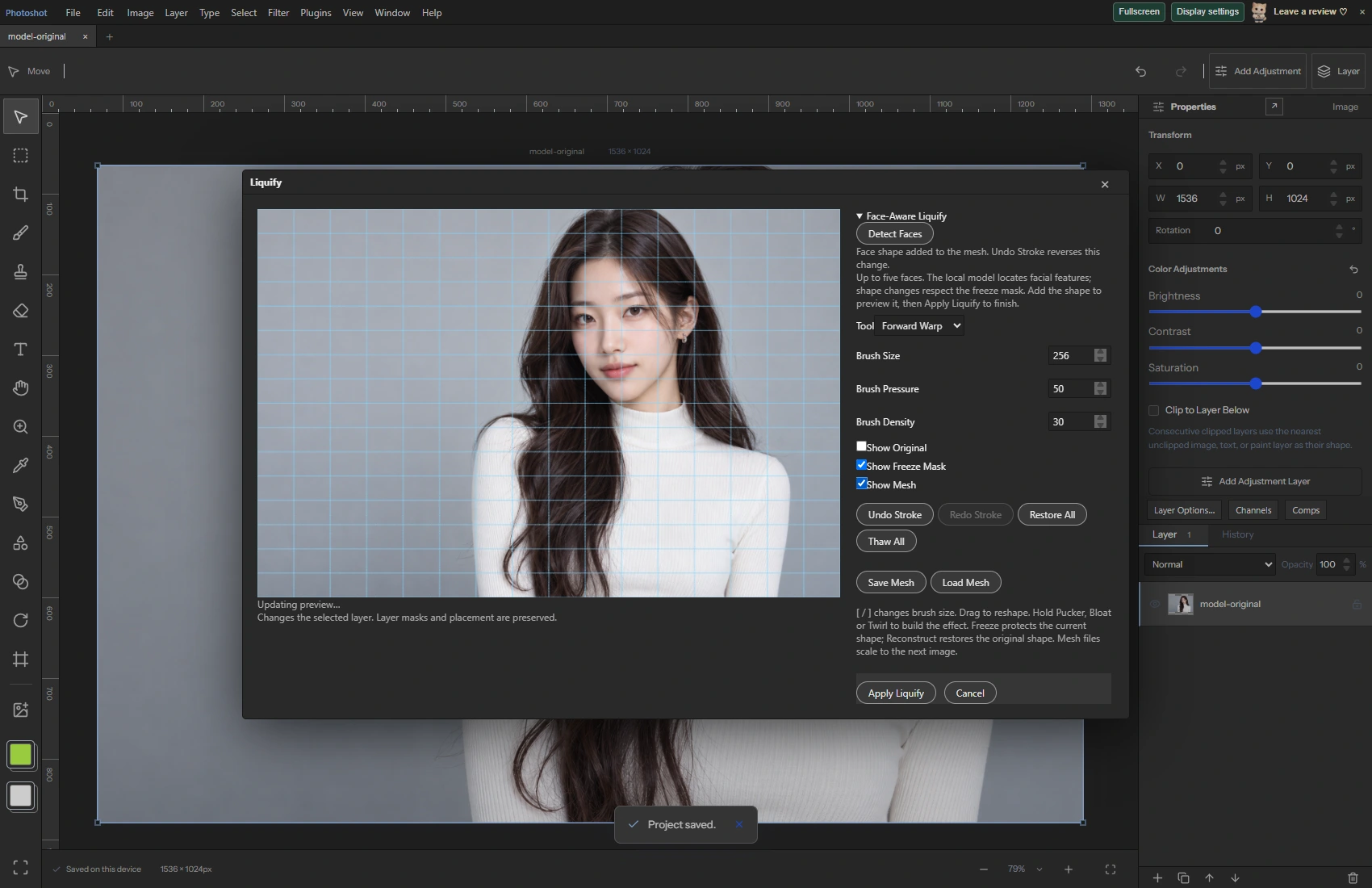
Sliders alone do not prove that a tool locates facial features. On this portrait we ran Detect Faces in public Photoshot, adjusted Eye Size and Smile, and checked the saved deformation mesh together with apply, undo and redo.
AI-generated demonstration image; not an actual celebrity photograph or official collaboration. Editing screens and results were made in Photoshot.
From the source.
Accumulate displacement rather than painted pixels
Liquify stores horizontal and vertical displacement plus protection at each mesh point. The default mesh size is 129; validation accepts square grids from 9 through 129. Brush strokes compose inverse deformations, with image resampling at final application.
The eight tools are Forward Warp, Pucker, Bloat, Twirl Clockwise, Reconstruct, Smooth, Freeze Mask and Thaw Mask. Protected areas are part of the same mesh and influence deformation. This is more than drawing a grid overlay.
Find facial positions with a local model
face-liquify uses MediaPipe FaceLandmarker with locally served model assets. IMAGE mode is configured for up to five faces, and detected coordinates feed the mesh deformation function. No detected face produces an explicit error and points users toward the regular brushes.
The deformation function requires at least 468 points and validates coordinates, aspect ratio and control ranges. It builds a rotated facial coordinate system from the eyes and computes local changes around eyes, nose, mouth and jaw. This locates features; it does not determine a person’s identity.
export const liquifyTools={warp:'Forward Warp',pucker:'Pucker',bloat:'Bloat',twirl:'Twirl Clockwise',reconstruct:'Reconstruct',smooth:'Smooth',freeze:'Freeze Mask',thaw:'Thaw Mask'};
export type LiquifyTool=keyof typeof liquifyTools;
export type LiquifyMesh={version:1;size:number;dx:number[];dy:number[];freeze:number[]};
export type LiquifyBrush={tool:LiquifyTool;radius:number;pressure:number;density:number;aspect:number};
export const newLiquifyMesh=(size=129):LiquifyMesh=>({version:1,size,dx:Array(size*size).fill(0),dy:Array(size*size).fill(0),freeze:Array(size*size).fill(0)});
export function validateLiquifyMesh(v:unknown):asserts v is LiquifyMesh{const m=v as LiquifyMesh;if(!m||m.version!==1||!Number.isInteger(m.size)||m.size<9||m.size>129)throw Error('Invalid Liquify mesh.');for(const k of ['dx','dy','freeze'] as const)if(!Array.isArray(m[k])||m[k].length!==m.size*m.size||m[k].some(n=>!Number.isFinite(n)||(k==='freeze'?(n<0||n>1):Math.abs(n)>4)))throw Error('Invalid Liquify mesh values.');}
const clamp=(v:number,a=0,b=1)=>Math.max(a,Math.min(b,v));
function sample(a:number[],n:number,x:number,y:number){x=clamp(x)*(n-1);y=clamp(y)*(n-1);const ix=Math.floor(x),iy=Math.floor(y),fx=x-ix,fy=y-iy,jy=Math.min(n-1,iy+1),jx=Math.min(n-1,ix+1);return a[iy*n+ix]*(1-fx)*(1-fy)+a[iy*n+jx]*fx*(1-fy)+a[jy*n+ix]*(1-fx)*fy+a[jy*n+jx]*fx*fy;}
/** Inverse deformation composition; images are resampled once on application. */Inside the
calculation.
Apply two controls to the new portrait
We ran Detect Faces in the public Liquify workspace and checked that it produced actual landmarks. Eye Size was set to 25 and Smile to 15, then Add Face Shape composed the change into the mesh. The workspace image shows Show Mesh enabled.
These settings exercise the feature. They are not a beauty standard or a recommendation to reshape a particular face. The before and after pair uses the generated source and its actual Photoshot deformation.
Check mesh output and document history separately
We saved a mesh file, verified changed displacement values and used Apply Liquify. The resulting src differed from the source. Undo restored the exact pre-application src; Redo restored the exact post-application src.
Separately rerun rendering checks cover eight controls, neutral identity, inverse mapping for eye enlargement, freeze protection, immutable input and invalid settings. Those use fixed fixtures. The new portrait has its own independent UI record.
Read the code.
export async function detectLiquifyFaces(source:HTMLCanvasElement):Promise<FacePoint[][]>{
 const base=((import.meta as ImportMeta & {env?:{BASE_URL?:string}}).env?.BASE_URL||'/photoshot/editor/')+'portrait-ai/';
 detector??=(async()=>{const vision=await import('./vendor/portrait/vision_bundle.js'),files=await vision.FilesetResolver.forVisionTasks(base+'wasm');return vision.FaceLandmarker.createFromOptions(files,{baseOptions:{modelAssetPath:base+'face_landmarker.task',delegate:'CPU'},runningMode:'IMAGE',numFaces:5,minFaceDetectionConfidence:.5,minFacePresenceConfidence:.5,outputFaceBlendshapes:false,outputFacialTransformationMatrixes:false});})().catch(e=>{detector=undefined;throw e;});
 const model=await detector;await new Promise<void>(r=>setTimeout(r,0));const faces=model.detect(source).faceLandmarks as FacePoint[][];if(!faces?.length)throw Error('No face found. Use a clear front-facing portrait or the Liquify brushes.');return faces.map(f=>f.map(({x,y})=>({x,y})));
}export function faceLiquifyMesh(mesh:LiquifyMesh,landmarks:FacePoint[],controls:FaceControls,aspect:number):LiquifyMesh{
validateLiquifyMesh(mesh);if(landmarks.length<468||landmarks.some(p=>!p||!Number.isFinite(p.x)||!Number.isFinite(p.y))||!Number.isFinite(aspect)||aspect<=0||Object.keys(faceControlNames).some(k=>!Number.isFinite(controls[k as keyof FaceControls])||Math.abs(controls[k as keyof FaceControls])>100))throw Error('Invalid Face-Aware Liquify settings.');
const point=(i:number)=>({x:landmarks[i].x*aspect,y:landmarks[i].y}),average=(a:number,b:number)=>({x:(point(a).x+point(b).x)/2,y:(point(a).y+point(b).y)/2}),left=average(33,133),right=average(362,263),eyeDistance=Math.hypot(right.x-left.x,right.y-left.y),ux=(right.x-left.x)/eyeDistance,uy=(right.y-left.y)/eyeDistance,vx=-uy,vy=ux,width=Math.hypot(point(454).x-point(234).x,point(454).y-point(234).y),height=Math.hypot(point(152).x-point(10).x,point(152).y-point(10).y);if(eyeDistance<.005||width<.01||height<.01)throw Error('Face is too small to reshape.');
const out={...mesh,dx:[...mesh.dx],dy:[...mesh.dy],freeze:[...mesh.freeze]},n=mesh.size;
type Region={center:FacePoint;rx:number;ry:number;sx?:number;sy?:number;mx?:number;my?:number};const regions:Region[]=[];
for(const [eye,direction] of [[left,-1],[right,1]] as const)regions.push({center:eye,rx:width*.2,ry:height*.12,sx:controls.eyeSize*.003,sy:controls.eyeSize*.003,mx:direction*controls.eyeDistance/100*width*.07});
regions.push({center:point(1),rx:width*.19,ry:height*.2,sx:controls.noseWidth*.003});import {surface,layerSurface,type StudioDoc,type Layer} from './document.ts';import {gaussianBlur} from './gaussian.ts';import {canGeneralFilter} from './general-filters.ts';import {selectionForLayer} from './photoshop-engine.ts';import {rasterizeLayer} from './rasterize.ts';
export type BlurGallery={bokeh?:number;bokehColor?:number;bokehLow?:number;bokehHigh?:number;mode:'field'|'iris'|'tilt'|'path'|'spin';path?:{x:number;y:number}[];spinAngle?:number;pins:{x:number;y:number;blur:number}[];x:number;y:number;radiusX:number;radiusY:number;feather:number;angle:number;blur:number};
export const defaultBlurGallery=():BlurGallery=>({bokeh:0,bokehColor:50,bokehLow:192,bokehHigh:255,mode:'field',path:[{x:.2,y:.5},{x:.5,y:.25},{x:.8,y:.5}],spinAngle:20,pins:[{x:.5,y:.5,blur:0},{x:.15,y:.15,blur:15}],x:.5,y:.5,radiusX:.25,radiusY:.25,feather:.25,angle:0,blur:15});
export function validateBlurGallery(v:unknown):asserts v is BlurGallery{const s=v as BlurGallery;if(!s||!['field','iris','tilt','path','spin'].includes(s.mode)||!Array.isArray(s.pins)||s.pins.length<1||s.pins.length>16||s.pins.some(p=>!p||![p.x,p.y,p.blur].every(Number.isFinite)||p.x<0||p.x>1||p.y<0||p.y>1||p.blur<0||p.blur>50))throw Error('Invalid Blur Gallery settings.');for(const [key,min,max]of [['x',0,1],['y',0,1],['radiusX',.01,1],['radiusY',.01,1],['feather',.01,1],['angle',-180,180],['blur',0,50]] as const)if(!Number.isFinite(s[key])||s[key]<min||s[key]>max)throw Error('Invalid Blur Gallery control.');for(const [key,min,max,initial]of [['bokeh',0,100,0],['bokehColor',0,100,50],['bokehLow',0,254,192],['bokehHigh',1,255,255]] as const){const v=s[key]??initial;if(!Number.isFinite(v)||v<min||v>max)throw Error('Invalid Bokeh setting.');}if((s.bokehLow??192)>=(s.bokehHigh??255))throw Error('Bokeh light range must increase.');if(s.mode==='path'&&(!Array.isArray(s.path)||s.path.length!==3||s.path.some(p=>!p||![p.x,p.y].every(Number.isFinite)||p.x<0||p.x>1||p.y<0||p.y>1)))throw Error('Path Blur requires three control points.');if(s.mode==='spin'&&(!Number.isFinite(s.spinAngle)||s.spinAngle!<0||s.spinAngle!>180))throw Error('Invalid Spin Blur angle.');}
export function blurAt(s:BlurGallery,x:number,y:number,aspect=1){if(s.mode==='field'){let sum=0,weight=0;for(const p of s.pins){const d=((x-p.x)*aspect)**2+(y-p.y)**2;if(d<1e-10)return p.blur;const q=1/(d*d);sum+=p.blur*q;weight+=q;}return sum/weight;}const a=s.angle*Math.PI/180,dx=(x-s.x)*aspect,dy=y-s.y,px=dx*Math.cos(a)+dy*Math.sin(a),py=-dx*Math.sin(a)+dy*Math.cos(a),d=s.mode==='iris'?(Math.hypot(px/(s.radiusX*aspect),py/s.radiusY)-1)*Math.min(s.radiusX*aspect,s.radiusY):Math.abs(py)-s.radiusY,t=Math.max(0,Math.min(1,d/s.feather));return s.blur*t*t*(3-2*t);}
async function renderBlurBase(source:HTMLCanvasElement,s:BlurGallery,ratio=1,cancel=()=>false,coverage?:number[]|Uint8ClampedArray,preserveAlpha=false){validateBlurGallery(s);const w=source.width,h=source.height;if(w*h>4_000_000)throw Error('Blur Gallery supports up to 4 MP per layer.');if(s.mode==='path'||s.mode==='spin')return renderMotionGallery(source,s,ratio,cancel,coverage,preserveAlpha);const check=()=>{if(cancel())throw Error('Blur Gallery cancelled. No changes applied.');},src=source.getContext('2d')!.getImageData(0,0,w,h),out=surface(w,h),g=out.getContext('2d')!,result=g.createImageData(w,h),radius=new Float32Array(w*h),sum=new Float32Array(w*h*4),max=(s.mode==='field'?Math.max(...s.pins.map(p=>p.blur)):s.blur),steps=8;for(let y=0;y<h;y++)for(let x=0;x<w;x++)radius[y*w+x]=max?blurAt(s,x/Math.max(1,w-1),y/Math.max(1,h-1),w/h)/max*steps:0;
for(let level=0;level<=steps;level++){await new Promise<void>(r=>setTimeout(r,0));check();const c=level?gaussianBlur(source,max*ratio*level/steps):source,pixels=level?c.getContext('2d')!.getImageData(0,0,w,h).data:src.data;for(let i=0;i<w*h;i++){const t=Math.max(0,1-Math.abs(radius[i]-level)),k=i*4,a=pixels[k+3]*t;sum[k+3]+=a;for(let ch=0;ch<3;ch++)sum[k+ch]+=pixels[k+ch]*a;}if(c!==source)c.width=c.height=1;}
for(let i=0;i<w*h;i++){const k=i*4,t=coverage?coverage[i]/255:1,a=sum[k+3]*t+src.data[k+3]*(1-t);for(let ch=0;ch<3;ch++)result.data[k+ch]=a?(sum[k+ch]*t+src.data[k+ch]*src.data[k+3]*(1-t))/a:0;result.data[k+3]=preserveAlpha?src.data[k+3]:a;}check();g.putImageData(result,0,0);return out;
}In the editor.
Dedicated workspaces have different data structures
Sharing the Filter menu does not mean every workspace uses Liquify meshes. Adaptive Wide Angle in the original episode plan uses line constraints; Blur Gallery uses pins and blur regions. Current code confirms five Blur Gallery modes and a 4 MP limit. Liquify uses the regular-filter 16 MP check.
The fresh portrait demonstration here is Liquify. We did not newly demonstrate every wide-angle and blur workspace on this photo. Keeping data structures and evidence scopes separate makes later revisions traceable. Next comes storing sensor originals and developing RAW again.
Source and result.

AI-generated demonstration image; not an actual celebrity photograph or official collaboration. Editing screens and results were made in Photoshot.