
Building a free Photoshop alternative
Three effects. One replay.
A list of effect names is only the start. We stacked Cutout, Texturizer and Colored Pencil on a new portrait, changed their order, undid the result and replayed the recorded action to check reproducibility.
AI-generated demonstration image; not an actual celebrity photograph or official collaboration. Editing screens and results were made in Photoshot.
From the source.
Connect menu names to real processing
The previous episode preserved the source through Smart Filters. Regular filters process the selected layer pixels. general-filters routes the chosen type and parameters to rendering and connects the output to the selection.
The rerun regular-filter rendering suite covers 106 entries. That number is not a claim of identical Photoshop algorithms. These are Photoshot checks for implemented processing paths and results that respond to parameters.
Organize 48 gallery effects into six groups
gallery-effects groups its 48 effects into Artistic, Brush Strokes, Gallery Distort, Sketch, Gallery Stylize and Texture. Depending on the effect, the UI exposes relevant Size, Strength, Tone, Angle, Seed, Ink or Paper controls. Every slider is not meaningful for every effect.
Fresh UI checks covered the six menu groups, preview cancellation, stack controls and reordering, original view, apply/undo/redo and action replay. The painting, printmaking and paper-texture implementations are independent effects, rather than imported Adobe kernels.
export const generalFilterNames={...galleryEffectNames,lighting:'Lighting Effects',extrude:'Extrude',lensProfile:'Lens Profile Correction',...legacyFilterNames,...filterNames,...advancedFilterNames,displace:'Displace',smartSharpen:'Smart Sharpen',shakeReduction:'Shake Reduction',shear:'Shear',deinterlace:'De-Interlace',sharpen:'Sharpen',sharpenMore:'Sharpen More',edges:'Find Edges',emboss:'Emboss',solarize:'Solarize',posterize:'Posterize',offset:'Offset',twirl:'Twirl',ripple:'Ripple',lens:'Lens Correction'};
export type GeneralFilterType=keyof typeof generalFilterNames;
export type GeneralFilter=Omit<SmartFilter,'type'> & {type:GeneralFilterType;halftoneShape?:'dot'|'line'|'circle';ditherMode?:'ordered'|'diffusion';ditherColor?:boolean;galleryInk?:string;galleryPaper?:string;lighting?:LightingSettings;extrude?:ExtrudeSettings;lensProfile?:LensProfileSettings;offsetX:number;offsetY:number;edge:'wrap'|'clamp'|'transparent';scale:number;vertical:number;horizontal:number;vignette:number;displacement?:{width:number;height:number;data:string};mapMode?:'stretch'|'tile';redFringe?:number;blueFringe?:number;shear?:number[];removeBlur?:'gaussian'|'motion';iterations?:number;kernel?:number[];divisor?:number;bias?:number};
export const defaultGeneralFilter=(type:GeneralFilterType):GeneralFilter=>({id:crypto.randomUUID(),type,radius:type==='posterize'?6:3,amount:type==='lens'?0:type==='noise'?10:100,threshold:type==='traceContour'||Object.hasOwn(galleryEffectNames,type)?128:0,opacity:1,blend:'normal',enabled:true,angle:0,seed:1,distribution:'uniform',monochromatic:true,offsetX:0,offsetY:0,edge:type==='offset'?'wrap':(type==='lens'||type==='lensProfile')?'transparent':'clamp',scale:100,vertical:0,horizontal:0,vignette:0,...(Object.hasOwn(galleryEffectNames,type)?{galleryInk:'#24202c',galleryPaper:'#f7eedb'}:{}),...(type==='lighting'?{lighting:defaultLighting()}:{}),...(type==='extrude'?{extrude:defaultExtrude(),radius:16,amount:30,angle:-45}:{}),...(type==='displace'?{offsetX:10,offsetY:10,mapMode:'stretch' as const}:{}),...(type==='lens'?{redFringe:0,blueFringe:0}:{}),...((type==='smartSharpen'||type==='shakeReduction')?{removeBlur:(type==='shakeReduction'?'motion':'gaussian') as 'motion'|'gaussian',iterations:5,radius:type==='shakeReduction'?2:1}:{}),...(type==='shear'?{shear:[0,20,-20,20,0]}:{}),...(type==='custom'?{kernel:[0,-1,0,-1,5,-1,0,-1,0],divisor:1,bias:0}:{})});
export function validateGeneralFilters(value:unknown):asserts value is GeneralFilter[]{
if(!Array.isArray(value)||!value.length||value.length>16)throw Error('Choose between 1 and 16 filters.');Inside the
calculation.
Change parameters and order on this portrait
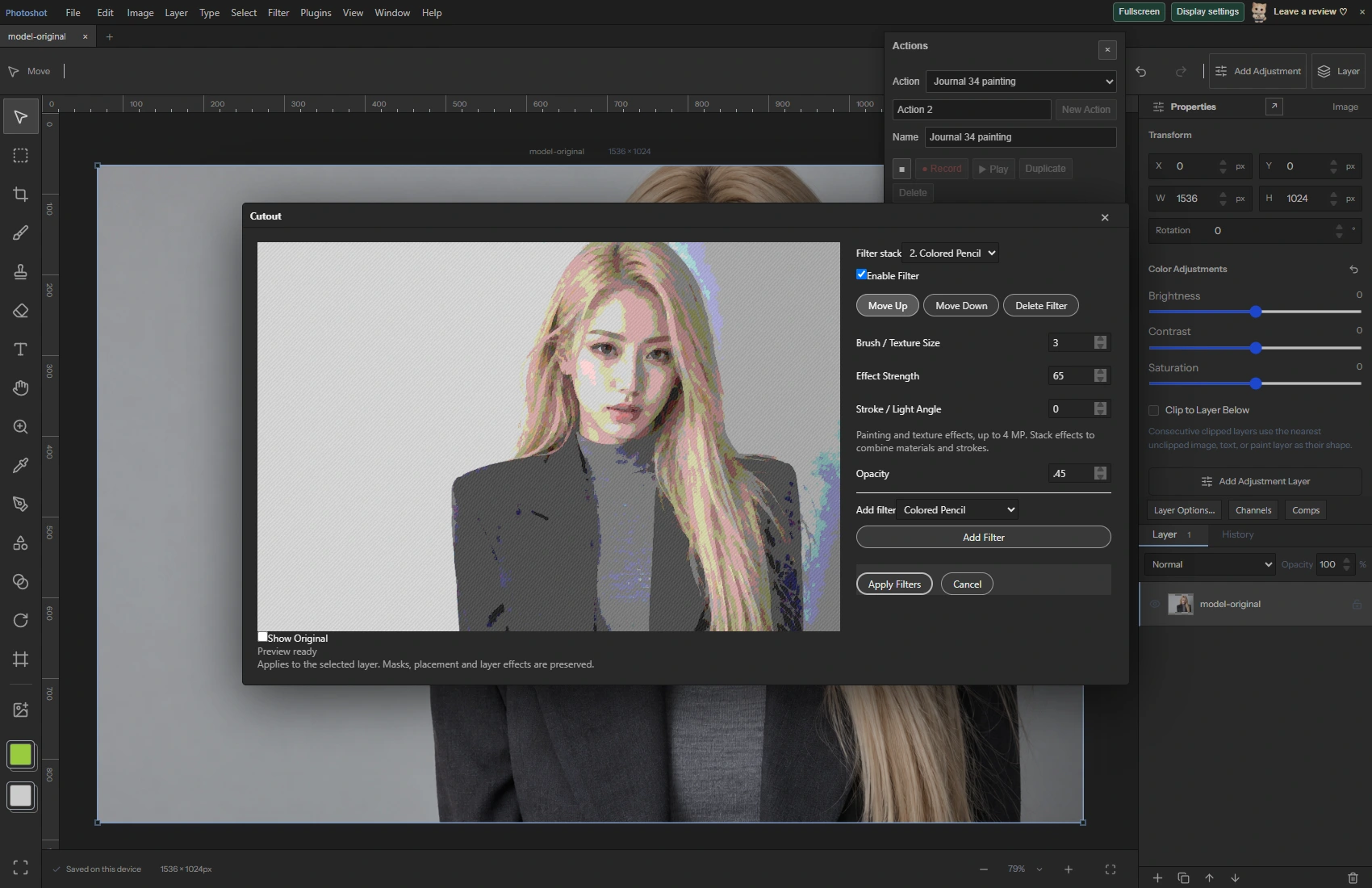
We opened the new AI demonstration PNG in public Photoshot and started recording an action. Cutout used Tone Detail 90. We added Texturizer and Colored Pencil, set the selected effect Strength to 65 and Opacity to 0.45, then used Move Up.
The displayed combination was made through those actual controls. We checked that the saved output differed from the source. The before and after are the same generated source and its Photoshot-processed result, rather than two independently generated pictures.
Undo, replay and compare
After Apply Filters, recording stopped. Undo restored the exact pre-filter layer src. Playing the recorded action reproduced the exact first output. The saved project also reopened with the same state.
This check concerns this input and its three recorded effects. It does not promise an identical visual impression on a different photograph. The useful criterion is that effect types and parameters survive recording and reproduce the result for the same input.
Read the code.
export const supportsPrecisionGeneralFilter=(type:string)=>!!smartFilterType(type)||hasPrecisionGeneralKernel(type);
export function canGeneralFilter(doc:StudioDoc,l?:Layer,type?:string){return (!(doc.precision&&(doc.precision.depth!==8||doc.precision.space!=='RGB'))||!!type&&supportsPrecisionGeneralFilter(type))&&!!l&&!layerLocked(doc,l,'pixels')&&(l.kind==='image'||l.kind==='paint')&&!l.smartObject&&!l.psdData?.placedLayer&&!l.shape&&!l.gridWarp&&!l.puppet;}
const check=(cancel:()=>boolean)=>{if(cancel())throw Error('Filter cancelled. No changes applied.');};export async function applyGeneralFilters(doc:StudioDoc,layer:Layer,filters:GeneralFilter[],cancel=()=>false):Promise<StudioDoc>{
validateGeneralFilters(filters);if(doc.precision&&(doc.precision.depth!==8||doc.precision.space!=='RGB')&&filters.some(f=>f.enabled&&f.opacity&&!supportsPrecisionGeneralFilter(f.type)))throw Error('This stack contains a filter that requires RGB 8-bit. Remove it or convert explicitly in Image > Color Mode and Precision.');if(!canGeneralFilter(doc,layer,'gaussian')||!filters.every(f=>!f.enabled||!f.opacity||canGeneralFilter(doc,layer,f.type)))throw Error('Select an unlocked raster layer. Use Rasterize Layer for text, shapes or Smart Objects.');if(layer.width*layer.height>16_000_000)throw Error('General filters support up to 16 megapixels per layer.');
if(doc.precision&&(doc.precision.depth!==8||doc.precision.space!=='RGB')){
check(cancel);const before=await precisionLayer(layer,doc.precision,{masks:false});check(cancel);const after=await renderPrecisionGeneralFilters(before,filters,1,cancel),clip=doc.selection?selectionForLayer(doc.selection,layer):undefined,n=precisionChannels(before.space),stride=n+1;const clamp=(v:number,a=0,b=255)=>Math.max(a,Math.min(b,v));
/** Independent painting, printmaking and paper-texture effects; not Adobe kernels. */
export async function galleryEffectPixels(image:ImageData,f:GeneralFilter,ratio=1,cancel=()=>false){
const {width:w,height:h,data:src}=image,n=w*h;
if(n>4_000_000)throw Error('Gallery painting and texture effects support up to 4 MP.');
const check=async()=>{await new Promise<void>(r=>setTimeout(r,0));if(cancel())throw Error('Filter cancelled. No changes applied.');};In the editor.
Check current size and precision boundaries
Regular filters check a 16 MP limit per layer. Painting and texture gallery effects have a separate 4 MP limit. The 1536×1024 portrait used here fits both. We did not treat oversized processing as a successful case.
Some filters use precision-specific kernels, so describing the entire regular-filter implementation as RGB8-only would be inaccurate. Supported paths differ by filter. Next we move from effect lists to Liquify meshes and dedicated filter workspaces.
Source and result.
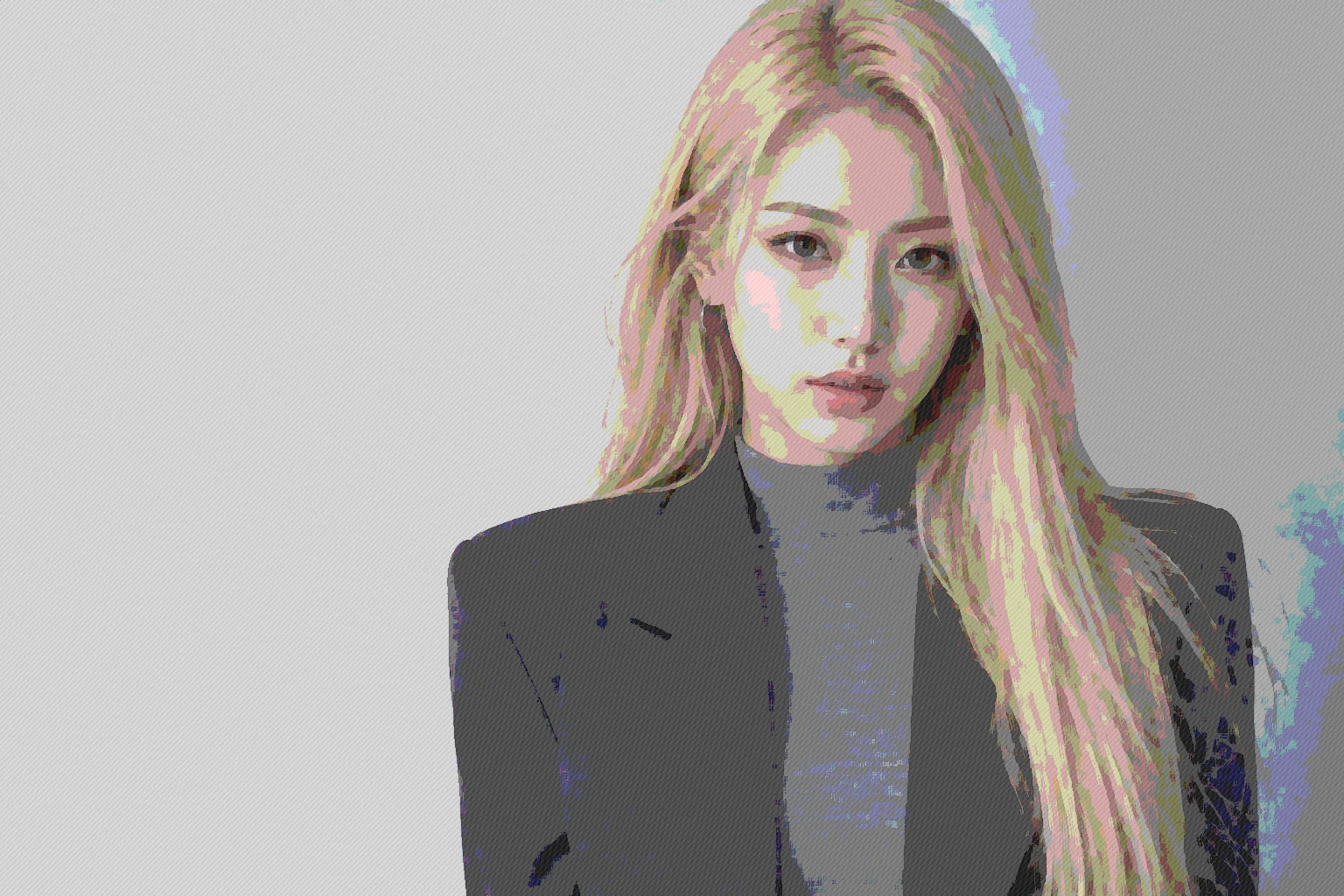
AI-generated demonstration image; not an actual celebrity photograph or official collaboration. Editing screens and results were made in Photoshot.