
무료 포토샵 개발기
잉크로 나누고 다시 열다
검정과 갈색 두 잉크로 인물 사진을 만들던 중, 저장한 듀오톤 PSD가 다시 열리지 않는 오류를 발견했습니다. 2026년 10월 22일 읽기 조건을 수정하고 공개 편집기에서 재검증한 뒤, CMYK 출력과 분판 파일까지 확인했습니다.
AI 생성 시연용 사진. 편집 화면과 출력 이미지는 실제 포토샷에서 만들었습니다.
출처에서 시작하다.
두 잉크의 곡선을 직접 정한다
시연에는 30편의 AI 생성 성인 가상 모델 원본을 사용했습니다. Duotone에서 Black과 Warm Brown 두 잉크를 선택하고, 갈색은 #98552e, 입력 50%에서 잉크 35%, 입력 100%에서 65%로 설정했습니다. 검정은 기본 직선 곡선을 유지했습니다. 미리보기 후 적용하니 원본의 색이 두 잉크의 농도로 바뀌었습니다.
duotone.ts는 합성 이미지를 흰 종이 위의 회색조로 만들고 잉크별 곡선을 선형 보간합니다. 원본의 여러 편집 레이어가 듀오톤 한 레이어로 정리되는 변환이므로, 원본 파일과 변환 프로젝트를 각각 보관했습니다. 실제 듀오톤 문서와 단순 갈색 필터의 결과를 구분하기 위한 출발점입니다.
저장 후 재열기에서 발견한 모드 검사 오류
Save As PSD로 만든 파일을 Open PSD / PSB로 열자 색상 모드 오류가 발생했습니다. 헤더를 읽어 보니 듀오톤 모드 8, 8비트, 단일 채널로 저장돼 있었습니다. 그런데 공용 픽셀 읽기 함수는 Gray 요청이면 모드 1만 받도록 검사하고 있어, 정상 듀오톤 파일까지 거부했습니다.
precision-psd.ts에 듀오톤용 조건을 추가했습니다. 모드 8이면서 Gray, 8비트, 채널 한 개, 별도 알파 없음인 경우에만 허용합니다. 다른 모드·비트 심도·알파 조합은 계속 거부합니다. 실패를 재현한 파일로 검사를 만들고 수정 전 실패, 수정 후 성공을 확인했습니다.
export type Duotone={inks:DuotoneInk[];overprints?:Record<string,string>;original?:string};
export const inkInputs=[0,5,10,20,30,40,50,60,70,80,90,95,100];
export const nullInkCurve=()=>[0,...Array(11).fill(-1),1000];
export const defaultDuotone=():Duotone=>({inks:[{name:'Black',color:'#000000',curve:nullInkCurve()},{name:'Warm Brown',color:'#98552e',curve:[0,...Array(11).fill(-1),650]}]});
const hex=(v:number[])=>'#'+v.map(n=>Math.round(Math.max(0,Math.min(1,n))*255).toString(16).padStart(2,'0')).join(''),rgb=(s:string)=>[1,3,5].map(i=>parseInt(s.slice(i,i+2),16)/255);
export function validateDuotone(d:Duotone){if(d?.original&&(typeof d.original!=='string'||d.original.length>87384))throw Error('Invalid preserved Duotone options.');if(!d||!Array.isArray(d.inks)||d.inks.length<1||d.inks.length>4)throw Error('Choose one to four inks.');for(const i of d.inks){if(typeof i.name!=='string'||!i.name.trim()||i.name.length>63||!/^#[0-9a-f]{6}$/i.test(i.color)||!Array.isArray(i.curve)||i.curve.length!==13||i.curve.some((n,j)=>!Number.isInteger(n)||n<((j===0||j===12)?0:-1)||n>1000))throw Error('Invalid ink name, color or curve.');}for(const [key,color] of Object.entries(d.overprints??{}))if(!Number.isInteger(+key)||+key<3||+key>15||!/^#[0-9a-f]{6}$/i.test(color))throw Error('Invalid overprint color.');}계산의
안쪽으로.
수정은 공개 편집기에서 같은 파일로 확인한다
수정한 읽기 조건을 공개 편집기에 반영한 뒤 같은 PSD를 다시 열었습니다. 이번에는 2 Ink Duotone 문서로 열렸고 Black과 Warm Brown 이름, 색, 50%→35%·100%→65% 곡선이 그대로 복원됐습니다. PSD·PSB 재저장 검사와 기존 RGB 32비트·Lab 16비트 읽기도 통과했습니다.
ADO 프리셋은 524바이트이며 PSD 안의 듀오톤 설정과 정확히 같았습니다. 회색조 픽셀의 PSD 저장 전후 최대 차이는 약 0.001961로 8비트 양자화 범위였습니다. 갈색 잉크 분판은 16비트 단일 채널 TIFF로 출력됐고, 잉크 곡선으로 독립 계산한 모든 값과 일치했습니다.
CMYK 파일과 검정 판을 따로 검사한다
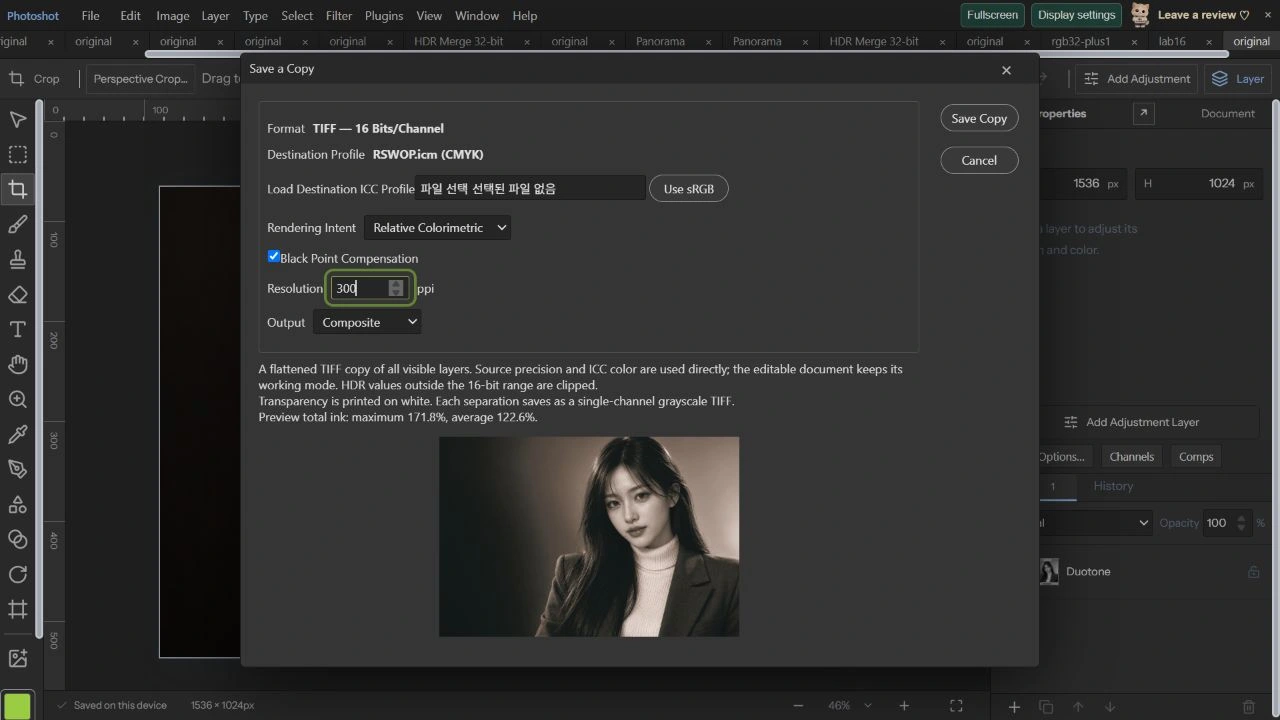
Save a Copy에서 설치돼 있던 RSWOP.icm을 출력 프로필로 불러왔습니다. Relative Colorimetric, Black Point Compensation 켬, 300ppi로 CMYK 합성 TIFF를 만들고 같은 설정의 Black Plate도 저장했습니다. 듀오톤의 두 잉크 정보가 들어 있는 PSD와 CMYK 네 채널로 변환한 TIFF는 서로 다른 출력물입니다.
TIFF는 실제 1536×1024, 채널당 16비트, CMYK 네 채널이었고 300ppi 태그와 입력 ICC 218,103바이트가 그대로 포함됐습니다. 검정 판은 CMYK의 K값을 흰 종이 기준 회색조로 바꾼 값과 전 픽셀이 일치했습니다. 전체 파일의 총잉크량은 최대 약 170.005%, 평균 약 122.617%였습니다.
코드를 읽다.
export function precisionCompositePixels(bytes:Uint8Array,space:PrecisionSpace,depth:PrecisionDepth,alpha:boolean,profile?:Uint8Array):PrecisionRaster{
 const n=precisionChannels(space),info=compositeInfo(bytes),{width,height,channels,large,compression}=info,size=width*height,needed=n+(alpha?1:0);
 // Duotone stores one 8-bit grayscale plane while keeping PSD color mode 8.
 const duotoneGray=info.colorMode===8&&space==='Gray'&&depth===8&&channels===1&&!alpha;
 if(size>16000000||channels<needed||info.depth!==depth||info.colorMode!==({RGB:3,Gray:1,CMYK:4,Lab:9})[space]&&!duotoneGray||depth===32&&!['RGB','Gray'].includes(space))throw Error('Unsupported flattened PSD dimensions, color mode, depth or channels.');
 const {planes}=compositePayloads(bytes,Array.from({length:needed},(_,i)=>i)),data=new Float32Array(size*(n+1));for(let i=n;i<data.length;i+=n+1)data[i]=1;
for(let c=0;c<needed;c++){const payload=planes.get(c)!,values=decodePrecisionPlane(payload.data,compression,width,height,depth,large,payload.inflated);for(let i=0;i<size;i++)data[i*(n+1)+c]=space==='CMYK'&&c<n?1-values[i]:values[i];}/** Piecewise-linear ink curves provide predictable control without clipping intermediate knots. */
export function inkCoverage(curve:number[],input:number){const points=curve.flatMap((v,i)=>v<0?[]:[{x:inkInputs[i]/100,y:v/1000}]);const x=Math.max(0,Math.min(1,input));let i=1;while(i<points.length-1&&x>points[i].x)i++;const a=points[i-1],b=points[i];return a.y+(b.y-a.y)*(x-a.x)/(b.x-a.x);}
export function duotoneCanvas(r:PrecisionRaster,d:Duotone){validateDuotone(d);if(r.space!=='Gray')throw Error('Duotone needs a grayscale source.');const c=surface(r.width,r.height),g=c.getContext('2d')!,im=g.createImageData(r.width,r.height),inks=d.inks.map(i=>rgb(i.color)),colors=Array.from({length:1<<inks.length},(_,mask)=>{if(d.overprints?.[mask])return rgb(d.overprints[mask]);return [0,1,2].map(k=>inks.reduce((n,ink,j)=>mask&1<<j?n*ink[k]:n,1));}),table=Array.from({length:256},(_,tone)=>{const coverage=d.inks.map(i=>inkCoverage(i.curve,tone/255)),out=[0,0,0];for(let m=0;m<colors.length;m++){const weight=coverage.reduce((n,t,j)=>n*(m&1<<j?t:1-t),1);for(let k=0;k<3;k++)out[k]+=colors[m][k]*weight;}return out;});for(let i=0;i<r.width*r.height;i++){const gray=r.data[i*2]*r.data[i*2+1]+1-r.data[i*2+1],color=table[Math.round(Math.max(0,Math.min(1,1-gray))*255)];for(let k=0;k<3;k++)im.data[i*4+k]=color[k]*255;im.data[i*4+3]=255;}g.putImageData(im,0,0);return c;}
export async function convertDuotone(doc:StudioDoc,settings:Duotone,wasm?:Uint8Array):Promise<StudioDoc>{validateDuotone(settings);if(doc.duotone)return {...doc,duotone:structuredClone(settings)};const image=await composite(doc,true),pixels=await convertPrecision(floatCanvas(image),'Gray',8,undefined,wasm),src=(await precisionCanvas(pixels,wasm)).toDataURL();return {...doc,version:6,duotone:structuredClone(settings),precision:{space:'Gray',depth:8},layers:[makeLayer({kind:'image',name:'Duotone',width:doc.width,height:doc.height,src,precision:packPrecision(pixels),precisionSource:precisionSource(src)})],groups:undefined,artboards:undefined,artboardWorkspace:undefined,psdData:undefined,selection:undefined,savedSelections:undefined,spotChannels:undefined,layerComps:undefined,activeLayerCompId:undefined};}
export async function readDuotonePSD(bytes:Uint8Array,name:string,base:StudioDoc){const v=new DataView(bytes.buffer,bytes.byteOffset,bytes.byteLength);if(v.getUint16(22)!==8)throw Error('Duotone PSD requires 8-bit grayscale.');const length=v.getUint32(26);if(length>65536||30+length>bytes.length)throw Error('Invalid Duotone data length.');const resolution=readResource(bytes,1005),ppi=resolution&&resolution.length>=4?new DataView(resolution.buffer,resolution.byteOffset,resolution.byteLength).getUint32(0)/65536:72,duotone=readDuotoneOptions(bytes.subarray(30,30+length)),pixels=precisionCompositePixels(bytes,'Gray',8,false),src=(await precisionCanvas(pixels)).toDataURL();return {...base,resolution:ppi,name:name.replace(/\.(psd|psb)$/i,''),width:pixels.width,height:pixels.height,version:6 as const,duotone,precision:{space:'Gray' as const,depth:8 as const},layers:[makeLayer({kind:'image',name:'Duotone',width:pixels.width,height:pixels.height,src,precision:packPrecision(pixels),precisionSource:precisionSource(src)})],sourceFile:{name,mode:8,depth:8,warnings:[]}};}
export async function writeDuotonePSD(doc:StudioDoc,psb:boolean){if(!doc.duotone||doc.precision?.space!=='Gray'||doc.precision.depth!==8)throw Error('Duotone requires an 8-bit grayscale document.');const options=writeDuotoneOptions(doc.duotone),r=await compositePrecisionDocument(doc);for(let i=0;i<r.width*r.height;i++){r.data[i*2]=r.data[i*2]*r.data[i*2+1]+1-r.data[i*2+1];r.data[i*2+1]=1;}const header=new Uint8Array(30),v=new DataView(header.buffer);header.set(new TextEncoder().encode('8BPS'));v.setUint16(4,psb?2:1);v.setUint16(12,1);v.setUint32(14,r.height);v.setUint32(18,r.width);v.setUint16(22,8);v.setUint16(24,8);v.setUint32(26,options.length);const tail=new Uint8Array(4+(psb?8:4)+2),pixels=channelBytes(r,0),out=new Uint8Array(header.length+options.length+tail.length+pixels.length);out.set(header);out.set(options,header.length);out.set(tail,header.length+options.length);out.set(pixels,header.length+options.length+tail.length);const resolution=new Uint8Array(16),rv=new DataView(resolution.buffer),ppi=Math.round((doc.resolution??72)*65536);rv.setUint32(0,ppi);rv.setUint16(4,1);rv.setUint16(6,1);rv.setUint32(8,ppi);rv.setUint16(12,1);rv.setUint16(14,1);return writeResource(out,1005,resolution);}export function inkSummary(output:ColorOutput){if(output.profile.space!=='CMYK')return undefined;let max=0,mean=0;for(let i=0;i<output.pixels.length;i+=4){const sum=(output.pixels[i]+output.pixels[i+1]+output.pixels[i+2]+output.pixels[i+3])/65535*100;max=Math.max(max,sum);mean+=sum;}return {max,mean:mean/(output.width*output.height)};}
export async function colorOutputPreview(output:ColorOutput,plate=-1,wasmBinary?:Uint8Array){const cmyk=output.profile.space==='CMYK',out=new Uint8ClampedArray(output.width*output.height*4);if(cmyk&&plate>=0){if(!Number.isInteger(plate)||plate>3)throw Error('Choose a CMYK plate.');for(let i=0;i<out.length;i+=4){out[i]=out[i+1]=out[i+2]=255-output.pixels[i+plate]/257;out[i+3]=255;}return out;}const m=await loadICCEngine(wasmBinary),a=m.cmsOpenProfileFromMem(output.profile.bytes,output.profile.bytes.length),b=m.cmsCreate_sRGBProfile();let t=0;try{const n=cmyk?4:3;t=m.cmsCreateTransform(a,((cmyk?6:4)<<16)|(n<<3)|2,b,(4<<16)|(3<<3)|1,1,0x2000);if(!t)throw Error('This output profile cannot be previewed.');for(let start=0;start<output.width*output.height;start+=8192){const count=Math.min(8192,output.width*output.height-start),input=new Uint16Array(count*n);for(let i=0;i<count;i++)for(let k=0;k<n;k++)input[i*n+k]=output.pixels[(start+i)*4+k];const rgb=m.cmsDoTransform(t,input,count);for(let i=0;i<count;i++){out[(start+i)*4]=rgb[i*3];out[(start+i)*4+1]=rgb[i*3+1];out[(start+i)*4+2]=rgb[i*3+2];out[(start+i)*4+3]=cmyk?255:output.pixels[(start+i)*4+3]/257;}await new Promise(r=>setTimeout(r,0));}return out;}finally{if(t)m.cmsDeleteTransform(t);if(a)m.cmsCloseProfile(a);if(b)m.cmsCloseProfile(b);}}
/** Single-channel uncompressed 16-bit TIFF, BlackIsZero; ink 100% is black. */
export function separationTiff(output:ColorOutput,plate:number,dpi:number){if(output.profile.space!=='CMYK'||!Number.isInteger(plate)||plate<0||plate>3||!Number.isFinite(dpi)||dpi<1||dpi>1200)throw Error('Invalid separation output.');return gray16Tiff(Uint16Array.from({length:output.width*output.height},(_,i)=>65535-output.pixels[i*4+plate]),output.width,output.height,dpi);}
export function saveColorOutput(output:ColorOutput,dpi:number,plate=-1){return plate>=0?separationTiff(output,plate,dpi):tiff16(output.pixels,output.width,output.height,dpi,output.profile.bytes,output.profile.space==='CMYK');}
export const defaultOutputProfile=():PrintProfile=>({name:'sRGB IEC61966-2.1',bytes:srgbProfile(),space:'RGB '});
export async function convertDocumentColorOutput(doc:StudioDoc,profile:PrintProfile,options:ColorOutputOptions,cancelled:()=>boolean=()=>false,maxEdge?:number,wasmBinary?:Uint8Array):Promise<ColorOutput>{if(!doc.precision||doc.duotone){const c=await composite(doc,false,{cancelled,maxEdge});return convertColorOutput(c.getContext('2d')!.getImageData(0,0,c.width,c.height).data,c.width,c.height,profile,options,cancelled,wasmBinary);}validatePrintProfile(profile.bytes,profile.name);if(![0,1,2,3].includes(options.intent)||!Number.isFinite(options.dpi)||options.dpi<1||options.dpi>1200)throw Error('Invalid output settings.');const check=()=>{if(cancelled())throw new DOMException('Export cancelled','AbortError');};check();let raster=await compositePrecisionDocument(doc,wasmBinary);const n=precisionChannels(raster.space);for(const [name,spot] of Object.entries(doc.spotChannels??{})){if(spot.visible===false||!spot.solidity)continue;const plate=doc.savedSelections?.[name];if(!plate)continue;const rgb=spot.color.slice(1).match(/../g)!.map(v=>parseInt(v,16)/255),color=await convertPrecision({width:1,height:1,space:'RGB',depth:8,data:new Float32Array([...rgb,1])},raster.space,raster.depth,profileBytes(doc.precision.profile),wasmBinary),ink={...raster,data:new Float32Array(raster.data.length)};for(let i=0;i<raster.width*raster.height;i++){ink.data.set(color.data.subarray(0,n),i*(n+1));ink.data[i*(n+1)+n]=(1-plate.alpha[i]/255)*spot.solidity/100;}raster=compositePrecision(raster,ink);}if(maxEdge&&Math.max(raster.width,raster.height)>maxEdge){const ratio=maxEdge/Math.max(raster.width,raster.height),width=Math.max(1,Math.round(raster.width*ratio)),height=Math.max(1,Math.round(raster.height*ratio)),original=raster;raster=resamplePrecision(original,width,height,(x,y)=>({x:x*original.width/width,y:y*original.height/height}));}check();const cmyk=profile.space==='CMYK',converted=await convertPrecision(raster,cmyk?'CMYK':'RGB',16,profile.bytes,wasmBinary,{intent:options.intent,blackPoint:options.blackPoint}),channels=cmyk?4:3,pixels=new Uint16Array(converted.width*converted.height*4);for(let i=0;i<converted.width*converted.height;i++){const a=converted.data[i*(channels+1)+channels];for(let c=0;c<channels;c++)pixels[i*4+c]=Math.round(Math.max(0,Math.min(1,converted.data[i*(channels+1)+c]*(cmyk?a:1)))*65535);if(!cmyk)pixels[i*4+3]=Math.round(a*65535);}check();return {pixels,width:converted.width,height:converted.height,profile};}편집 화면에서.
작은 미리보기와 실제 출력의 숫자를 구분한다
대화상자의 축소 미리보기에는 총잉크량 최대 171.8%, 평균 122.6%가 표시됐습니다. 전체 크기 TIFF의 최대값과 다른 이유는 통계를 낸 래스터 크기가 다르기 때문입니다. 원고의 파일 수치는 다운로드한 원본 크기 데이터를 직접 읽어 계산했습니다. 300ppi 설정은 해상도 태그이며 사진의 픽셀 수는 그대로였습니다.
A4, 여백 10mm, Scale to Fit 인쇄 미리보기에서는 190×126.7mm로 배치됐습니다. 이번 검증은 편집기 미리보기와 파일 구조·픽셀 검사까지이며 실제 프린터와 종이에 출력한 측정은 아닙니다. 실패했던 재열기는 코드 수정으로 해결했고, 다음 32편은 스마트 오브젝트와 연결 소스를 실제로 바꾸며 확인합니다.
원본과 다시 열린 듀오톤.
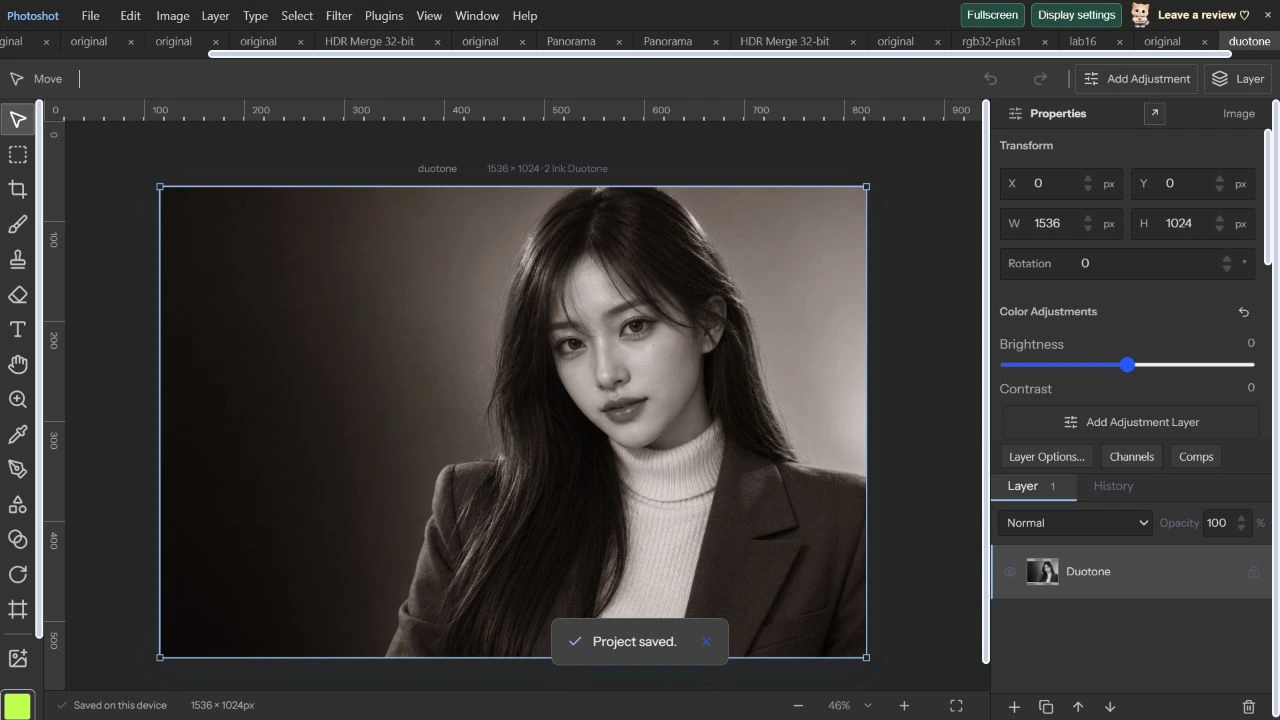
AI 생성 시연용 사진. 편집 화면과 출력 이미지는 실제 포토샷에서 만들었습니다.