
Building a free Photoshop alternative
Reuse a selection
A selection can become a named resource rather than a disposable editing step. This Photoshot journal follows a rectangle on a new AI portrait through saving, loading, masking and reopening the project.
AI-generated study photograph. Editor captures and outputs show Photoshot in use.
From the source.
More than inside or outside a dotted line
A selection stores dimensions and an alpha value for every pixel. Values between 0 and 255 preserve partial coverage at the boundary. The dotted outline is a visual guide, not a display of every boundary value.
In selection-tools.ts, add takes the maximum, subtract takes the nonnegative difference, and intersect takes the minimum. Mismatched dimensions produce an error. The behavior of intermediate values matters as much as the operation labels.
Selection, channel and mask have different jobs
The active selection limits a subsequent edit. A saved channel retains a region for later loading. A layer mask controls one layer’s visibility. They can reuse alpha data while serving different roles and lifetimes.
selection-mask.ts builds a mask from selection alpha and combines an existing enabled mask through destination-in. That differs from deleting source image pixels. Keeping the ability to disable or revise a mask supports nondestructive editing.
export type SelectionOperation='replace'|'add'|'subtract'|'intersect';
export function combineSelection(a:PixelSelection|undefined,b:PixelSelection,op:SelectionOperation):PixelSelection{if(!a||op==='replace')return b;if(a.width!==b.width||a.height!==b.height)throw Error('Selection size mismatch.');return {...b,alpha:b.alpha.map((v,i)=>op==='add'?Math.max(a.alpha[i],v):op==='subtract'?Math.max(0,a.alpha[i]-v):Math.min(a.alpha[i],v))};}
export function shapeSelection(w:number,h:number,points:Point[],ellipse=false,feather=0):PixelSelection{const c=surface(w,h),g=c.getContext('2d')!;g.fillStyle='#fff';g.beginPath();if(ellipse&&points.length>=2){const [a,b]=points;g.ellipse((a.x+b.x)/2,(a.y+b.y)/2,Math.abs(b.x-a.x)/2,Math.abs(b.y-a.y)/2,0,0,Math.PI*2);}else{points.forEach((p,i)=>i?g.lineTo(p.x,p.y):g.moveTo(p.x,p.y));g.closePath();}g.fill();const p=g.getImageData(0,0,w,h).data;let s={width:w,height:h,alpha:Array.from({length:w*h},(_,i)=>p[i*4+3])};if(feather)s=modifySelection(s,'feather',feather);return s;}Inside the
calculation.
Channel operations and vector paths need separate checks
channel-operations.ts selects component names for the color space and validates blend, opacity, scale and offset. Add and subtract have explicit formulas followed by range limiting. Creating a saved alpha channel does not test this entire operation system.
Vector paths retain coordinates and curve structure. psd-paths.ts validates record lengths and anchor counts and interprets coordinates relative to document dimensions. Rasterizing a vector mask introduces separate resolution and edge questions; that route was not tested in this demonstration.
Save and reload a 12px feathered rectangle
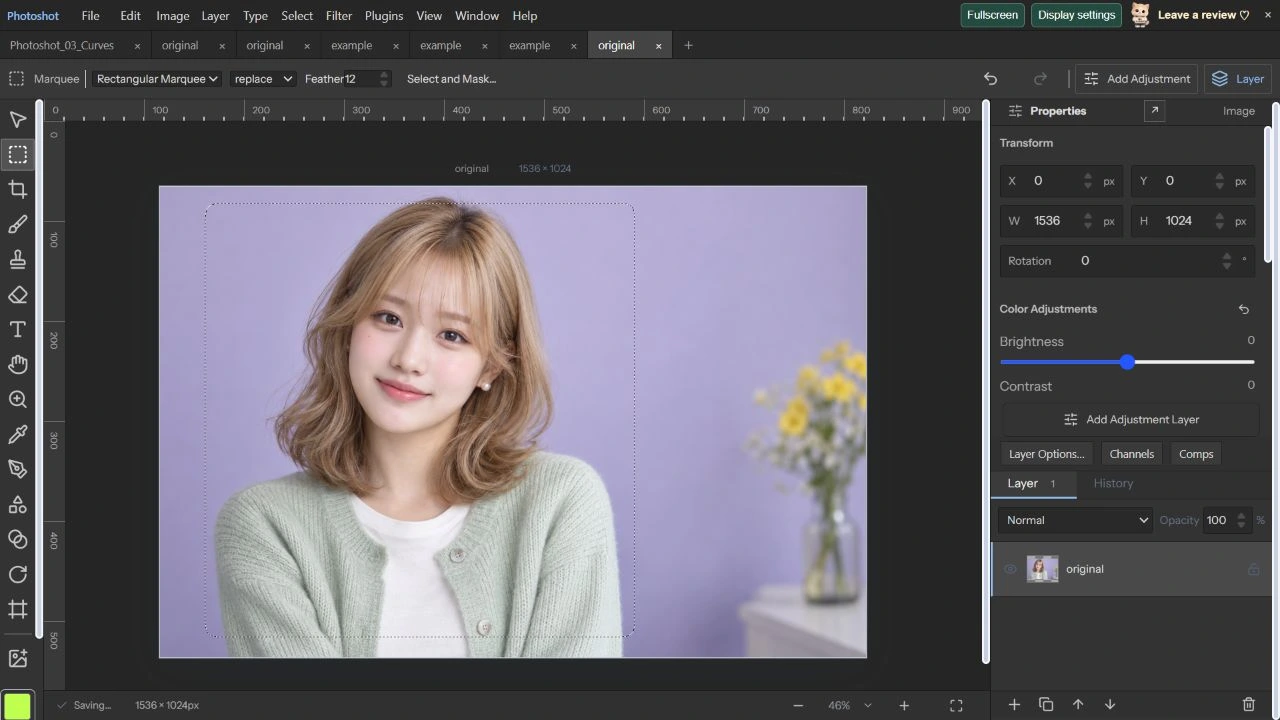
On October 22, 2026, we selected a rectangular portrait area in a 1536×1024 AI image with Feather set to 12px. Save Selection retained it as Portrait window. We deselected it, then used Load Selection with New Selection.
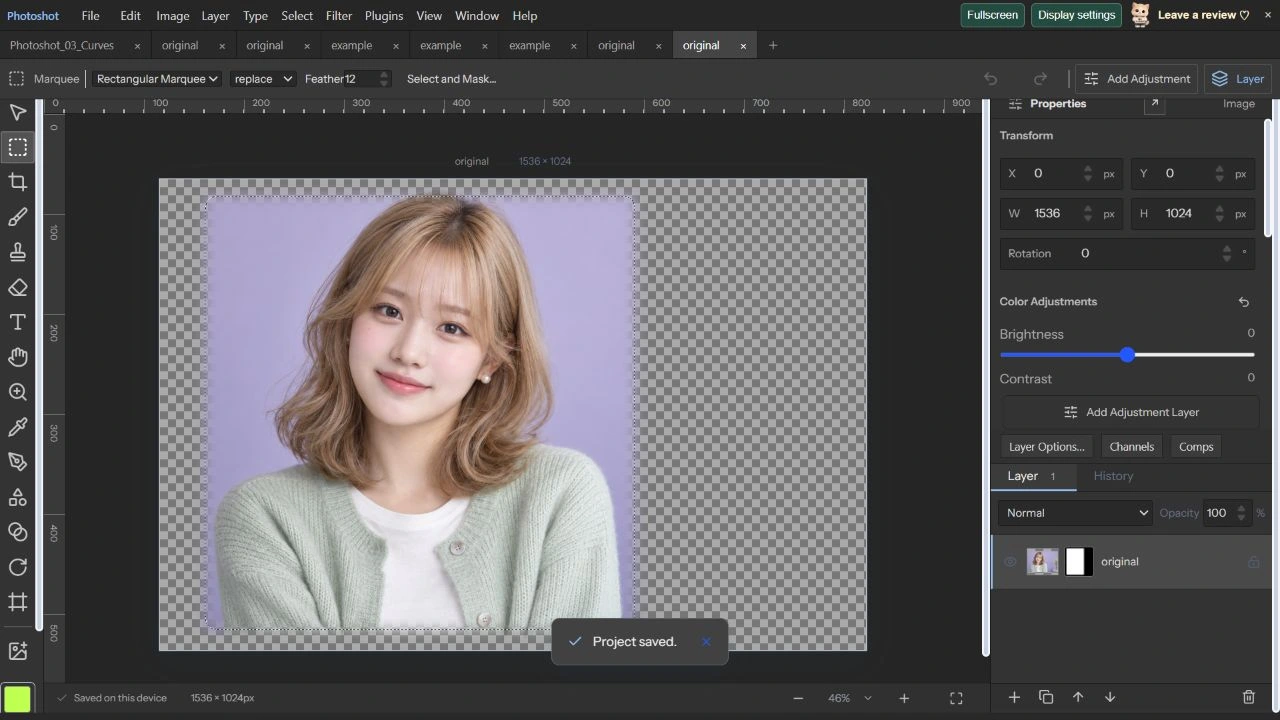
Layer Mask from Selection made the exterior transparent while retaining a soft boundary. The channel preview showed gray transition values between white coverage and black exterior. This is an actual selection-reuse demonstration, not automatic hair extraction.
Read the code.
export function refineSelection(alpha:Uint8Array,w:number,h:number,feather:number){const c=surface(w,h),g=c.getContext('2d')!,im=g.createImageData(w,h);for(let i=0;i<alpha.length;i++){im.data[i*4]=im.data[i*4+1]=im.data[i*4+2]=255;im.data[i*4+3]=alpha[i];}g.putImageData(im,0,0);if(feather>0){const out=surface(w,h),ctx=out.getContext('2d')!;ctx.filter=`blur(${feather}px)`;ctx.drawImage(c,0,0);return out;}return c;}
export function selectionMask(alpha:Uint8Array,w:number,h:number,width:number,height:number,feather:number,existing?:LayerMask):LayerMask{const c=refineSelection(alpha,w,h,feather),g=c.getContext('2d')!;if(existing?.enabled){g.globalCompositeOperation='destination-in';g.drawImage(maskSurface(existing,w,h),0,0);}
const data=g.getImageData(0,0,w,h).data;return{width,height,enabled:true,inverted:false,strokes:[],raster:{width:w,height:h,alpha:Array.from({length:w*h},(_,i)=>data[i*4+3])}};}export function mixChannel(a:number,b:number,o:ChannelMix){
let v=o.blend==='add'?(a+b)/o.scale+o.offset:o.blend==='subtract'?(a-b)/o.scale+o.offset:blendRGB([a/255,a/255,a/255],[b/255,b/255,b/255],o.blend as BlendMode,[0,0,0])[0]*255;
v=Math.max(0,Math.min(255,v));return a*(1-o.opacity)+v*o.opacity;
}
function validateMix(o:ChannelMix){if(!channelBlendNames.includes(o.blend)||!Number.isFinite(o.opacity)||o.opacity<0||o.opacity>1||!Number.isFinite(o.scale)||o.scale<1||o.scale>2||!Number.isFinite(o.offset)||o.offset< -255||o.offset>255)throw Error('Invalid channel blending settings.');}
export const componentNames=(doc:StudioDoc)=>doc.precision?.space==='CMYK'?['Cyan','Magenta','Yellow','Black']:doc.precision?.space==='Lab'?['Lightness','a','b']:doc.precision?.space==='Gray'?['Gray']:['Red','Green','Blue'];export function readPsdPaths(bytes:Uint8Array,width:number,height:number):WorkPath[]{
const output:WorkPath[]=[];for(const block of resourceBlocks(bytes)){if(!(block.id>=2000&&block.id<=2997||block.id===1025))continue;if(output.length>=100)throw Error('PSD contains more than 100 saved paths.');const data=block.data;if(data.length%26)throw Error('Invalid Photoshop path resource length.');const v=new DataView(data.buffer,data.byteOffset,data.byteLength),paths:PathShape[]=[];let path:PathShape|undefined,count=0;
for(let at=0;at<data.length;at+=26){const selector=v.getUint16(at);if(selector===0||selector===3){if(path&&path.knots.length!==count)throw Error('Incomplete Photoshop path.');count=v.getUint16(at+2);path={open:selector===3,operation:operations[v.getInt16(at+4)]??'exclude',fillRule:v.getUint16(at+6)===2?'non-zero':'even-odd',knots:[]};paths.push(path);}else if([1,2,4,5].includes(selector)){if(!path||path.knots.length>=count)throw Error('Unexpected Photoshop path anchor.');const points:number[]=[];for(const j of [2,1,0])points.push(v.getInt32(at+6+j*8)/16777216*width,v.getInt32(at+2+j*8)/16777216*height);path.knots.push({linked:selector===1||selector===4,points});}else if(![6,7,8].includes(selector))throw Error('Unsupported Photoshop path record.');}
if(path&&path.knots.length!==count)throw Error('Incomplete Photoshop path.');const nameBytes=bytes.subarray(block.start+7,block.start+7+bytes[block.start+6]);let name:string;try{name=new TextDecoder('utf-8',{fatal:true}).decode(nameBytes);}catch{try{name=new TextDecoder('euc-kr',{fatal:true}).decode(nameBytes);}catch{name=new TextDecoder('windows-1252').decode(nameBytes);}}output.push({id:uid(),name:name||'Work Path',paths});}
validatePaths(output);return output;In the editor.
Compare alpha data after reopening
We saved .layerstudio, reopened it, confirmed Portrait window in the UI, and saved again for comparison. Saved-selection data and layer-mask data each matched exactly. The mask contained all 256 values from 0 through 255.
Stored spot-channels-render and spot-channels-native reports each record eight passing designated 8/16-bit PSD/PSB cases. These are not fresh spot-ink or Adobe tests from this session. The model is AI-generated and workspace images are actual captures. Part 23 covers editable text, text paths and OpenType boundaries.
Original and reopened mask.
AI-generated study photograph. Editor captures and outputs show Photoshot in use.