
무료 포토샵 개발기
효과를 쌓고 범위를 남기다
32편에서 원본을 공유했다면, 이번에는 그 위에 효과와 적용 범위를 얹습니다. 새 시연 사진에 흐림과 선명 효과를 쌓고 부분 마스크를 만든 뒤, 공개 포토샷에서 저장한 PSD를 다시 열어 설정이 남는지 확인했습니다.
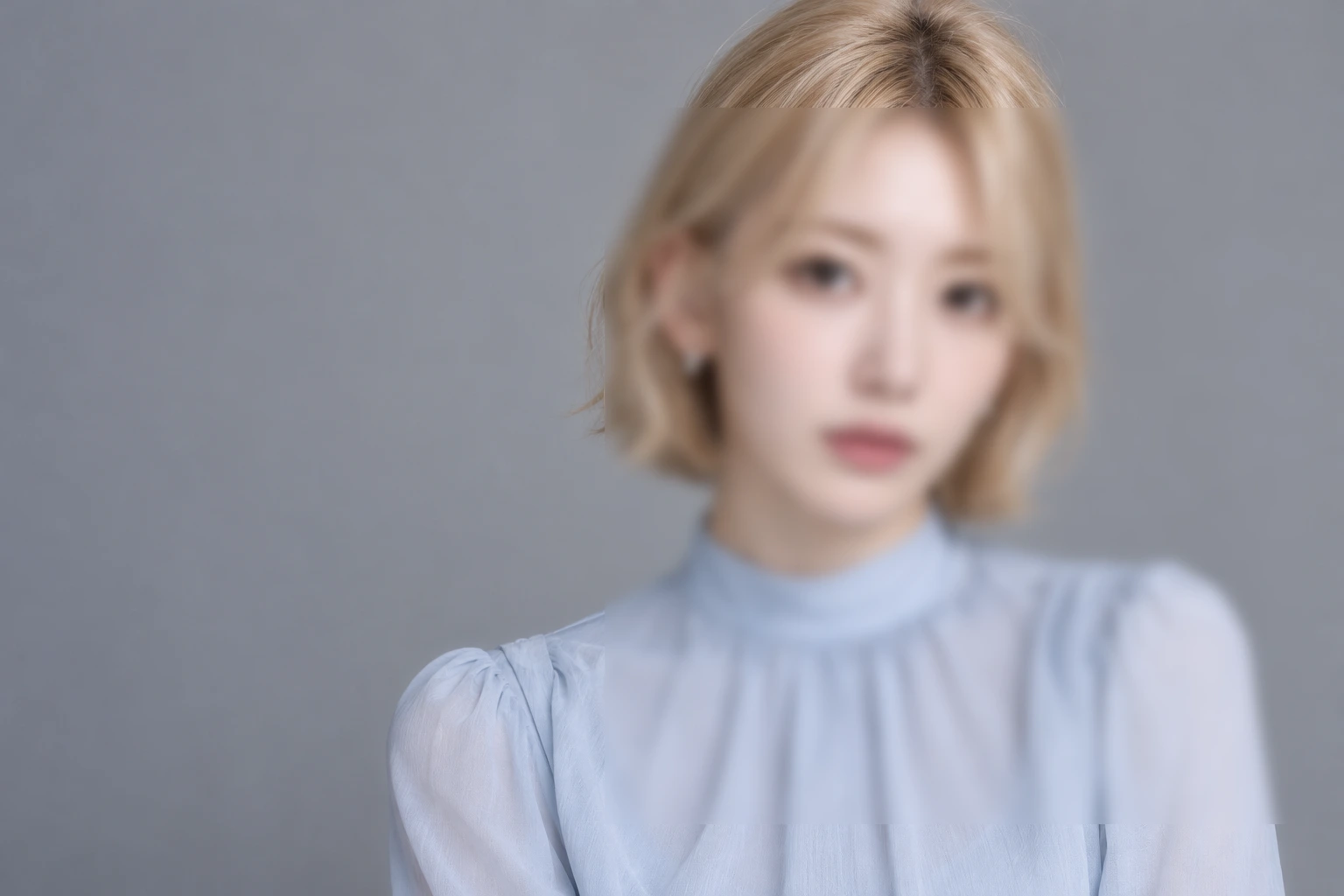
AI 생성 시연 이미지 · 실제 인물 촬영 및 공식 협업 이미지가 아닙니다. 편집 화면과 결과는 실제 포토샷에서 만들었습니다.
출처에서 시작하다.
픽셀을 바꾸기 전에 효과의 목록을 만든다
일반 필터는 적용한 픽셀을 결과로 남깁니다. 스마트 필터는 원본과 별도로 효과의 종류·수치·혼합·활성 상태를 기록하고 합성할 때 처리합니다. 지난 편의 스마트 오브젝트가 이때 효과를 다시 계산할 원본이 됩니다.
현재 코드의 filterCapabilities에는 21종이 있고 PSD 네이티브 이름이 있는 것은 19종입니다. 예전 기록의 숫자를 그대로 옮기지 않았습니다. Twirl은 현재 네이티브 대응이 있으며 Ripple과 Shear는 없습니다. 필터 이름이 메뉴에 보인다는 사실과 다른 프로그램에서 편집 가능한 형태로 저장된다는 사실은 따로 확인해야 합니다.
흐림 다음에 선명 효과를 두었다
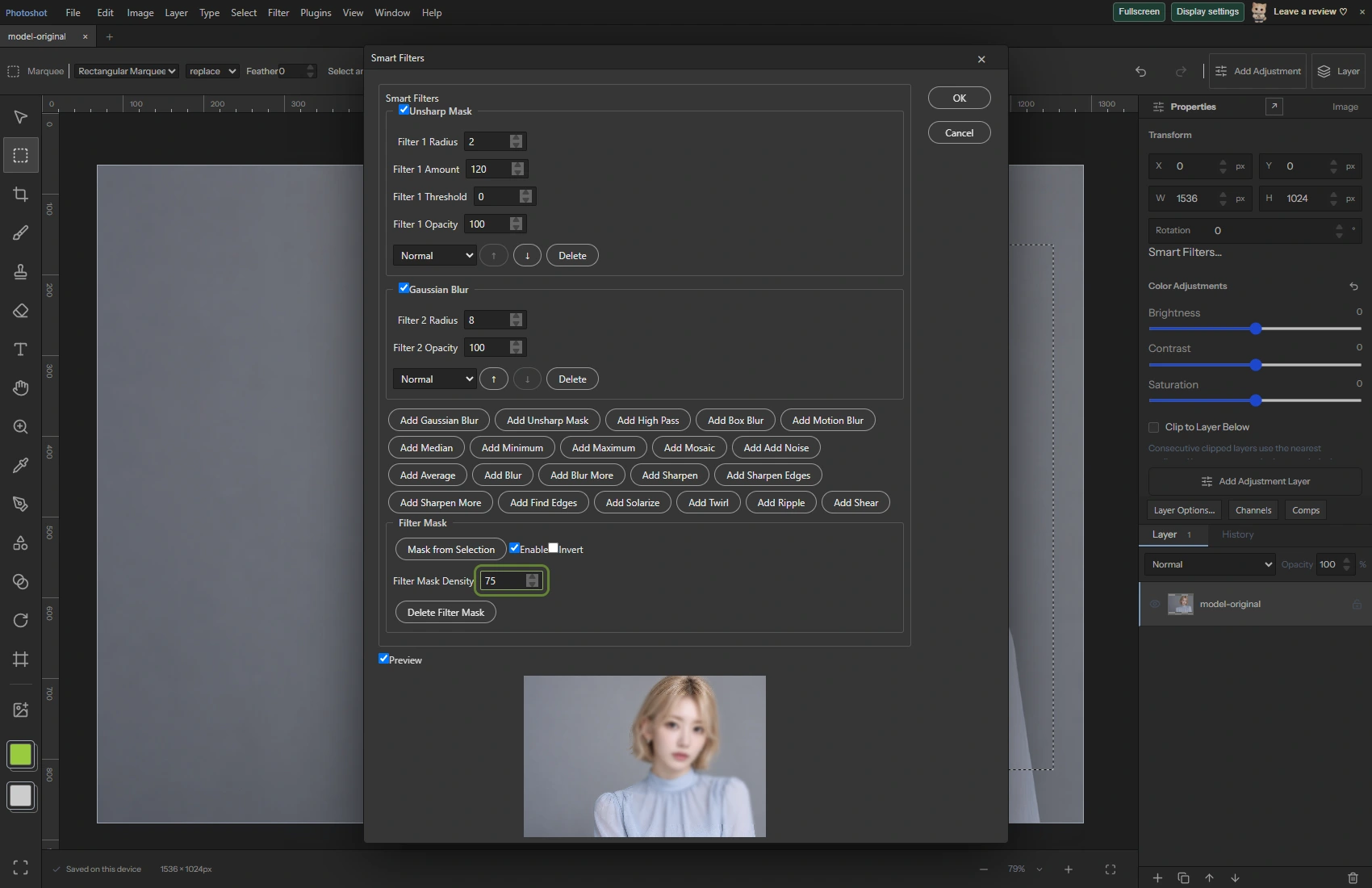
새 AI 시연 PNG를 스마트 오브젝트로 바꾸고 사진의 일부를 사각형으로 선택했습니다. Gaussian Blur의 Radius는 8, Unsharp Mask의 Radius는 2와 Amount 120으로 설정했습니다. 저장한 데이터에서는 Gaussian 다음에 Unsharp가 들어 있습니다.
대화상자는 위쪽에 최근 효과를 보여 주므로 화면의 위아래와 내부 적용 순서를 혼동하기 쉽습니다. 이번 글은 저장된 배열과 실제 화면을 함께 대조했습니다. 두 효과를 사용했다는 사실만으로 모든 필터 조합의 순서가 검증됐다고 확대하지 않았습니다.
export const filterCapabilities={
 gaussian:{name:'Gaussian Blur',native:'gaussian blur'},unsharp:{name:'Unsharp Mask',native:'unsharp mask'},highpass:{name:'High Pass',native:'high pass'},box:{name:'Box Blur',native:'box blur'},motion:{name:'Motion Blur',native:'motion blur'},median:{name:'Median',native:'median'},minimum:{name:'Minimum',native:'minimum'},maximum:{name:'Maximum',native:'maximum'},mosaic:{name:'Mosaic',native:'mosaic'},noise:{name:'Add Noise',native:'add noise'},average:{name:'Average',native:'average'},blur:{name:'Blur',native:'blur'},blurMore:{name:'Blur More',native:'blur more'},sharpen:{name:'Sharpen',native:'sharpen'},sharpenEdges:{name:'Sharpen Edges',native:'sharpen edges'},sharpenMore:{name:'Sharpen More',native:'sharpen more'},findEdges:{name:'Find Edges',native:'find edges'},solarize:{name:'Solarize',native:'solarize'},
 twirl:{name:'Twirl',native:'twirl'},ripple:{name:'Ripple',native:null},shear:{name:'Shear',native:null},
} as const;계산의
안쪽으로.
선택 영역을 효과의 마스크로 바꿨다
Mask from Selection으로 선택 영역을 스마트 필터 마스크로 만들고 Density를 75로 지정했습니다. 검사에서는 선택 배열에 0인 곳과 0보다 큰 곳이 모두 있는지 먼저 확인했습니다. 화면 전체를 선택한 상태로 부분 마스크를 시험했다고 기록하지 않기 위해서입니다.
저장된 마스크의 밀도는 0.75였습니다. 원본 사진 자체를 지우는 대신 효과의 적용량을 가리는 구조입니다. 합성 코드는 필터 결과를 원본과 마스크로 섞으며, 필터별 불투명도와 혼합 방식도 별도 값으로 다룹니다.
저장 후 다시 열어 같은 설정인지 비교했다
공개 편집기에서 Save As PSD를 실행하고 그 파일을 다시 열었습니다. 재열기 전후의 smartFilters와 smartFilterMask를 깊은 비교로 검사했고 두 항목이 모두 같았습니다. 이번 사진에 적용한 두 효과의 수치와 부분 마스크를 대상으로 한 결과입니다.
별도로 다시 실행한 렌더 검사는 필터 마스크·효과 확장·정밀도별 캐시를 확인합니다. PSD에는 필터를 계산하기 전의 원본 캐시와 결과를 구분해서 써야 합니다. 이미 흐려진 결과를 원본처럼 저장하면 다른 프로그램이 효과를 다시 계산할 때 중복 적용될 수 있기 때문입니다.
코드를 읽다.
export function validateSmartFilters(filters:SmartFilter[]){if(!Array.isArray(filters)||filters.length>16)throw Error('Use up to 16 Smart Filters.');const ids=new Set();for(const f of filters){if(!f||typeof f.id!=='string'||ids.has(f.id)||!Object.hasOwn(filterNames,f.type)||!Number.isFinite(f.radius)||f.radius<0||f.radius>50||!Number.isFinite(f.amount)||f.amount<0||f.amount>500||!Number.isFinite(f.threshold)||f.threshold<0||f.threshold>255||!Number.isFinite(f.opacity)||f.opacity<0||f.opacity>1||!Object.hasOwn(blendNames,f.blend)||typeof f.enabled!=='boolean')throw Error('Invalid Smart Filter.');if(f.angle!==undefined&&(!Number.isFinite(f.angle)||f.angle < -180||f.angle>180)||f.seed!==undefined&&(!Number.isInteger(f.seed)||f.seed<1||f.seed>2147483647)||f.distribution!==undefined&&!['uniform','gaussian'].includes(f.distribution)||f.monochromatic!==undefined&&typeof f.monochromatic!=='boolean')throw Error('Invalid Smart Filter options.');if(f.edge!==undefined&&!['wrap','clamp','transparent'].includes(f.edge)||f.type==='shear'&&(!Array.isArray(f.shear)||f.shear.length!==5||f.shear.some(n=>!Number.isFinite(n)||Math.abs(n)>100)))throw Error('Invalid geometric Smart Filter.');ids.add(f.id);}}export function nativeSmartFilters(filters:SmartFilter[],mask?:LayerMask){validateSmartFilters(filters);const unsupported=filters.find(f=>!filterCapabilities[f.type].native);if(unsupported)throw Error(filterNames[unsupported.type]+' Smart Filter is editable in Photoshot projects. Native PSD export for this operation is not supported yet; save a project or rasterize a duplicate.');return {enabled:true,validAtPosition:true,maskEnabled:!!mask?.enabled,maskLinked:mask?.linked!==false,maskExtendWithWhite:!mask,list:filters.map(f=>({type:filterCapabilities[f.type].native,name:filterNames[f.type],enabled:f.enabled,hasOptions:!simpleSmartTypes.includes(f.type as any),opacity:f.opacity,blendMode:f.blend.replaceAll('-',' '),foregroundColor:{r:0,g:0,b:0},backgroundColor:{r:255,g:255,b:255},filter:simpleSmartTypes.includes(f.type as any)?undefined:f.type==='twirl'?{angle:f.angle??0}:f.type==='motion'?{angle:f.angle??0,distance:{units:'Pixels',value:f.radius}}:f.type==='mosaic'?{cellSize:{units:'Pixels',value:Math.max(1,Math.round(f.radius))}}:f.type==='noise'?{amount:f.amount/100,distribution:f.distribution??'uniform',monochromatic:f.monochromatic??true,randomSeed:f.seed??1}:{radius:{units:'Pixels',value:f.radius},...(f.type==='unsharp'?{amount:f.amount/100,threshold:f.threshold}:{})}}))};}export async function filterMaskGuard(cache:any){if(!cache?.extra)return undefined;const m=cache.extra,w=m.right-m.left,h=m.bottom-m.top;if(w<=0||h<=0||w*h>64*1024*1024||cache.depth!==8)return {unsupported:true};const pixels=decodePlane(m.data,m.compressionMode,w,h,true);return {bounds:[m.left,m.top,m.right,m.bottom],hash:Array.from(new Uint8Array(await crypto.subtle.digest('SHA-256',new Uint8Array(pixels)))).map(n=>n.toString(16).padStart(2,'0')).join('')};}
export function editableNativeFilters(doc:StudioDoc,layer:Layer):Layer{if(layer.smartFilters!==undefined){validateSmartFilters(layer.smartFilters);return layer;}const native=unpackMetadata(layer.psdData??{}).placedLayer?.filter,cache=filterCache(doc,layer);if(!native?.list?.length)return layer;const names=Object.fromEntries(Object.entries(filterCapabilities).filter(([,c])=>c.native).map(([id,c])=>[c.native,id])) as Record<string,SmartFilter['type']>;if(native.list.some((f:any)=>!names[f.type]))throw Error('This stack contains filters that cannot yet be edited. Its original pixels and settings are preserved.');if(!cache||![8,16,32].includes(cache.depth)||cache.depth!==8&&!doc.precision)throw Error('This file has no supported unfiltered pixel cache. Open and save it in Photoshop before editing its Smart Filters.');const w=cache.right-cache.left,h=cache.bottom-cache.top;if(w<=0||h<=0||w*h>64*1024*1024)throw Error('The filter cache exceeds the supported size.');const filters:SmartFilter[]=native.list.map((f:any)=>({id:crypto.randomUUID(),type:names[f.type],radius:f.filter?.radius?.value??f.filter?.distance?.value??f.filter?.cellSize?.value??0,amount:['unsharp mask','add noise'].includes(f.type)?(f.filter.amount??0)*100:100,...(['motion blur','twirl'].includes(f.type)?{angle:f.filter.angle}:{}),...(f.type==='add noise'?{seed:Math.max(1,(f.filter.randomSeed??1)&2147483647),distribution:f.filter.distribution,monochromatic:f.filter.monochromatic}:{}),threshold:f.filter?.threshold??0,opacity:f.opacity??1,blend:(f.blendMode??'normal').replaceAll(' ','-'),enabled:native.enabled!==false&&f.enabled!==false}));validateSmartFilters(filters);let smartFilterMask:Layer['smartFilterMask'];if(cache.extra){const m=cache.extra,mw=m.right-m.left,mh=m.bottom-m.top;if(mw<=0||mh<=0||mw*mh>64*1024*1024)throw Error('Invalid filter mask size.');const a=cache.depth===8?decodePlane(m.data,m.compressionMode,mw,mh,true):Uint8Array.from(decodePrecisionPlane(m.data,m.compressionMode,mw,mh,cache.depth,true),v=>Math.round(Math.max(0,Math.min(1,v))*255)),mc=surface(mw,mh),mg=mc.getContext('2d')!,im=mg.createImageData(mw,mh);for(let p=0;p<a.length;p++){im.data[p*4]=im.data[p*4+1]=im.data[p*4+2]=a[p];im.data[p*4+3]=255;}mg.putImageData(im,0,0);const result=surface(layer.width,layer.height),rg=result.getContext('2d')!;rg.fillStyle=native.maskExtendWithWhite?'#fff':'#000';rg.fillRect(0,0,result.width,result.height);rg.drawImage(mc,m.left-layer.x,m.top-layer.y);const values=rg.getImageData(0,0,result.width,result.height).data;smartFilterMask={width:layer.width,height:layer.height,enabled:native.maskEnabled!==false,inverted:false,linked:native.maskLinked!==false,strokes:[],raster:{width:result.width,height:result.height,alpha:Array.from({length:result.width*result.height},(_,i)=>values[i*4])}};}if(doc.precision){let r=precisionLayerPixels({left:cache.left,top:cache.top,right:cache.right,bottom:cache.bottom,rawData:{large:true,channels:cache.channels.map((c:any,i:number)=>c?{id:i===25?-1:i,data:c.data,compression:c.compressionMode}:null).filter(Boolean)}},doc.precision.space,cache.depth as PrecisionDepth,profileBytes(doc.precision.profile));if(!r)throw Error('Missing native filter cache pixels.');if(w!==Math.round(layer.width)||h!==Math.round(layer.height)||cache.left!==layer.x||cache.top!==layer.y)r=resamplePrecision(r,Math.round(layer.width),Math.round(layer.height),(x,y)=>({x:x+layer.x-cache.left,y:y+layer.y-cache.top}));return {...layer,precision:packPrecision(r),precisionSource:precisionSource(layer.src),smartFilters:filters,smartFilterMask};}const c=surface(w,h),g=c.getContext('2d')!,data=g.createImageData(w,h);for(const [i,index]of [0,1,2,25].entries()){const ch=cache.channels[index];if(!ch&&index!==25)throw Error('The unfiltered cache is incomplete.');const plane=ch?(cache.depth===8?decodePlane(ch.data,ch.compressionMode,w,h,true):Uint8Array.from(decodePrecisionPlane(ch.data,ch.compressionMode,w,h,cache.depth,true),v=>Math.round(Math.max(0,Math.min(1,v))*255))):new Uint8Array(w*h).fill(255);for(let p=0;p<w*h;p++)data.data[p*4+i]=plane[p];}g.putImageData(data,0,0);const local=surface(layer.width,layer.height);local.getContext('2d')!.drawImage(c,cache.left-layer.x,cache.top-layer.y);const src=local.toDataURL();return {...layer,src,smartFilters:filters,smartFilterMask};}편집 화면에서.
프로젝트 보존과 PSD 호환의 경계를 드러낸다
Ripple과 Shear처럼 네이티브 대응이 없는 효과는 PSD 저장 단계에서 지원 여부를 검사합니다. 지원하지 않는 필터를 아무 설명 없이 지워 내보내는 방식으로 해결하지 않습니다. 편집 정보 전체를 보존하려면 포토샷 프로젝트 저장 경로도 함께 사용해야 합니다.
이번에 새로 수행한 것은 포토샷 UI의 저장·재열기와 코드 검사입니다. Photoshop을 새로 실행해 이 사진을 열었다는 주장은 하지 않습니다. 다음 편에서는 스마트 필터 목록 밖의 일반 필터와 Filter Gallery를 실제 효과 스택으로 살펴봅니다.
원본과 편집 결과.
AI 생성 시연 이미지 · 실제 인물 촬영 및 공식 협업 이미지가 아닙니다. 편집 화면과 결과는 실제 포토샷에서 만들었습니다.