
Building a free Photoshop alternative
Stack effects. Keep their scope.
Episode 32 shared a source. This time we add effects and a limited application area. A new demonstration portrait goes through blur, sharpening and a partial mask, followed by a PSD save and reopen in the public Photoshot editor.
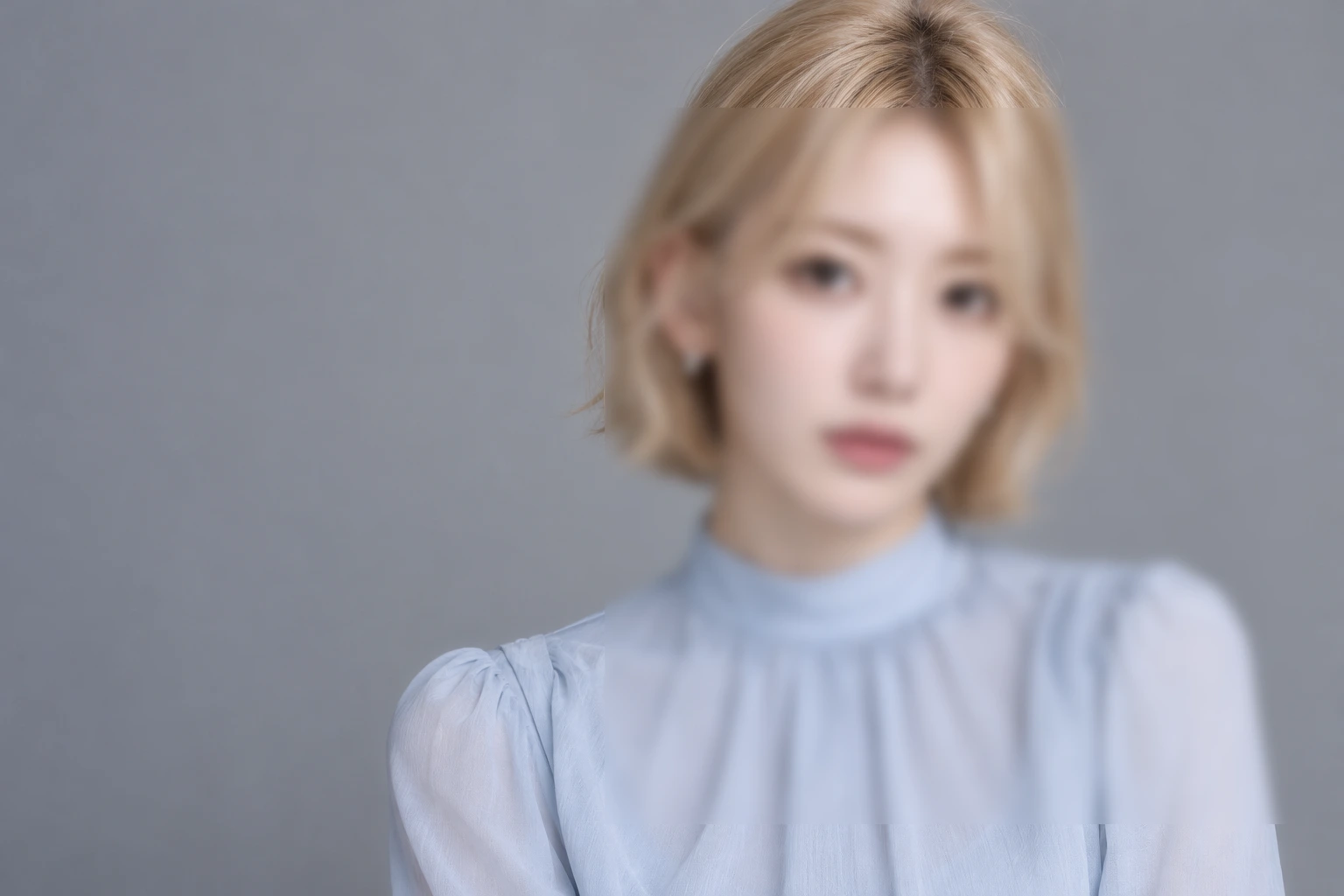
AI-generated demonstration image; not an actual celebrity photograph or official collaboration. Editing screens and results were made in Photoshot.
From the source.
Store an effect list before changing pixels
A regular filter leaves processed pixels. A Smart Filter stores its type, parameters, blend and enabled state separately from the source, then participates in rendering. The Smart Object from the previous episode supplies that source.
The current filterCapabilities table contains 21 types, with native PSD names for 19. These counts come from current code. Twirl now has a native mapping; Ripple and Shear do not. A menu entry and an editable representation in another application are different capabilities.
Blur first, then sharpen
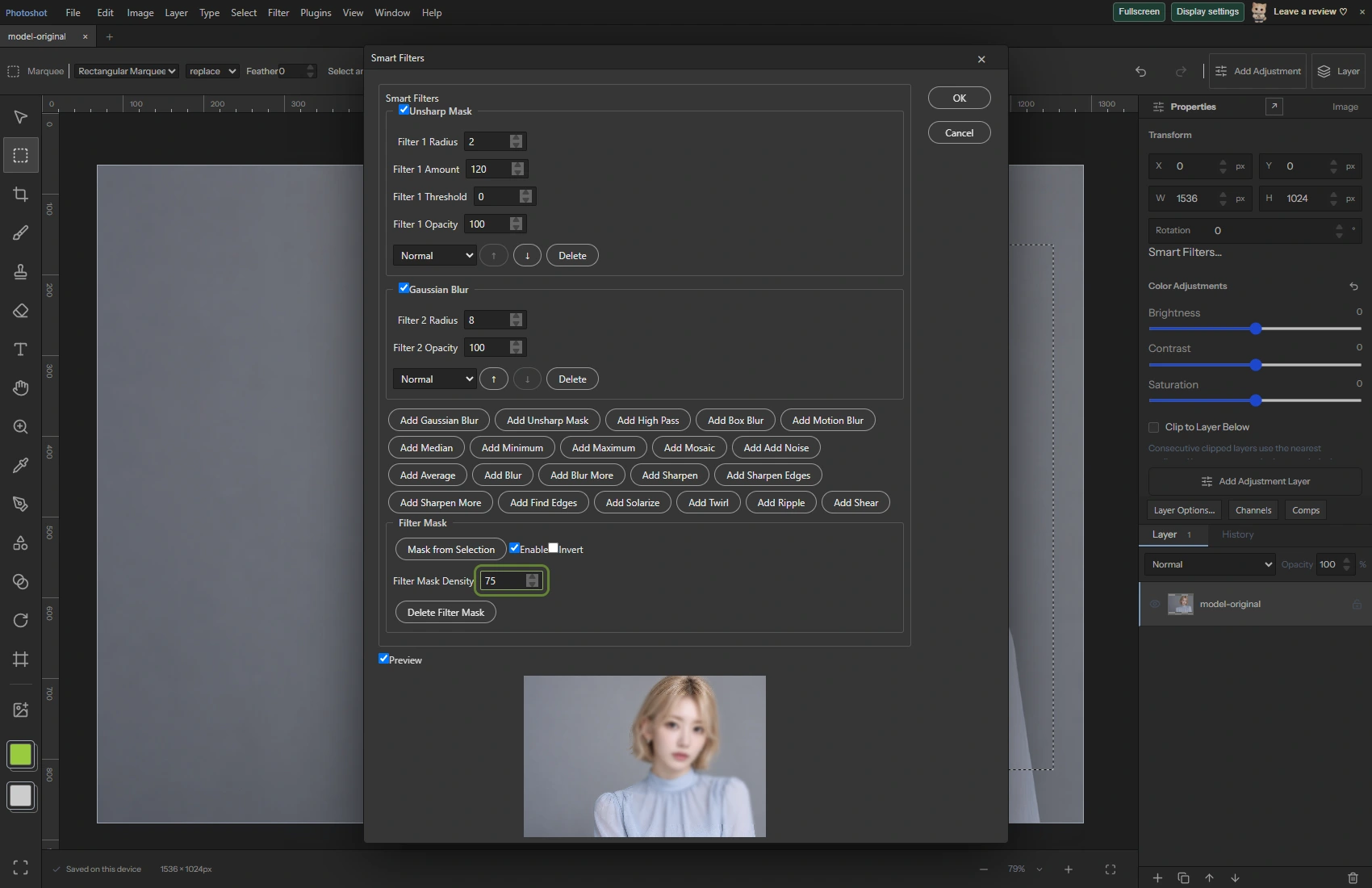
We converted the new AI demonstration PNG to a Smart Object and selected a rectangle covering part of the photo. Gaussian Blur used Radius 8. Unsharp Mask used Radius 2 and Amount 120. The saved array puts Gaussian before Unsharp.
The dialog displays the most recently added effect at the top, so visual order and application order need careful reading. We compared the screen with the saved array. This two-effect example does not establish every possible ordering combination.
export const filterCapabilities={
 gaussian:{name:'Gaussian Blur',native:'gaussian blur'},unsharp:{name:'Unsharp Mask',native:'unsharp mask'},highpass:{name:'High Pass',native:'high pass'},box:{name:'Box Blur',native:'box blur'},motion:{name:'Motion Blur',native:'motion blur'},median:{name:'Median',native:'median'},minimum:{name:'Minimum',native:'minimum'},maximum:{name:'Maximum',native:'maximum'},mosaic:{name:'Mosaic',native:'mosaic'},noise:{name:'Add Noise',native:'add noise'},average:{name:'Average',native:'average'},blur:{name:'Blur',native:'blur'},blurMore:{name:'Blur More',native:'blur more'},sharpen:{name:'Sharpen',native:'sharpen'},sharpenEdges:{name:'Sharpen Edges',native:'sharpen edges'},sharpenMore:{name:'Sharpen More',native:'sharpen more'},findEdges:{name:'Find Edges',native:'find edges'},solarize:{name:'Solarize',native:'solarize'},
 twirl:{name:'Twirl',native:'twirl'},ripple:{name:'Ripple',native:null},shear:{name:'Shear',native:null},
} as const;Inside the
calculation.
Turn a selection into an effect mask
Mask from Selection created the Smart Filter mask, with Density set to 75. Before applying it, the check confirmed both zero and nonzero values in the selection array. That distinguishes a real partial selection from a full-canvas selection.
The stored mask density was 0.75. It controls the contribution of the effects rather than erasing the source photograph. Rendering mixes filtered and unfiltered content through the mask, while each filter also retains its own opacity and blend settings.
Compare settings after reopening the PSD
We used Save As PSD in the public editor and opened that file again. Deep comparisons found identical smartFilters and smartFilterMask data before and after reopening. This result applies to the two effects, parameters and partial mask used here.
Separately rerun rendering checks cover masks, expanded effects and caches at different precisions. A PSD must distinguish the unfiltered source cache from the rendered result. Otherwise, another application could apply an effect again to pixels that already contain it.
Read the code.
export function validateSmartFilters(filters:SmartFilter[]){if(!Array.isArray(filters)||filters.length>16)throw Error('Use up to 16 Smart Filters.');const ids=new Set();for(const f of filters){if(!f||typeof f.id!=='string'||ids.has(f.id)||!Object.hasOwn(filterNames,f.type)||!Number.isFinite(f.radius)||f.radius<0||f.radius>50||!Number.isFinite(f.amount)||f.amount<0||f.amount>500||!Number.isFinite(f.threshold)||f.threshold<0||f.threshold>255||!Number.isFinite(f.opacity)||f.opacity<0||f.opacity>1||!Object.hasOwn(blendNames,f.blend)||typeof f.enabled!=='boolean')throw Error('Invalid Smart Filter.');if(f.angle!==undefined&&(!Number.isFinite(f.angle)||f.angle < -180||f.angle>180)||f.seed!==undefined&&(!Number.isInteger(f.seed)||f.seed<1||f.seed>2147483647)||f.distribution!==undefined&&!['uniform','gaussian'].includes(f.distribution)||f.monochromatic!==undefined&&typeof f.monochromatic!=='boolean')throw Error('Invalid Smart Filter options.');if(f.edge!==undefined&&!['wrap','clamp','transparent'].includes(f.edge)||f.type==='shear'&&(!Array.isArray(f.shear)||f.shear.length!==5||f.shear.some(n=>!Number.isFinite(n)||Math.abs(n)>100)))throw Error('Invalid geometric Smart Filter.');ids.add(f.id);}}export function nativeSmartFilters(filters:SmartFilter[],mask?:LayerMask){validateSmartFilters(filters);const unsupported=filters.find(f=>!filterCapabilities[f.type].native);if(unsupported)throw Error(filterNames[unsupported.type]+' Smart Filter is editable in Photoshot projects. Native PSD export for this operation is not supported yet; save a project or rasterize a duplicate.');return {enabled:true,validAtPosition:true,maskEnabled:!!mask?.enabled,maskLinked:mask?.linked!==false,maskExtendWithWhite:!mask,list:filters.map(f=>({type:filterCapabilities[f.type].native,name:filterNames[f.type],enabled:f.enabled,hasOptions:!simpleSmartTypes.includes(f.type as any),opacity:f.opacity,blendMode:f.blend.replaceAll('-',' '),foregroundColor:{r:0,g:0,b:0},backgroundColor:{r:255,g:255,b:255},filter:simpleSmartTypes.includes(f.type as any)?undefined:f.type==='twirl'?{angle:f.angle??0}:f.type==='motion'?{angle:f.angle??0,distance:{units:'Pixels',value:f.radius}}:f.type==='mosaic'?{cellSize:{units:'Pixels',value:Math.max(1,Math.round(f.radius))}}:f.type==='noise'?{amount:f.amount/100,distribution:f.distribution??'uniform',monochromatic:f.monochromatic??true,randomSeed:f.seed??1}:{radius:{units:'Pixels',value:f.radius},...(f.type==='unsharp'?{amount:f.amount/100,threshold:f.threshold}:{})}}))};}export async function filterMaskGuard(cache:any){if(!cache?.extra)return undefined;const m=cache.extra,w=m.right-m.left,h=m.bottom-m.top;if(w<=0||h<=0||w*h>64*1024*1024||cache.depth!==8)return {unsupported:true};const pixels=decodePlane(m.data,m.compressionMode,w,h,true);return {bounds:[m.left,m.top,m.right,m.bottom],hash:Array.from(new Uint8Array(await crypto.subtle.digest('SHA-256',new Uint8Array(pixels)))).map(n=>n.toString(16).padStart(2,'0')).join('')};}
export function editableNativeFilters(doc:StudioDoc,layer:Layer):Layer{if(layer.smartFilters!==undefined){validateSmartFilters(layer.smartFilters);return layer;}const native=unpackMetadata(layer.psdData??{}).placedLayer?.filter,cache=filterCache(doc,layer);if(!native?.list?.length)return layer;const names=Object.fromEntries(Object.entries(filterCapabilities).filter(([,c])=>c.native).map(([id,c])=>[c.native,id])) as Record<string,SmartFilter['type']>;if(native.list.some((f:any)=>!names[f.type]))throw Error('This stack contains filters that cannot yet be edited. Its original pixels and settings are preserved.');if(!cache||![8,16,32].includes(cache.depth)||cache.depth!==8&&!doc.precision)throw Error('This file has no supported unfiltered pixel cache. Open and save it in Photoshop before editing its Smart Filters.');const w=cache.right-cache.left,h=cache.bottom-cache.top;if(w<=0||h<=0||w*h>64*1024*1024)throw Error('The filter cache exceeds the supported size.');const filters:SmartFilter[]=native.list.map((f:any)=>({id:crypto.randomUUID(),type:names[f.type],radius:f.filter?.radius?.value??f.filter?.distance?.value??f.filter?.cellSize?.value??0,amount:['unsharp mask','add noise'].includes(f.type)?(f.filter.amount??0)*100:100,...(['motion blur','twirl'].includes(f.type)?{angle:f.filter.angle}:{}),...(f.type==='add noise'?{seed:Math.max(1,(f.filter.randomSeed??1)&2147483647),distribution:f.filter.distribution,monochromatic:f.filter.monochromatic}:{}),threshold:f.filter?.threshold??0,opacity:f.opacity??1,blend:(f.blendMode??'normal').replaceAll(' ','-'),enabled:native.enabled!==false&&f.enabled!==false}));validateSmartFilters(filters);let smartFilterMask:Layer['smartFilterMask'];if(cache.extra){const m=cache.extra,mw=m.right-m.left,mh=m.bottom-m.top;if(mw<=0||mh<=0||mw*mh>64*1024*1024)throw Error('Invalid filter mask size.');const a=cache.depth===8?decodePlane(m.data,m.compressionMode,mw,mh,true):Uint8Array.from(decodePrecisionPlane(m.data,m.compressionMode,mw,mh,cache.depth,true),v=>Math.round(Math.max(0,Math.min(1,v))*255)),mc=surface(mw,mh),mg=mc.getContext('2d')!,im=mg.createImageData(mw,mh);for(let p=0;p<a.length;p++){im.data[p*4]=im.data[p*4+1]=im.data[p*4+2]=a[p];im.data[p*4+3]=255;}mg.putImageData(im,0,0);const result=surface(layer.width,layer.height),rg=result.getContext('2d')!;rg.fillStyle=native.maskExtendWithWhite?'#fff':'#000';rg.fillRect(0,0,result.width,result.height);rg.drawImage(mc,m.left-layer.x,m.top-layer.y);const values=rg.getImageData(0,0,result.width,result.height).data;smartFilterMask={width:layer.width,height:layer.height,enabled:native.maskEnabled!==false,inverted:false,linked:native.maskLinked!==false,strokes:[],raster:{width:result.width,height:result.height,alpha:Array.from({length:result.width*result.height},(_,i)=>values[i*4])}};}if(doc.precision){let r=precisionLayerPixels({left:cache.left,top:cache.top,right:cache.right,bottom:cache.bottom,rawData:{large:true,channels:cache.channels.map((c:any,i:number)=>c?{id:i===25?-1:i,data:c.data,compression:c.compressionMode}:null).filter(Boolean)}},doc.precision.space,cache.depth as PrecisionDepth,profileBytes(doc.precision.profile));if(!r)throw Error('Missing native filter cache pixels.');if(w!==Math.round(layer.width)||h!==Math.round(layer.height)||cache.left!==layer.x||cache.top!==layer.y)r=resamplePrecision(r,Math.round(layer.width),Math.round(layer.height),(x,y)=>({x:x+layer.x-cache.left,y:y+layer.y-cache.top}));return {...layer,precision:packPrecision(r),precisionSource:precisionSource(layer.src),smartFilters:filters,smartFilterMask};}const c=surface(w,h),g=c.getContext('2d')!,data=g.createImageData(w,h);for(const [i,index]of [0,1,2,25].entries()){const ch=cache.channels[index];if(!ch&&index!==25)throw Error('The unfiltered cache is incomplete.');const plane=ch?(cache.depth===8?decodePlane(ch.data,ch.compressionMode,w,h,true):Uint8Array.from(decodePrecisionPlane(ch.data,ch.compressionMode,w,h,cache.depth,true),v=>Math.round(Math.max(0,Math.min(1,v))*255))):new Uint8Array(w*h).fill(255);for(let p=0;p<w*h;p++)data.data[p*4+i]=plane[p];}g.putImageData(data,0,0);const local=surface(layer.width,layer.height);local.getContext('2d')!.drawImage(c,cache.left-layer.x,cache.top-layer.y);const src=local.toDataURL();return {...layer,src,smartFilters:filters,smartFilterMask};}In the editor.
Make the compatibility boundary visible
Effects without native mappings, including Ripple and Shear, are checked at PSD export. Silently dropping unsupported effects is not a satisfactory export strategy. Photoshot project files provide another route for preserving the full editing state.
The fresh checks here cover Photoshot UI save/reopen and code tests. We did not freshly launch Photoshop to open this portrait. Next we move beyond the Smart Filter list to regular filters and an actual Filter Gallery stack.
Source and result.
AI-generated demonstration image; not an actual celebrity photograph or official collaboration. Editing screens and results were made in Photoshot.