
無料Photoshop代替の開発記
文字を編集可能に
22回のAI原画像にSOFTとSTUDYを二行で置きました。文字の画像だけでなく、文字列・部分スタイル・字間・Warp設定を編集可能な状態で残す仕組みを確認します。
AI生成の動作例用写真。編集画面と出力画像は実際のPhotoshotで作成しました。
ソースから始める。
一つのレイヤー内にも複数のスタイル
text-runs.tsのTextRunは開始・終了位置とスタイルを保持します。レイヤー全体の書体・サイズ・色を基本に、選択範囲だけ属性を上書きできます。今回は同じ文字レイヤー内の先頭四文字SOFTだけを太字にしました。
範囲の重なりを検査し、適用時には境界を分割して同じスタイルの隣接区間を結合します。文字の挿入や削除ではeditTextRunsが前後の範囲を調整します。固定インデックスだけでは編集後に違う文字へスタイルが移り得ます。
パス文字は曲線上の距離で配置する
text-path.tsは曲線を細分化して累積長を計算します。ベジエのパラメーターtを等間隔にしても、実際の距離は等しくならないからです。文字幅と字間で位置を決め、その点の接線角度で回転します。
開始位置・終了範囲・反転・最低二つのアンカーなども検査します。パス文字とWarpは別機能です。今回の画面では新しいパス文字を作らず、Arc Warpを使いました。
export type CharacterStyle={openType?:OpenType;fontSize?:number;fontFamily?:string;color?:string;bold?:boolean;italic?:boolean;underline?:boolean;strike?:boolean;tracking?:number;baseline?:number};
export type TextRun={start:number;end:number;style:CharacterStyle};
export function validateTextRuns(runs:TextRun[],text:string){if(!Array.isArray(runs)||runs.length>2048)throw Error('Use up to 2048 text style ranges.');let end=0;for(const r of runs){if(!Number.isInteger(r.start)||!Number.isInteger(r.end)||r.start<end||r.end<=r.start||r.end>text.length||!r.style)throw Error('Invalid text style range.');end=r.end;const s=r.style;if(s.openType)validateOpenType(s.openType);if(s.fontFamily!==undefined&&(typeof s.fontFamily!=='string'||s.fontFamily.length>200)||s.color!==undefined&&!/^#[0-9a-f]{6}$/i.test(s.color))throw Error('Invalid character style.');for(const [k,min,max] of [['fontSize',1,1000],['tracking',-1000,10000],['baseline',-1000,1000]] as const)if(s[k]!==undefined&&(!Number.isFinite(s[k])||s[k]!<min||s[k]!>max))throw Error('Invalid character metric.');for(const k of ['bold','italic','underline','strike'] as const)if(s[k]!==undefined&&typeof s[k]!=='boolean')throw Error('Invalid character style.');}}
export function characterStyle(l:Layer,index:number):Required<CharacterStyle>{const t=l.typography,r=l.textRuns?.find(r=>index>=r.start&&index<r.end)?.style;return {openType:t?.openType??{},fontSize:l.fontSize,fontFamily:l.fontFamily??'Arial',color:l.color,bold:t?.bold??(l.textStyle?.fontWeight??600)>=600,italic:t?.italic??false,underline:t?.underline??false,strike:t?.strike??false,tracking:t?.tracking??0,baseline:t?.baseline??0,...r};}
export function applyTextStyle(text:string,runs:TextRun[]|undefined,start:number,end:number,style:CharacterStyle|null):TextRun[]{start=Math.max(0,Math.min(text.length,start));end=Math.max(start,Math.min(text.length,end));if(start===end)return runs??[];const boundaries=[...new Set([0,text.length,start,end,...(runs??[]).flatMap(r=>[r.start,r.end])])].sort((a,b)=>a-b),out:TextRun[]=[];for(let i=1;i<boundaries.length;i++){const a=boundaries[i-1],b=boundaries[i],old=runs?.find(r=>r.start<=a&&r.end>=b)?.style,inside=a>=start&&b<=end,patch=inside?(style?{...old,...style}:undefined):old;if(!patch||!Object.keys(patch).length)continue;const last=out.at(-1);if(last?.end===a&&JSON.stringify(last.style)===JSON.stringify(patch))last.end=b;else out.push({start:a,end:b,style:{...patch}});}validateTextRuns(out,text);return out;}
export function editTextRuns(before:string,after:string,runs:TextRun[]|undefined){if(!runs?.length)return undefined;let start=0;while(start<before.length&&start<after.length&&before[start]===after[start])start++;let tail=0;while(tail<before.length-start&&tail<after.length-start&&before[before.length-1-tail]===after[after.length-1-tail])tail++;const oldEnd=before.length-tail,newEnd=after.length-tail,delta=newEnd-oldEnd,out:TextRun[]=[];for(const r of runs){const a=r.start<=start?r.start:r.start>=oldEnd?r.start+delta:start,b=r.end<=start?r.end:r.end>=oldEnd?r.end+delta:newEnd;if(b>a&&a<after.length)out.push({start:a,end:Math.min(b,after.length),style:r.style});}let result:TextRun[]=[];for(const r of out)result=applyTextStyle(after,result,r.start,r.end,r.style);return result.length?result:undefined;}計算の
内側へ。
OpenTypeの変化はフォント次第
opentype.tsはカーニング・合字・分数・数字変形などを検査してfont-feature-settingsにつなぎます。選択フォントが対応グリフを持つ必要があります。SOFT / STUDYで任意合字を有効にしただけでは合字の形状を試験したことにはなりません。
ブラウザー表現とPSDの属性変換も区別します。読んだ変換コードのfontCapsはsmall-capsとall-small-capsを同じ値へ対応付けます。チェック項目の存在だけで全属性の一対一の往復保持を説明できません。
部分太字・字間・Arcを保存する
2026年10月22日、同じ1536×1024原画像に80pxの二行を作りました。先頭四文字を太字、Trackingを50、Discretionary Ligaturesを有効にしました。Arc Warpは横方向、Bend 15、横・縦の歪み0です。
text-warp.tsはWarpを別の設定オブジェクトで保持し、数値範囲を検査します。変形して見えても文字列をピクセルに置換していません。色は編集機の黄緑設定を使い、人物と文字は別レイヤーです。
コードを読む。
export type TextPath={path:PathShape;offset:number;end?:number;flip:boolean};
export function validateTextPath(t:TextPath){if(!t||!Number.isFinite(t.offset)||Math.abs(t.offset)>100000||typeof t.flip!=='boolean')throw Error('Invalid text path.');if(t.end!==undefined&&(!Number.isFinite(t.end)||t.end<0||t.end>100000))throw Error('Invalid text path end.');validatePaths([{id:'type',name:'Type',paths:[t.path]}]);if(t.path.knots.length<2)throw Error('Text needs at least two path anchors.');}
/** Adaptive subdivision preserves arc length on curved paths, rather than spacing by parameter t. */
export function flattenTextPath(path:PathShape){const points:Point[]=[],knots=path.knots;let length=0;const append=(p:Point)=>{if(points.length)length+=Math.hypot(p.x-points.at(-1)!.x,p.y-points.at(-1)!.y);points.push(p);distances.push(length);},distances:number[]=[];const pt=(a:number[],i:number)=>({x:a[i],y:a[i+1]}),mid=(a:Point,b:Point)=>({x:(a.x+b.x)/2,y:(a.y+b.y)/2});
 const subdivide=(a:Point,b:Point,c:Point,d:Point,depth:number)=>{const chord=Math.hypot(d.x-a.x,d.y-a.y),polygon=Math.hypot(b.x-a.x,b.y-a.y)+Math.hypot(c.x-b.x,c.y-b.y)+Math.hypot(d.x-c.x,d.y-c.y);if(depth>=12||polygon-chord<.025){append(d);return;}const ab=mid(a,b),bc=mid(b,c),cd=mid(c,d),abc=mid(ab,bc),bcd=mid(bc,cd),center=mid(abc,bcd);subdivide(a,ab,abc,center,depth+1);subdivide(center,bcd,cd,d,depth+1);};
 if(knots.length){append(pt(knots[0].points,2));for(let i=1;i<knots.length+(path.open?0:1);i++){const a=knots[(i-1)%knots.length].points,b=knots[i%knots.length].points;subdivide(pt(a,2),pt(a,4),pt(b,0),pt(b,2),0);}}
const at=(distance:number)=>{if(!length||distance<0||distance>length)return;let lo=1,hi=distances.length-1;while(lo<hi){const m=(lo+hi)>>1;if(distances[m]<distance)lo=m+1;else hi=m;}const a=points[lo-1],b=points[lo],span=distances[lo]-distances[lo-1],t=span?(distance-distances[lo-1])/span:0;return {x:a.x+(b.x-a.x)*t,y:a.y+(b.y-a.y)*t,angle:Math.atan2(b.y-a.y,b.x-a.x)};};return {length,at};export const warpNames={arc:'Arc',arcLower:'Arc Lower',arcUpper:'Arc Upper',arch:'Arch',bulge:'Bulge',shellLower:'Shell Lower',shellUpper:'Shell Upper',flag:'Flag',wave:'Wave',fish:'Fish',rise:'Rise',fisheye:'Fisheye',inflate:'Inflate',squeeze:'Squeeze',twist:'Twist'};
export type TextWarp={style:keyof typeof warpNames;bend:number;horizontal:number;vertical:number;orientation:'horizontal'|'vertical'};
export function validateTextWarp(w:TextWarp){if(!w||!Object.hasOwn(warpNames,w.style)||!['horizontal','vertical'].includes(w.orientation)||[w.bend,w.horizontal,w.vertical].some(n=>!Number.isFinite(n)||n< -100||n>100))throw Error('Invalid text warp.');}export type OpenType={kerning?:boolean;ligatures?:boolean;discretionaryLigatures?:boolean;fractions?:boolean;ordinals?:boolean;alternates?:boolean;swash?:boolean;oldStyle?:boolean;tabular?:boolean;caps?:'normal'|'small-caps'|'all-small-caps'|'uppercase';position?:'normal'|'superscript'|'subscript'};
export const openTypeFlags=['kerning','ligatures','discretionaryLigatures','fractions','ordinals','alternates','swash','oldStyle','tabular'] as const;
export function validateOpenType(t:OpenType){if(!t||typeof t!=='object')throw Error('Invalid OpenType options.');for(const k of openTypeFlags)if(t[k]!==undefined&&typeof t[k]!=='boolean')throw Error('Invalid OpenType option.');if(t.caps!==undefined&&!['normal','small-caps','all-small-caps','uppercase'].includes(t.caps)||t.position!==undefined&&!['normal','superscript','subscript'].includes(t.position))throw Error('Invalid character variant.');}
export function openTypeStyle(t:OpenType={}){const pairs=[['kern',t.kerning??true],['liga',t.ligatures??true],['clig',t.ligatures??true],['dlig',!!t.discretionaryLigatures],['frac',!!t.fractions],['ordn',!!t.ordinals],['salt',!!t.alternates],['swsh',!!t.swash],['onum',!!t.oldStyle],['tnum',!!t.tabular],['smcp',t.caps==='small-caps'||t.caps==='all-small-caps'],['c2sc',t.caps==='all-small-caps']];return `font-feature-settings:${pairs.map(([k,v])=>`'${k}' ${v?1:0}`).join(',')};font-kerning:${t.kerning===false?'none':'normal'};text-transform:${t.caps==='uppercase'?'uppercase':'none'};`;}
export function openTypeToPsd(t:OpenType={}){return {autoKerning:t.kerning!==false,ligatures:t.ligatures!==false,dLigatures:!!t.discretionaryLigatures,fontCaps:t.caps==='uppercase'?2:t.caps==='small-caps'||t.caps==='all-small-caps'?1:0,fontBaseline:t.position==='superscript'?1:t.position==='subscript'?2:0};}
export function openTypeFromPsd(s:any):OpenType|undefined{if(!s)return;const t:OpenType={};if(s.autoKerning===false)t.kerning=false;if(s.ligatures===false)t.ligatures=false;if(s.dLigatures)t.discretionaryLigatures=true;if(s.fontCaps===2)t.caps='uppercase';else if(s.fontCaps===1)t.caps='small-caps';if(s.fontBaseline===1)t.position='superscript';else if(s.fontBaseline===2)t.position='subscript';return Object.keys(t).length?t:undefined;}エディターで見る。
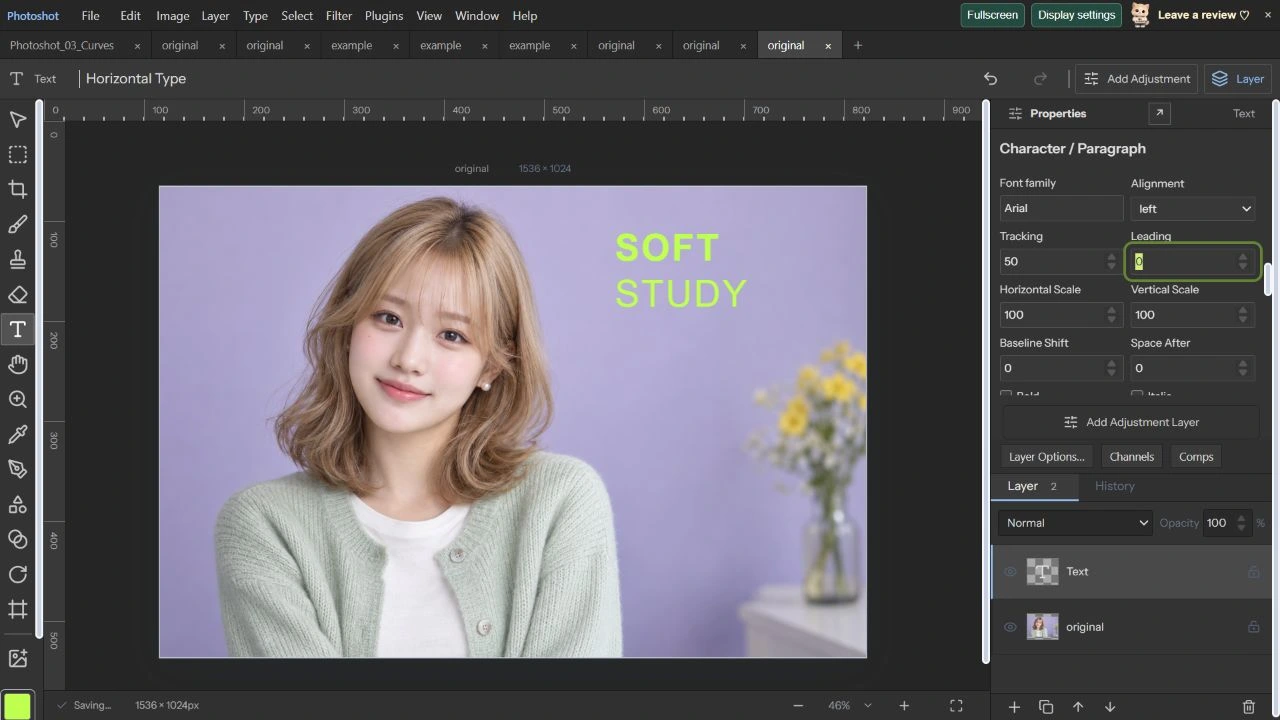
見た目と編集データを確認する
.layerstudioを保存・再読込・再保存して比較しました。文字列、0~4の太字範囲、字間、OpenTypeとArcを含む文字レイヤーデータが完全一致しました。プロジェクト形式の往復であり、今日Adobeで編集した試験ではありません。
既存opentype-native報告は指定PSD/PSBの範囲設定保持と実際のPhotoshop文字編集を通過と記録します。一方、Adobe DOMで全文字を置換すると範囲が初期化される条件も明記しています。過去報告と今回の操作を分け、インストール済みフォントの影響も残します。24回は図形とベジエパスです。
原画像と編集可能な文字。
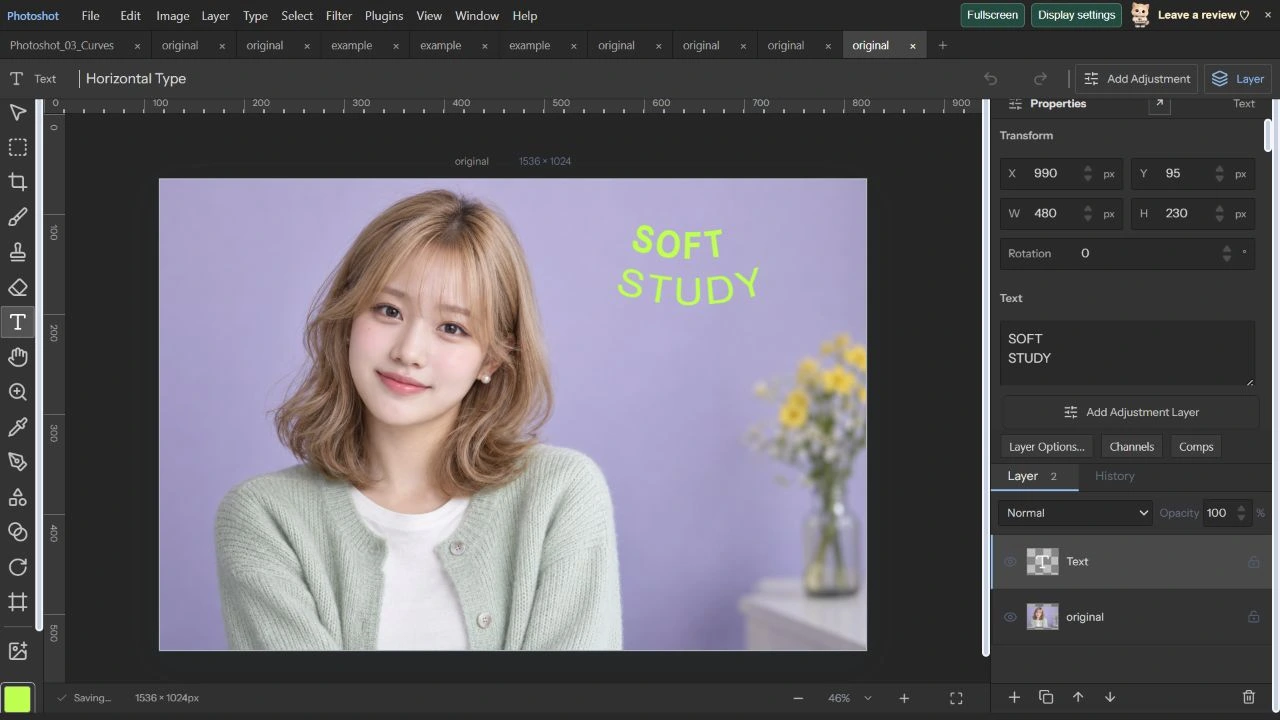
AI生成の動作例用写真。編集画面と出力画像は実際のPhotoshotで作成しました。