
무료 포토샵 개발기
겹치는 사진을 하나로
무료 포토샵을 만드는 포토샷 개발기입니다. 2026년 10월 22일 실제 편집기에서 세 노출의 HDR과 두 이미지의 파노라마를 만들었습니다. 미리보기에서 끝내지 않고 파일 출력, 프로젝트 재열기, 픽셀 비교까지 확인했습니다.
AI 생성 시연용 사진. 편집 화면과 출력 이미지는 실제 포토샷에서 만들었습니다.
출처에서 시작하다.
먼저 비교할 수 있는 입력을 만든다
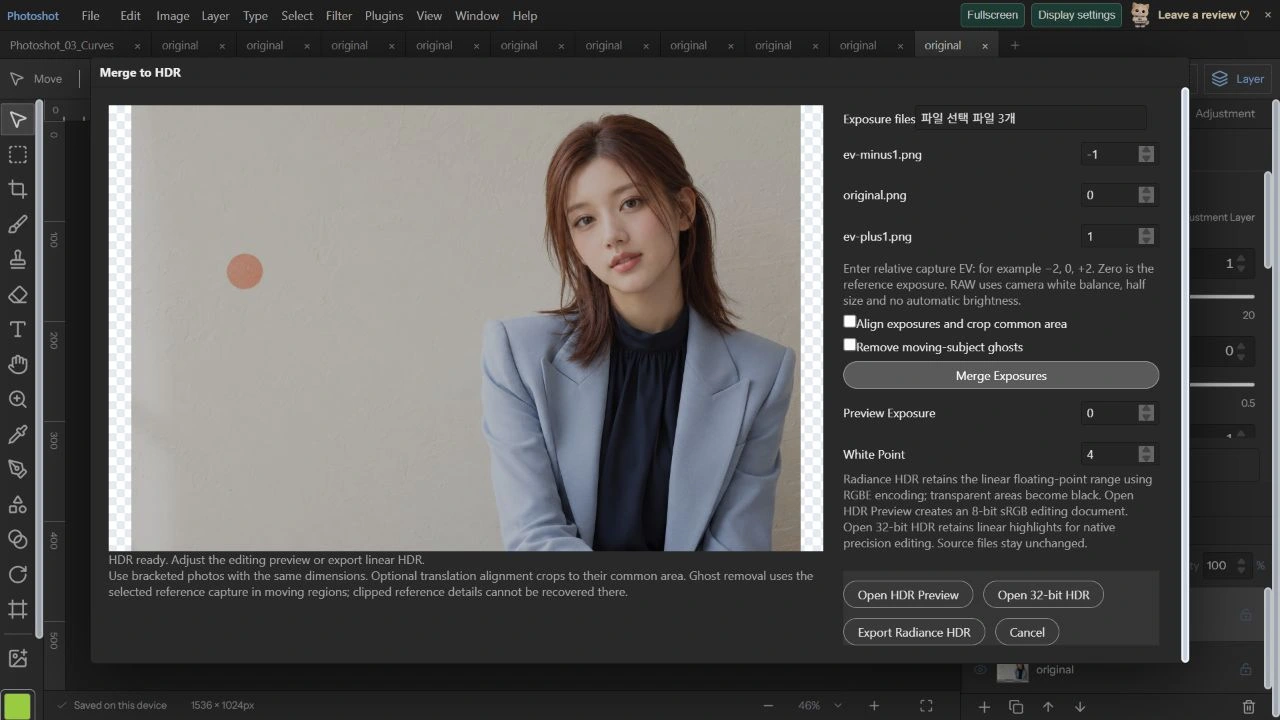
이번 인물은 AI로 만든 성인 가상 모델입니다. 원본에서 Exposure 조정으로 −1 EV와 +1 EV 이미지를 각각 PNG로 내보내고, 조정하지 않은 원본을 0 EV로 사용했습니다. 같은 장면의 합성 노출 세 장이므로 위치가 어긋나지 않습니다. HDR 설정에서 정렬과 Deghost를 끄고 EV를 −1, 0, +1로 직접 지정했습니다.
이 입력은 카메라가 실제로 서로 다른 노출로 촬영한 브래킷이 아닙니다. 노출 조정과 HDR 디코더의 감마 처리도 같지 않습니다. 따라서 잃어버린 하이라이트를 복원했다거나 실제 장면의 밝기를 측정했다는 뜻으로 사용하지 않고, 병합·출력·저장 경로를 검사하는 재현 가능한 입력으로 사용했습니다.
HDR은 밝기 값을 합치고 미리보기는 따로 만든다
hdr-merge.ts는 sRGB를 선형 값으로 바꾼 뒤 각 입력을 2의 EV승으로 나눠 비교합니다. 중간 밝기에 더 큰 가중치를 주고, 포화에 가까운 값의 비중은 줄입니다. 같은 크기의 2~8장, 최대 4MP를 받으며 서로 다른 EV가 필요합니다. 이번 세 장은 각각 1536×1024입니다.
Merge가 끝나 HDR ready를 확인했습니다. Preview Exposure 0, White Point 4의 미리보기와 Export Radiance HDR, Open 32-bit HDR를 각각 확인했습니다. 화면 표시용 톤 매핑과 원래의 부동소수점 병합값은 구분됩니다. 화면에서 보기 좋게 표시됐다는 이유만으로 저장 데이터도 8비트라고 판단하지 않았습니다.
export type HdrImage={width:number;height:number;data:Float32Array;alpha:Uint8ClampedArray};
const linear=(v:number)=>v<=.04045?v/12.92:((v+.055)/1.055)**2.4,encoded=(v:number)=>255*(v<=.0031308?v*12.92:1.055*Math.max(0,v)**(1/2.4)-.055);
export async function mergeHdr(images:ImageData[],exposures:number[],cancel=()=>false,ghost?:HdrGhostOptions):Promise<HdrImage>{if(images.length<2||images.length>8||images.length!==exposures.length||exposures.some(e=>!Number.isFinite(e)||Math.abs(e)>20)||new Set(exposures).size<2)throw Error('Use 2–8 exposures with distinct EV values between -20 and +20.');const w=images[0].width,h=images[0].height;if(w*h>4_000_000||images.some(im=>im.width!==w||im.height!==h))throw Error('HDR sources must have the same dimensions, up to 4 MP.');const ghostMask=ghost?await hdrGhostMask(images,exposures,ghost,cancel):null;const out=new Float32Array(w*h*3),alpha=new Uint8ClampedArray(w*h),factors=exposures.map(e=>2**e);for(let y=0;y<h;y++){if(y%32===0){await new Promise<void>(r=>setTimeout(r,0));if(cancel())throw Error('HDR merge cancelled.');}for(let x=0;x<w;x++){const i=y*w+x,k=i*4;alpha[i]=Math.max(...images.map(im=>im.data[k+3]));for(let ch=0;ch<3;ch++){let sum=0,total=0,best=-1,bestDistance=Infinity;for(let j=0;j<images.length;j++){const im=images[j].data,v=im[k+ch]/255,a=im[k+3]/255;if(!a)continue;const distance=Math.abs(v-.5),weight=Math.max(0,1-distance*2)*a;if(distance<bestDistance||(distance===bestDistance&&best>=0&&(v>.5?factors[j]<factors[best]:factors[j]>factors[best]))){bestDistance=distance;best=j;}sum+=linear(v)/factors[j]*weight;total+=weight;}out[i*3+ch]=total?sum/total:best>=0?linear(images[best].data[k+ch]/255)/factors[best]:0;if(ghost&&ghostMask){const m=ghostMask[i];out[i*3+ch]=out[i*3+ch]*(1-m)+linear(images[ghost.reference].data[k+ch]/255)/factors[ghost.reference]*m;}}}}if(cancel())throw Error('HDR merge cancelled.');return {width:w,height:h,data:out,alpha};}
export function toneMapHdr(hdr:HdrImage,exposure=0,whitePoint=4){if(!Number.isFinite(exposure)||Math.abs(exposure)>10||!Number.isFinite(whitePoint)||whitePoint<1||whitePoint>32)throw Error('Invalid tone mapping.');const c=surface(hdr.width,hdr.height),g=c.getContext('2d')!,im=g.createImageData(c.width,c.height),gain=2**exposure;for(let i=0;i<hdr.alpha.length;i++){const r=hdr.data[i*3]*gain,green=hdr.data[i*3+1]*gain,b=hdr.data[i*3+2]*gain,y=.2126*r+.7152*green+.0722*b,mapped=y*(1+y/(whitePoint*whitePoint))/(1+y),scale=y?mapped/y:1;im.data[i*4]=encoded(r*scale);im.data[i*4+1]=encoded(green*scale);im.data[i*4+2]=encoded(b*scale);im.data[i*4+3]=hdr.alpha[i];}g.putImageData(im,0,0);return c;}계산의
안쪽으로.
32비트 파일을 다시 열어 실제 값을 확인한다
RGB 32-bit 문서를 프로젝트로 저장하고 다시 연 다음 재저장했습니다. 두 파일의 레이어 데이터는 완전히 같았습니다. 압축된 래스터를 풀었을 때 1536×1024×4개의 Float32 값이 존재하고, 모두 유한한 수였습니다. 실제 입력으로 가중 병합을 독립 계산한 최대 차이는 약 0.000000029였습니다.
Radiance 파일도 헤더와 RLE를 풀어 비교했습니다. RGBE의 공통 지수 양자화 때문에 Float32와 비트 단위로 같지는 않으며 최대 차이는 약 0.00387이었습니다. 이번 입력의 병합 RGB 최댓값은 약 0.91449입니다. 32비트 저장이 성공한 것과 1보다 큰 광량을 실제로 확보한 것은 서로 다른 확인 항목입니다.
512px가 겹치는 두 장을 자동 정렬한다
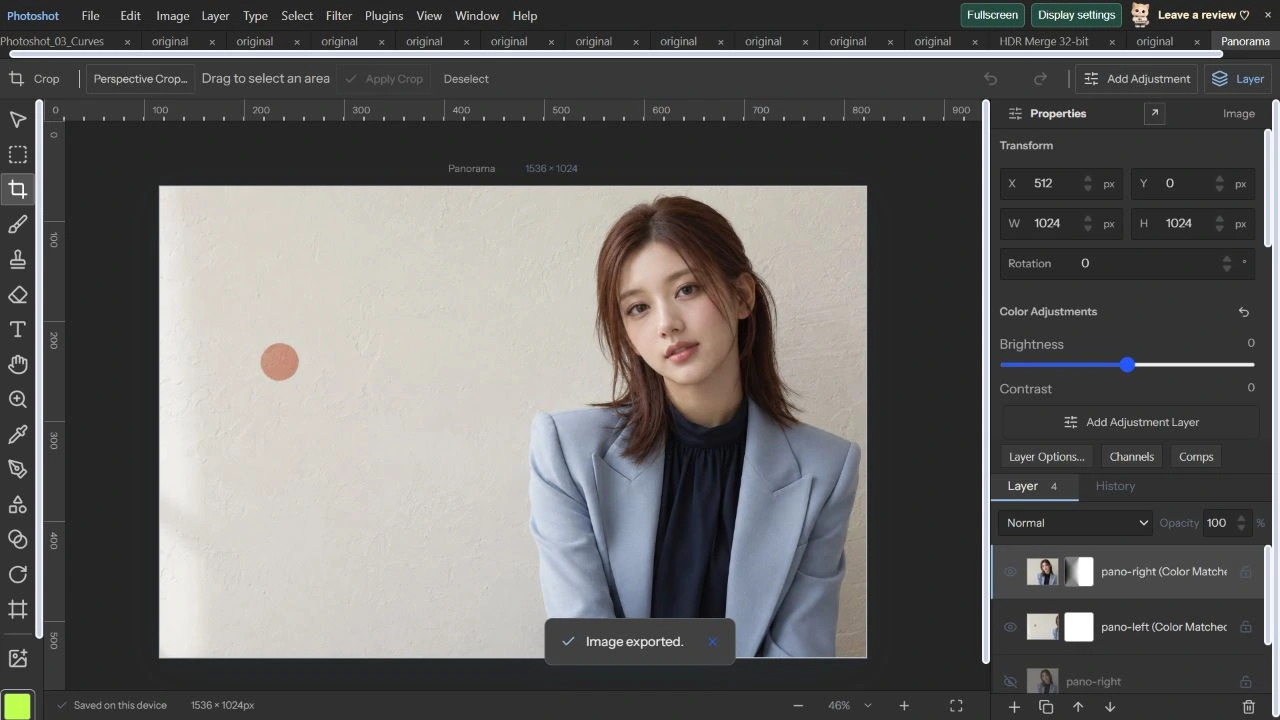
같은 원본을 포토샷의 Canvas Size로 왼쪽 1024×1024, 오른쪽 1024×1024로 잘라 저장했습니다. 두 입력의 512px 겹침과 각 픽셀이 원본의 해당 위치와 일치하는지 먼저 검사했습니다. Merge to Panorama에 왼쪽부터 넣고 Projection은 Reposition, Match Colors는 켰습니다.
처리 후 Panorama ready · 1536×1024를 확인하고 문서로 열었습니다. 왼쪽 레이어는 X=0, 오른쪽은 X=512로 정렬됐습니다. 숨겨진 원본 두 장과 색 맞춤 결과 두 장이 남고, 결과 레이어에는 수정 가능한 겹침 마스크가 붙었습니다. 평행 이동으로 정답이 정해진 입력을 써서 정렬 결과를 직접 확인한 사례입니다.
코드를 읽다.
export function hdrDocument(hdr:HdrImage,exposure:number,whitePoint:number,name='HDR Merge'):StudioDoc{const c=toneMapHdr(hdr,exposure,whitePoint);return {...blankDoc(),version:6,name,width:c.width,height:c.height,sourceFile:{name:name+'.hdr',mode:3,depth:32,warnings:['Tone-mapped editing document is 8-bit sRGB. Export Radiance HDR from the merge dialog to retain the linear high dynamic range data.']},layers:[makeLayer({name,kind:'image',width:c.width,height:c.height,src:c.toDataURL()})]};}
export function encodeRadiance(hdr:HdrImage){const {width:w,height:h,data,alpha}=hdr;if(!Number.isInteger(w)||!Number.isInteger(h)||h<1||w<8||w>16384||data.length!==w*h*3||alpha.length!==w*h)throw Error('Radiance export requires width 8–16,384 pixels.');const header=new TextEncoder().encode('#?RADIANCE\nFORMAT=32-bit_rle_rgbe\n\n-Y '+h+' +X '+w+'\n'),chunks:Uint8Array[]=[header];for(let y=0;y<h;y++){const row=new Uint8Array(w*4);for(let x=0;x<w;x++){const i=y*w+x,a=alpha[i]/255,r=data[i*3]*a,g=data[i*3+1]*a,b=data[i*3+2]*a,max=Math.max(r,g,b);if(![r,g,b].every(v=>Number.isFinite(v)&&v>=0))throw Error('Invalid HDR radiance.');if(max<1e-32)continue;const exponent=Math.floor(Math.log2(max))+1,scale=256/2**exponent;row[x]=Math.min(255,Math.floor(r*scale));row[w+x]=Math.min(255,Math.floor(g*scale));row[w*2+x]=Math.min(255,Math.floor(b*scale));row[w*3+x]=exponent+128;}const encoded=new Uint8Array(4+w*4+Math.ceil(w/128)*4);encoded.set([2,2,w>>8,w&255]);let position=4;for(let c=0;c<4;c++)for(let x=0;x<w;x+=128){const count=Math.min(128,w-x);encoded[position++]=count;encoded.set(row.subarray(c*w+x,c*w+x+count),position);position+=count;}chunks.push(encoded);}return new Blob(chunks as BlobPart[],{type:'image/vnd.radiance'});}

export async function hdrPrecisionDocument(hdr:HdrImage,name='HDR Merge 32-bit'):Promise<StudioDoc>{const data=new Float32Array(hdr.width*hdr.height*4);for(let i=0;i<hdr.alpha.length;i++){data.set(hdr.data.subarray(i*3,i*3+3),i*4);data[i*4+3]=hdr.alpha[i]/255;}const raster={width:hdr.width,height:hdr.height,space:'RGB' as const,depth:32 as const,data},canvas=await precisionCanvas(raster),src=canvas.toDataURL();return {...blankDoc(),version:6,name,width:hdr.width,height:hdr.height,precision:{space:'RGB',depth:32},sourceFile:{name:name+'.hdr',mode:3,depth:32,warnings:['Linear HDR retained in native 32-bit RGB. Screen preview clips display highlights; use Precision Channels to adjust exposure.']},layers:[makeLayer({name,kind:'image',width:hdr.width,height:hdr.height,src,precision:packPrecision(raster),precisionSource:precisionSource(src)})]};}import {blankDoc,makeLayer,composite,type StudioDoc} from './document.ts';import {autoAlign} from './auto-align.ts';import {autoBlend} from './auto-blend.ts';import {projectedCopies} from './panorama-projection.ts';import {quadPoints} from './photoshop-engine.ts';
export type PanoramaOptions={projection:'reposition'|'perspective'|'cylindrical'|'spherical';fieldOfView:number;matchColors:boolean};
export async function mergePanorama(inputs:StudioDoc[],options:PanoramaOptions,signal:AbortSignal,progress=(message:string)=>{}):Promise<StudioDoc>{if(inputs.length<2||inputs.length>8||!['reposition','perspective','cylindrical','spherical'].includes(options.projection)||!Number.isFinite(options.fieldOfView)||options.fieldOfView<10||options.fieldOfView>150)throw Error('Use 2–8 ordered overlapping photos and a valid projection.');if(inputs.reduce((sum,d)=>sum+d.width*d.height,0)>32_000_000)throw Error('Panorama inputs support up to 32 MP in total.');const check=()=>{if(signal.aborted)throw new DOMException('Panorama cancelled.','AbortError');};let doc:StudioDoc={...blankDoc(),name:'Panorama',width:Math.max(...inputs.map(d=>d.width)),height:Math.max(...inputs.map(d=>d.height)),resolution:inputs[0].resolution,layers:[]};for(let i=0;i<inputs.length;i++){check();progress('Preparing photo '+(i+1)+' / '+inputs.length+'…');const c=await composite(inputs[i]);doc.layers.push(makeLayer({kind:'image',name:inputs[i].name,width:c.width,height:c.height,src:c.toDataURL()}));}let ids=doc.layers.map(l=>l.id);if(options.projection==='cylindrical'||options.projection==='spherical'){progress('Projecting photographs…');const result=await projectedCopies(doc,ids,options.projection,options.fieldOfView,signal);doc={...result.doc,layers:[...result.doc.layers.filter(l=>!result.ids.includes(l.id)),...result.doc.layers.filter(l=>result.ids.includes(l.id))]};ids=result.ids;}for(let i=1;i<ids.length;i++){check();progress('Aligning overlap '+i+' / '+(ids.length-1)+'…');const result=await autoAlign(doc,[ids[i-1],ids[i]],ids[i-1],signal,undefined,options.projection==='perspective'?'perspective':'reposition');doc=result.doc;}const points=doc.layers.filter(l=>ids.includes(l.id)).flatMap(quadPoints),left=Math.floor(Math.min(...points.map(p=>p.x))),top=Math.floor(Math.min(...points.map(p=>p.y))),right=Math.ceil(Math.max(...points.map(p=>p.x))),bottom=Math.ceil(Math.max(...points.map(p=>p.y))),width=right-left,height=bottom-top;if(width<1||height<1||width>16384||height>16384||width*height>16_000_000)throw Error('Merged panorama exceeds 16 MP or 16,384 pixels per side. Use smaller inputs.');doc={...doc,width,height,layers:doc.layers.map(l=>({...l,x:l.x-left,y:l.y-top}))};check();progress('Blending overlaps…');doc=await autoBlend(doc,ids,{mode:'panorama',feather:3,matchColors:options.matchColors,color:true,signal});check();return {...doc,name:'Panorama',version:6,sourceFile:{name:'Panorama',mode:3,depth:8,warnings:['Ordered photos merged as 8-bit sRGB layers with editable overlap masks. Input files are unchanged. Automatic subject ghost removal is not applied.']}};}const linear=(v:number)=>v<=.04045?v/12.92:((v+.055)/1.055)**2.4;
export type HdrGhostOptions={reference:number;threshold:number};
/** Uses the selected capture in regions whose exposure-normalized colors disagree. */
export async function hdrGhostMask(images:ImageData[],ev:number[],options:HdrGhostOptions,cancel=()=>false){편집 화면에서.
최종 PNG와 편집 구조를 함께 통과시킨다
파노라마를 PNG로 내보내 원본과 RGBA 전체를 비교하니 바뀐 픽셀은 0개, 최대 차이도 0이었습니다. 원본 레이어의 픽셀 역시 입력 PNG와 같았으며 프로젝트 저장·재열기 후 네 레이어 전체 데이터도 유지됐습니다. 한 장으로 보이는 결과뿐 아니라 나중에 마스크를 다시 고칠 구조까지 확인했습니다.
이번 사진에는 움직임이나 시차를 넣지 않았습니다. 이 정합 결과를 움직이는 인물의 고스트 제거 성능으로 확대하지 않습니다. 코드의 원통·구면 투영 경로와 기존 검사 기록은 참고 자료로 구분해 연결했습니다. 다음 30편에서는 색 공간과 높은 비트 심도가 실제 저장·편집에 어떻게 이어지는지 확인합니다.
원본과 파노라마 문서.
AI 생성 시연용 사진. 편집 화면과 출력 이미지는 실제 포토샷에서 만들었습니다.