
無料Photoshop代替の開発記
重なる画像を一つに
2026年10月22日、実際のPhotoshotで三つの露出をHDRに、重なる二枚をパノラマに統合しました。プレビューで終わらせず、書き出したファイル、再読込したプロジェクト、画素の比較まで確認しました。
AI生成の動作例用写真。編集画面と出力画像は実際のPhotoshotで作成しました。
ソースから始める。
比較できる入力を先に作る
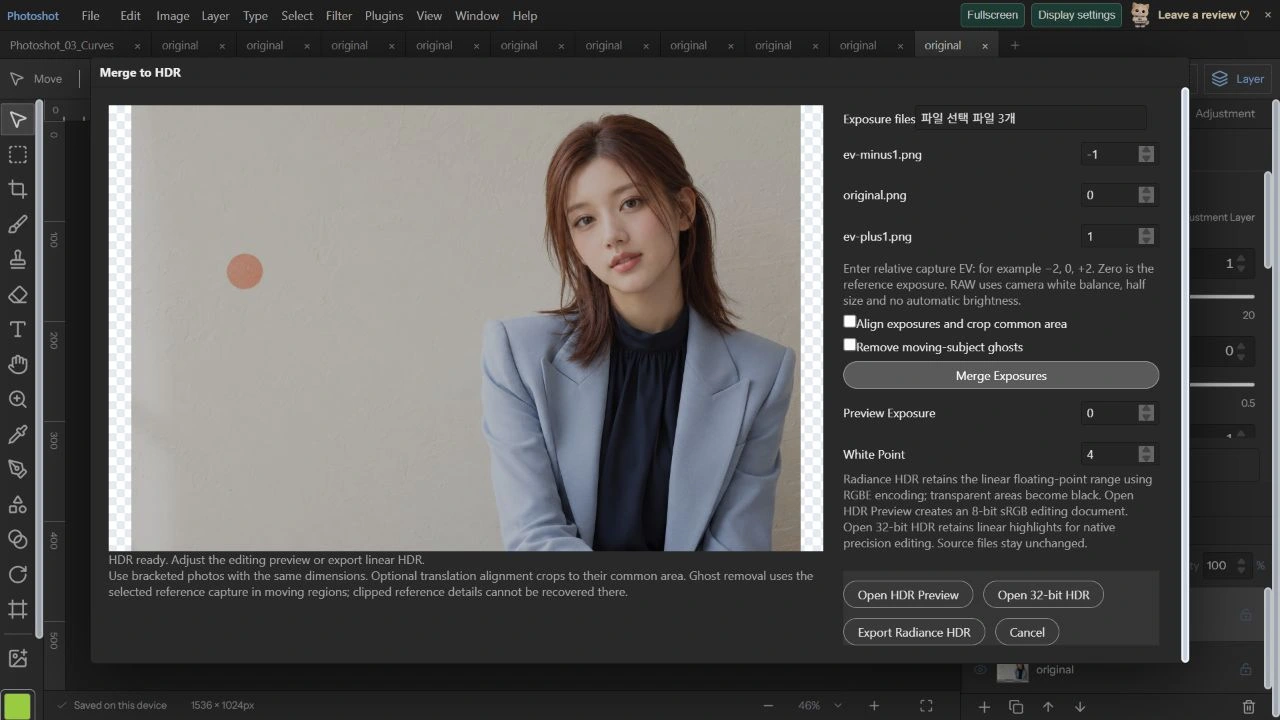
人物はAIで生成した架空の成人モデルです。Exposure調整で−1 EVと+1 EVのPNGを作り、未調整の原画像を0 EVとして使いました。同じ配置の合成露出なので位置はずれません。HDRの整列とDeghostをオフにし、EVを−1、0、+1と明示しました。
実際のカメラで露出を変えて撮ったブラケットではありません。露出調整とHDRのデコードではガンマ処理も異なります。失われたハイライトの復元や実景の光量測定とはせず、統合・出力・保存を再現可能な入力で検査する実験としました。
統合した値とプレビューを分ける
hdr-merge.tsはsRGBを線形値に変換し、各入力を2のEV乗で割って比較します。中間の明るさに大きな重みを与え、飽和に近い値の重みは小さくします。同じ寸法の2〜8枚、最大4MPに対応し、異なるEVが必要です。今回は各1536×1024です。
HDR readyを確認し、Preview Exposure 0、White Point 4の表示、Radiance HDRの出力、32-bit HDRとして開く操作を実行しました。表示用のトーンマッピングと浮動小数点の統合値は別です。画面が見やすいから保存値も8ビットだとは判断しません。
export type HdrImage={width:number;height:number;data:Float32Array;alpha:Uint8ClampedArray};
const linear=(v:number)=>v<=.04045?v/12.92:((v+.055)/1.055)**2.4,encoded=(v:number)=>255*(v<=.0031308?v*12.92:1.055*Math.max(0,v)**(1/2.4)-.055);
export async function mergeHdr(images:ImageData[],exposures:number[],cancel=()=>false,ghost?:HdrGhostOptions):Promise<HdrImage>{if(images.length<2||images.length>8||images.length!==exposures.length||exposures.some(e=>!Number.isFinite(e)||Math.abs(e)>20)||new Set(exposures).size<2)throw Error('Use 2–8 exposures with distinct EV values between -20 and +20.');const w=images[0].width,h=images[0].height;if(w*h>4_000_000||images.some(im=>im.width!==w||im.height!==h))throw Error('HDR sources must have the same dimensions, up to 4 MP.');const ghostMask=ghost?await hdrGhostMask(images,exposures,ghost,cancel):null;const out=new Float32Array(w*h*3),alpha=new Uint8ClampedArray(w*h),factors=exposures.map(e=>2**e);for(let y=0;y<h;y++){if(y%32===0){await new Promise<void>(r=>setTimeout(r,0));if(cancel())throw Error('HDR merge cancelled.');}for(let x=0;x<w;x++){const i=y*w+x,k=i*4;alpha[i]=Math.max(...images.map(im=>im.data[k+3]));for(let ch=0;ch<3;ch++){let sum=0,total=0,best=-1,bestDistance=Infinity;for(let j=0;j<images.length;j++){const im=images[j].data,v=im[k+ch]/255,a=im[k+3]/255;if(!a)continue;const distance=Math.abs(v-.5),weight=Math.max(0,1-distance*2)*a;if(distance<bestDistance||(distance===bestDistance&&best>=0&&(v>.5?factors[j]<factors[best]:factors[j]>factors[best]))){bestDistance=distance;best=j;}sum+=linear(v)/factors[j]*weight;total+=weight;}out[i*3+ch]=total?sum/total:best>=0?linear(images[best].data[k+ch]/255)/factors[best]:0;if(ghost&&ghostMask){const m=ghostMask[i];out[i*3+ch]=out[i*3+ch]*(1-m)+linear(images[ghost.reference].data[k+ch]/255)/factors[ghost.reference]*m;}}}}if(cancel())throw Error('HDR merge cancelled.');return {width:w,height:h,data:out,alpha};}
export function toneMapHdr(hdr:HdrImage,exposure=0,whitePoint=4){if(!Number.isFinite(exposure)||Math.abs(exposure)>10||!Number.isFinite(whitePoint)||whitePoint<1||whitePoint>32)throw Error('Invalid tone mapping.');const c=surface(hdr.width,hdr.height),g=c.getContext('2d')!,im=g.createImageData(c.width,c.height),gain=2**exposure;for(let i=0;i<hdr.alpha.length;i++){const r=hdr.data[i*3]*gain,green=hdr.data[i*3+1]*gain,b=hdr.data[i*3+2]*gain,y=.2126*r+.7152*green+.0722*b,mapped=y*(1+y/(whitePoint*whitePoint))/(1+y),scale=y?mapped/y:1;im.data[i*4]=encoded(r*scale);im.data[i*4+1]=encoded(green*scale);im.data[i*4+2]=encoded(b*scale);im.data[i*4+3]=hdr.alpha[i];}g.putImageData(im,0,0);return c;}計算の
内側へ。
32ビット文書を再読込して値を調べる
RGB 32-bit文書を保存して再読込し、再び保存しました。レイヤーデータは完全に一致しました。ラスターを展開すると1536×1024×4個の有限なFloat32値があり、実際の入力から独立計算した加重統合との差は最大約0.000000029でした。
RadianceのヘッダーとRLEも復号しました。RGBEは共通指数で量子化するためFloat32とビット単位では同じにならず、最大差は約0.00387でした。今回の統合RGBの最大値は約0.91449です。32ビット保存の成功と、1を超える光量が含まれることは別々の確認事項です。
512px重なる二枚を自動整列する
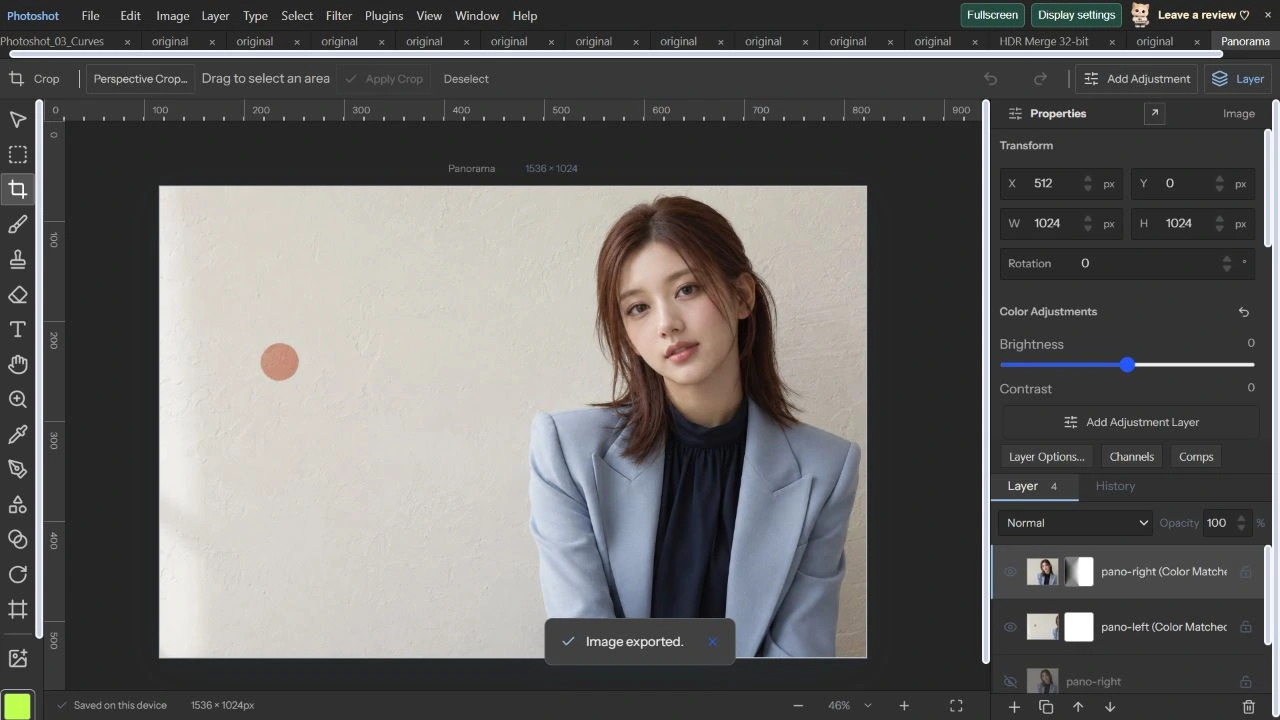
PhotoshotのCanvas Sizeを使い、原画像の左1024×1024と右1024×1024を保存しました。512pxの重なりと原画像との画素一致を先に確認しました。左から順にMerge to Panoramaへ入れ、RepositionとMatch Colorsを選びました。
Panorama ready · 1536×1024になり、開いた文書では左がX=0、右がX=512に配置されました。非表示の原本二枚と色合わせ結果二枚が残り、結果には編集可能な重なりマスクが付きます。正解の移動量が分かる入力で整列を直接確認しました。
コードを読む。
export function hdrDocument(hdr:HdrImage,exposure:number,whitePoint:number,name='HDR Merge'):StudioDoc{const c=toneMapHdr(hdr,exposure,whitePoint);return {...blankDoc(),version:6,name,width:c.width,height:c.height,sourceFile:{name:name+'.hdr',mode:3,depth:32,warnings:['Tone-mapped editing document is 8-bit sRGB. Export Radiance HDR from the merge dialog to retain the linear high dynamic range data.']},layers:[makeLayer({name,kind:'image',width:c.width,height:c.height,src:c.toDataURL()})]};}
export function encodeRadiance(hdr:HdrImage){const {width:w,height:h,data,alpha}=hdr;if(!Number.isInteger(w)||!Number.isInteger(h)||h<1||w<8||w>16384||data.length!==w*h*3||alpha.length!==w*h)throw Error('Radiance export requires width 8–16,384 pixels.');const header=new TextEncoder().encode('#?RADIANCE\nFORMAT=32-bit_rle_rgbe\n\n-Y '+h+' +X '+w+'\n'),chunks:Uint8Array[]=[header];for(let y=0;y<h;y++){const row=new Uint8Array(w*4);for(let x=0;x<w;x++){const i=y*w+x,a=alpha[i]/255,r=data[i*3]*a,g=data[i*3+1]*a,b=data[i*3+2]*a,max=Math.max(r,g,b);if(![r,g,b].every(v=>Number.isFinite(v)&&v>=0))throw Error('Invalid HDR radiance.');if(max<1e-32)continue;const exponent=Math.floor(Math.log2(max))+1,scale=256/2**exponent;row[x]=Math.min(255,Math.floor(r*scale));row[w+x]=Math.min(255,Math.floor(g*scale));row[w*2+x]=Math.min(255,Math.floor(b*scale));row[w*3+x]=exponent+128;}const encoded=new Uint8Array(4+w*4+Math.ceil(w/128)*4);encoded.set([2,2,w>>8,w&255]);let position=4;for(let c=0;c<4;c++)for(let x=0;x<w;x+=128){const count=Math.min(128,w-x);encoded[position++]=count;encoded.set(row.subarray(c*w+x,c*w+x+count),position);position+=count;}chunks.push(encoded);}return new Blob(chunks as BlobPart[],{type:'image/vnd.radiance'});}

export async function hdrPrecisionDocument(hdr:HdrImage,name='HDR Merge 32-bit'):Promise<StudioDoc>{const data=new Float32Array(hdr.width*hdr.height*4);for(let i=0;i<hdr.alpha.length;i++){data.set(hdr.data.subarray(i*3,i*3+3),i*4);data[i*4+3]=hdr.alpha[i]/255;}const raster={width:hdr.width,height:hdr.height,space:'RGB' as const,depth:32 as const,data},canvas=await precisionCanvas(raster),src=canvas.toDataURL();return {...blankDoc(),version:6,name,width:hdr.width,height:hdr.height,precision:{space:'RGB',depth:32},sourceFile:{name:name+'.hdr',mode:3,depth:32,warnings:['Linear HDR retained in native 32-bit RGB. Screen preview clips display highlights; use Precision Channels to adjust exposure.']},layers:[makeLayer({name,kind:'image',width:hdr.width,height:hdr.height,src,precision:packPrecision(raster),precisionSource:precisionSource(src)})]};}import {blankDoc,makeLayer,composite,type StudioDoc} from './document.ts';import {autoAlign} from './auto-align.ts';import {autoBlend} from './auto-blend.ts';import {projectedCopies} from './panorama-projection.ts';import {quadPoints} from './photoshop-engine.ts';
export type PanoramaOptions={projection:'reposition'|'perspective'|'cylindrical'|'spherical';fieldOfView:number;matchColors:boolean};
export async function mergePanorama(inputs:StudioDoc[],options:PanoramaOptions,signal:AbortSignal,progress=(message:string)=>{}):Promise<StudioDoc>{if(inputs.length<2||inputs.length>8||!['reposition','perspective','cylindrical','spherical'].includes(options.projection)||!Number.isFinite(options.fieldOfView)||options.fieldOfView<10||options.fieldOfView>150)throw Error('Use 2–8 ordered overlapping photos and a valid projection.');if(inputs.reduce((sum,d)=>sum+d.width*d.height,0)>32_000_000)throw Error('Panorama inputs support up to 32 MP in total.');const check=()=>{if(signal.aborted)throw new DOMException('Panorama cancelled.','AbortError');};let doc:StudioDoc={...blankDoc(),name:'Panorama',width:Math.max(...inputs.map(d=>d.width)),height:Math.max(...inputs.map(d=>d.height)),resolution:inputs[0].resolution,layers:[]};for(let i=0;i<inputs.length;i++){check();progress('Preparing photo '+(i+1)+' / '+inputs.length+'…');const c=await composite(inputs[i]);doc.layers.push(makeLayer({kind:'image',name:inputs[i].name,width:c.width,height:c.height,src:c.toDataURL()}));}let ids=doc.layers.map(l=>l.id);if(options.projection==='cylindrical'||options.projection==='spherical'){progress('Projecting photographs…');const result=await projectedCopies(doc,ids,options.projection,options.fieldOfView,signal);doc={...result.doc,layers:[...result.doc.layers.filter(l=>!result.ids.includes(l.id)),...result.doc.layers.filter(l=>result.ids.includes(l.id))]};ids=result.ids;}for(let i=1;i<ids.length;i++){check();progress('Aligning overlap '+i+' / '+(ids.length-1)+'…');const result=await autoAlign(doc,[ids[i-1],ids[i]],ids[i-1],signal,undefined,options.projection==='perspective'?'perspective':'reposition');doc=result.doc;}const points=doc.layers.filter(l=>ids.includes(l.id)).flatMap(quadPoints),left=Math.floor(Math.min(...points.map(p=>p.x))),top=Math.floor(Math.min(...points.map(p=>p.y))),right=Math.ceil(Math.max(...points.map(p=>p.x))),bottom=Math.ceil(Math.max(...points.map(p=>p.y))),width=right-left,height=bottom-top;if(width<1||height<1||width>16384||height>16384||width*height>16_000_000)throw Error('Merged panorama exceeds 16 MP or 16,384 pixels per side. Use smaller inputs.');doc={...doc,width,height,layers:doc.layers.map(l=>({...l,x:l.x-left,y:l.y-top}))};check();progress('Blending overlaps…');doc=await autoBlend(doc,ids,{mode:'panorama',feather:3,matchColors:options.matchColors,color:true,signal});check();return {...doc,name:'Panorama',version:6,sourceFile:{name:'Panorama',mode:3,depth:8,warnings:['Ordered photos merged as 8-bit sRGB layers with editable overlap masks. Input files are unchanged. Automatic subject ghost removal is not applied.']}};}const linear=(v:number)=>v<=.04045?v/12.92:((v+.055)/1.055)**2.4;
export type HdrGhostOptions={reference:number;threshold:number};
/** Uses the selected capture in regions whose exposure-normalized colors disagree. */
export async function hdrGhostMask(images:ImageData[],ev:number[],options:HdrGhostOptions,cancel=()=>false){エディターで見る。
完成画像と編集構造を一緒に確認する
書き出したPNGは原画像の全RGBA画素と一致し、変化した画素数も最大差も0でした。原本レイヤーの画素も入力PNGと一致し、保存・再読込後も四つのレイヤーデータを完全に保持しました。見た目だけでなく、後からマスクを直す構造も確認できました。
この入力には動きや視差がありません。この結果を動く人物のゴースト除去性能には広げません。円筒・球面投影の実装と既存の検査記録は参考資料として区別して掲載しました。次の30回では色空間と高ビット深度が編集と保存につながる部分を検証します。
原画像とパノラマ文書。
AI生成の動作例用写真。編集画面と出力画像は実際のPhotoshotで作成しました。