
Building a free Photoshop alternative
Choose the reds
This Photoshot journal follows the development of a free image editor. Selective Color changes components within color families instead of rotating every color at once. We read the actual weighting and relative-mode calculations, then compare a new portrait’s clothing, skin and background.
AI-generated study photograph. Editor captures and outputs show Photoshot in use.
From the source.
A color family is not an object selection
Choosing Reds to change a red sweater does not make the editor recognize clothing. Red components in lips and skin can enter the same calculation. To restrict the adjustment to clothing, a layer mask must also define the spatial area.
Selective Color weights pixel color families and connects cyan, magenta, yellow and black controls to changes in RGB. These CMYK-named controls do not convert the document to a print CMYK profile.
Nine families use weights, not hard labels
The public code defines red, yellow, green, cyan, blue, magenta, white, neutrals and black. It finds each pixel’s highest, lowest and middle RGB values. The red weight is hi−mid when R is the highest channel, otherwise zero. The effect therefore depends on how far red sits above the other channels.
Whites use how far the lowest channel exceeds 0.5; blacks use how far the highest channel falls below 0.5. Neutrals use 1−|hi+lo−1|. These are not mutually exclusive categories. Adjustments to several families can accumulate within the same pixel.
    if (t === 'selective') {
      const hi = Math.max(r, g, b),
        lo = Math.min(r, g, b),
        mid = r + g + b - hi - lo;
      weights[0] = r === hi ? hi - mid : 0;
      weights[1] = b === lo ? mid - lo : 0;
      weights[2] = g === hi ? hi - mid : 0;
      weights[3] = r === lo ? mid - lo : 0;
      weights[4] = b === hi ? hi - mid : 0;
      weights[5] = g === lo ? mid - lo : 0;
      weights[6] = clamp((lo - 0.5) * 2);
      weights[7] = 1 - Math.abs(hi + lo - 1);
      weights[8] = clamp((0.5 - hi) * 2);
const input = scratch;Inside the
calculation.
Relative and absolute change the amount
Each RGB output channel receives its corresponding C, M or Y control plus K. Relative mode multiplies the color component by 1−input channel and the black component by the input channel. Turning Relative off uses a multiplier of one for both. Both modes still apply family weights and clamp the output to 0–1.
Increasing magenta acts by reducing the green channel. Absolute mode does not mean every pixel changes equally: family weights remain active. This describes the quoted Photoshot implementation, not numerical equivalence with Adobe Photoshop.
A red sweater and a green leaf
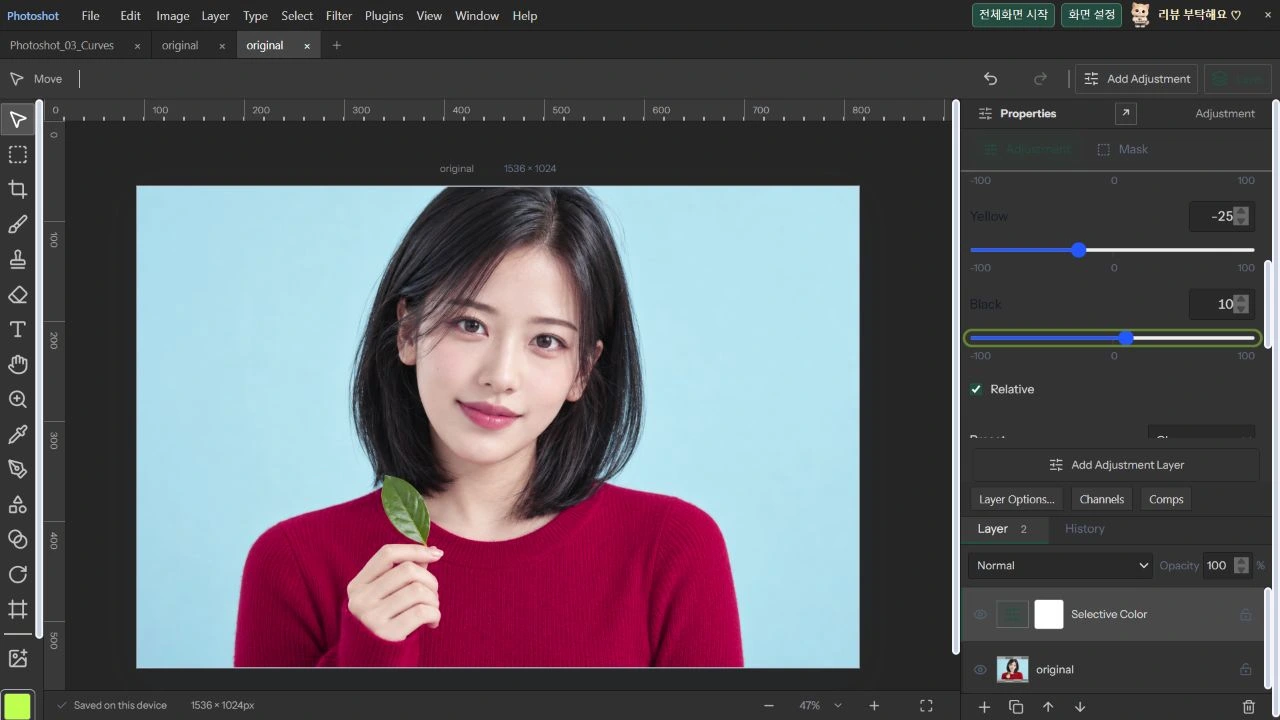
On October 22, 2026, we opened a new AI portrait in production Photoshot. Only Reds were changed: C 0, M +35, Y −25, K +10. The other eight families remained at zero. Relative was on, with Normal blending, 100% opacity and no spatial mask restriction.
Original and output are the same 1536×1024 frame. The sweater shifts toward magenta, with visible changes to lips and skin as well. The cyan background and green leaf remain comparatively stable. The model is AI-generated, not an actual celebrity photograph or endorsement. The editor capture, exported PNG and editable project were retained.
Read the code.
        let delta = 0;
        for (let k = 0; k < 9; k++) {
          const ink = v[k + 'CMY'[c]] / 100,
            black = v[k + 'K'] / 100;
          delta +=
            weights[k] *
            (ink * (v.relative ? 1 - input[c] : 1) + black * (v.relative ? input[c] : 1));
        }
        out[c] = clamp(input[c] - delta);
      }
    }
    if (t === 'lookup' && cube) {
const cr = shaperValue(cube, 0, r), selective: {
name: '선택 색상',
description: '색상 계열별로 청록·자홍·노랑·검정 성분을 조절합니다.',
controls: colorNames
.flatMap((_, i) =>
['C', 'M', 'Y', 'K'].map((c, j) =>
control(i + c, ['청록', '자홍', '노랑', '검정'][j], -100, 100, 0, 1, String(i)),
),
)
.concat(control('relative', '상대값', 0, 1, 1)),
},check('selective color targets one color family', () => {
const a = A.makeAdjustment('selective');
a.values['0M'] = 100;
const p = Uint8ClampedArray.from([220, 90, 90, 255, 90, 220, 90, 255]);
A.adjustPixels(p, a);
assert(p[1] < 90);
close(Array.from(p.slice(4)), [90, 220, 90, 255]);
});In the editor.
Verification and the next development scope
The public source is pinned to commit d08d365. On October 22, 2026, adjustment-render passed all 22 test groups. Its dedicated Selective Color check increases magenta in a red pixel, verifies reduced green, and checks that a separate green pixel stays unchanged. General coverage includes alpha, adjustment masks, compositing and project compatibility.
We also inspected the production project for all four Reds values, relative=1, zero values in the other families and opacity=1. This does not certify every photographic color boundary or print workflow. Part 18 moves to the menu and feature verification matrix, clearly separating the public repository from the production implementation.
The visible result.

AI-generated study photograph. Editor captures and outputs show Photoshot in use.